.avif)

JavaScript SEO in 2026: How Googlebot, GPTBot, ClaudeBot, and PerplexityBot Render (or Don't Render) Your Site
Key Takeaways
- Your website now has two kinds of machine readers. Googlebot renders JavaScript in a headless, evergreen Chromium. Most AI crawlers do not. GPTBot, OAI-SearchBot, ChatGPT-User, ClaudeBot, and PerplexityBot read the raw HTML your server returns and stop there.
- The most cited independent test (Vercel and MERJ, December 2024) found that ChatGPT's and Claude's crawlers download JavaScript files but never execute them. JavaScript made up 11.5 percent of ChatGPT's fetches and 23.8 percent of Claude's.
- A January 2026 test of user-triggered AI fetchers found the same split. ChatGPT, Claude, Gemini, and Perplexity executed no JavaScript. Bing Copilot did, but with a timeout of roughly 53 milliseconds.
- Google's pipeline has its own traps. Rendering is queued, only 200 responses are guaranteed to be sent to rendering, a
noindexin the original HTML can stop rendering entirely, and Google Search only processes the first 2MB of each HTML file. - Google updated its JavaScript documentation three times in December 2025. The message of all three: put your noindex, canonical, and status code decisions in the server response, not in JavaScript.
- The fix is not "stop using JavaScript." It is server-render the content that matters (copy, headings, metadata, links, prices, FAQ answers, structured data) and let JavaScript handle interaction.
- You can measure your exposure in an afternoon. Compare the raw HTML against the rendered DOM for your key templates. If more than about 20 percent of the visible words only exist after rendering, AI engines are missing part of your site.
Introduction: Two Readers, Two Versions of Your Website
For most of the last decade, JavaScript SEO meant one question: can Google see this? The answer slowly became "yes, mostly, eventually." Google moved its renderer to an evergreen version of Chromium in 2019, stopped recommending the old AJAX crawling scheme, and taught a generation of developers that a React single-page application could rank if it was built carefully.
That answer is now incomplete, because Google is no longer the only machine that decides whether your content gets found.
When a buyer asks ChatGPT for a shortlist of vendors, asks Claude to compare two products, or asks Perplexity how a service is priced, those systems fetch and read web pages. Some fetch pages in advance to build an index or a training corpus. Others fetch a page live, at the moment a user asks about it. Either way, the content those systems can read is the content they can cite, summarize, and recommend.
Here is the problem. The evidence available in 2026 says that most of those AI systems read only the HTML your server sends. They do not run your JavaScript. If your product descriptions, pricing tables, reviews, FAQ answers, or even your page titles are assembled in the browser, a large share of the AI answer ecosystem sees an empty shell.
So every page on a modern website effectively exists in two versions:
- The raw HTML version: what the server returns before any script runs. This is what most AI crawlers read.
- The rendered version: what a browser shows after JavaScript has fetched data, built components, and changed the DOM. This is what users see, and what Googlebot eventually indexes.
When those two versions match, you have no JavaScript SEO problem. When they diverge, you have a visibility gap, and it grows every time an AI assistant answers a question your website should have answered.
This guide covers how Google actually processes JavaScript in 2026, what is known (and not known) about how AI crawlers handle it, how each rendering strategy holds up, the platform-specific traps in Next.js, React, Vue, Angular, Webflow, and WordPress, and a step-by-step method for measuring the gap on your own site. It ends with a prioritized remediation plan.
Part 1: How Google Processes JavaScript
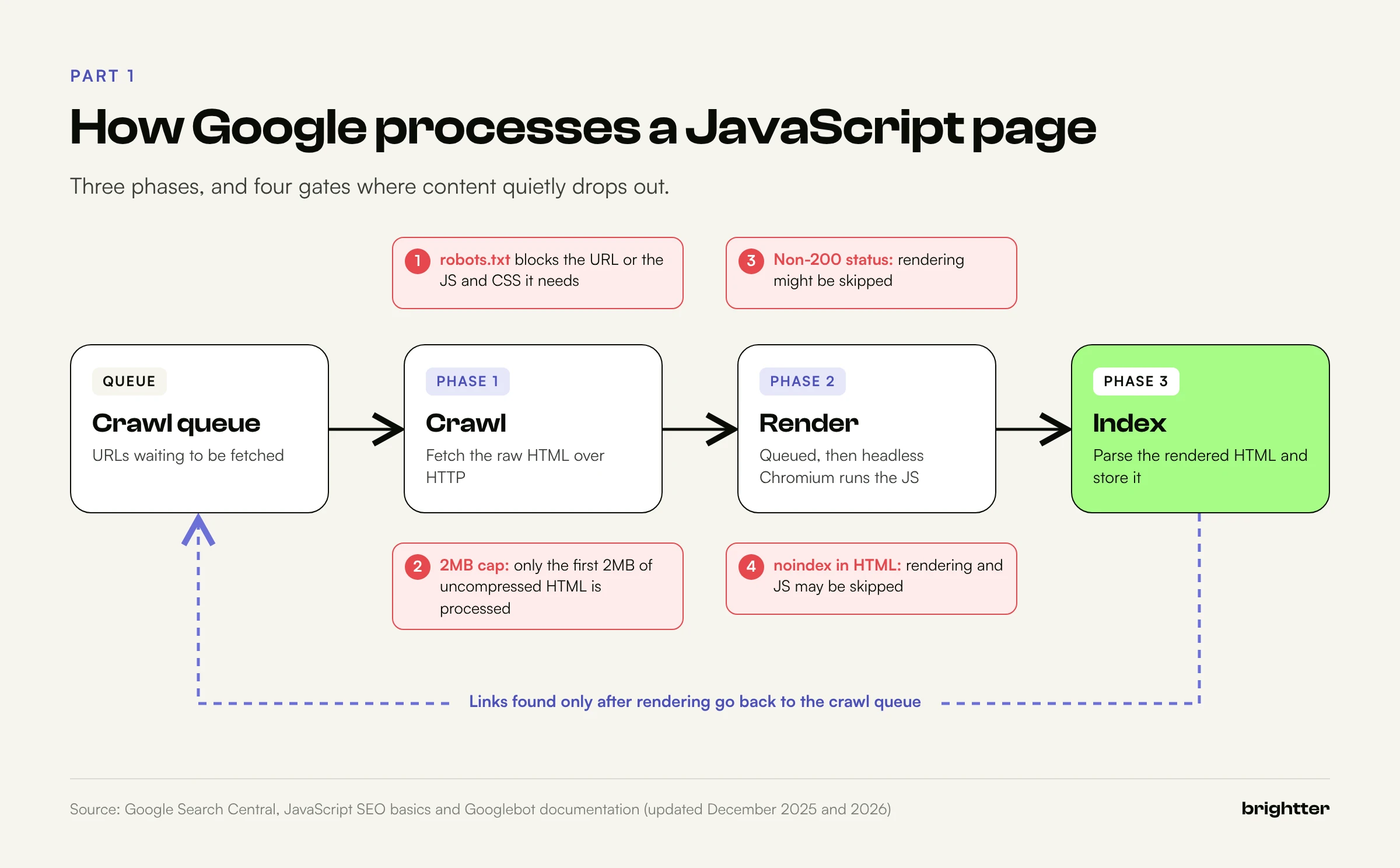
Google describes its handling of JavaScript as three phases: crawling, rendering, and indexing. The details of each phase matter, because most JavaScript SEO failures happen at the handoff between them.
Phase 1: Crawling
Googlebot takes a URL from its crawl queue and first checks robots.txt. If the URL is disallowed, Googlebot does not request it at all. Google's documentation is explicit that it "won't render JavaScript from blocked files or on blocked pages." This is the first and oldest trap: if your robots.txt blocks /static/, /_next/, /assets/, or a third-party script host your page depends on, Google renders a broken page.
If the URL is allowed, Googlebot fetches it over HTTP and receives the initial HTML. At this point Google can already parse the HTML for links, metadata, and content. For a server-rendered page, nearly everything Google needs is already here. For a client-rendered application shell, Google has a <div id="root"></div>, a few script tags, and not much else.
The 2MB limit. In early 2026, Google clarified its file size documentation. Google's crawlers and fetchers have a general default limit of 15MB, but for Google Search, Googlebot "crawls the first 2MB of a supported file type," with a separate limit of 64MB for PDFs. Three details matter here:
- The limit applies to uncompressed data, so gzip or Brotli compression does not buy you headroom.
- Each resource referenced in the HTML, such as a CSS or JavaScript file, is fetched separately and is subject to the same limit.
- Once the limit is reached, Googlebot stops the fetch and sends only what it has already downloaded for indexing.
Most HTML documents are nowhere near 2MB. But JavaScript frameworks that serialize application state into the HTML (a large __NEXT_DATA__ blob, a Nuxt payload, or an inlined Redux store) can push long product listing pages or documentation pages surprisingly close. Anything past the cutoff is invisible.
Phase 2: Rendering
Google's documentation says that Googlebot "queues all pages with a 200 HTTP status code for rendering, no matter whether JavaScript is present on the page." A page "may stay on this queue for a few seconds, but it can take longer than that." When resources allow, Google's Web Rendering Service (WRS) loads the page in headless Chromium, executes the JavaScript, and produces rendered HTML.
Four facts about this phase cause most of the confusion.
First, rendering is a separate queue. The crawl and the render are different jobs. For a well-linked, frequently crawled site, the delay is usually short. For a large site, a new site, or a page with weak internal links, the gap between "crawled" and "rendered" can stretch, and content that only exists after rendering is indexed later than content in the initial HTML.
Second, only 200 responses are guaranteed a trip to the renderer. In December 2025, Google clarified that rendering "might be skipped" for pages that return other status codes, such as 404 or 301. This matters for single-page applications that return a 200 for every route and then display "Product not found" in JavaScript. Google treats those as soft 404s at best, and the content of a real error page may never be rendered at all.
Third, noindex can stop rendering. Also in December 2025, Google added a warning that "when Google encounters the noindex tag, it may skip rendering and JavaScript execution." Developers sometimes ship a noindex in the HTML template and remove it with JavaScript once the page's data loads. That pattern no longer works reliably. Google's advice is direct: if you want the page indexed, don't put noindex in the original page code.
Fourth, canonicalization happens on both sides of rendering. Google's December 2025 update said canonicalization happens before and after rendering, so canonical signals should be as clear as possible. Google prefers that you set the canonical URL in the HTML, and says you "shouldn't use JavaScript to change the canonical URL to something else." Two conflicting canonicals (one in the server HTML, another injected by a client-side SEO library) is a common problem in headless builds.
Phase 3: Indexing
After rendering, Google parses the rendered HTML again: it extracts links that were not in the initial HTML, reads content added by JavaScript, and indexes the result. Links discovered only after rendering go back into the crawl queue.
This is where the old "Google indexes JavaScript just fine" claim comes from, and it is basically true for Google, with conditions. Content added by JavaScript does get indexed, provided the page returns a 200, carries no noindex, doesn't depend on blocked resources, renders without errors, and puts the content in the DOM without requiring a click or a scroll.
What Google's renderer does not do
The WRS behaves like a browser in some ways and very unlike a user in others. Plan around these behaviors:
- It does not click, type, or hover. Content that appears only after a click (a "Load more" button that fetches data, a tab that requests its content from an API on click, a modal opened by a button) is not seen. Content that is already in the DOM and merely hidden with CSS, like a closed accordion, is seen.
- It does not scroll the way a person does. Google renders with a tall viewport rather than scrolling, so lazy loading that relies on
IntersectionObserveror nativeloading="lazy"generally works. Lazy loading that waits for ascrollevent may never fire. - It is stateless. Each render starts fresh. Cookies,
localStorage,sessionStorage, and IndexedDB do not persist between page loads. Content that depends on a returning-visitor state, or on a consent choice saved in storage, will render in its first-visit state. - It declines permission prompts. Geolocation, notifications, and camera requests are denied. A page that waits for a location before showing local content shows its fallback.
- It ignores URL fragments for routing. Google says not to use fragments (
#/products/42) to load different page content. Use the History API (pushState) and real paths. - It only follows real links. Google discovers links that are
<a>elements with anhrefattribute. A<div onclick="navigate('/pricing')">or a<button>that routes in JavaScript is not a link to Google. Injecting proper<a href>elements with JavaScript is fine. - It may use cached resources. Google caches aggressively, and the WRS "may ignore caching headers," which can leave it rendering your page with an outdated script or stylesheet. Content fingerprinting in filenames, such as
main.2bb85551.js, is the fix Google recommends. - It flattens shadow DOM. Web components are supported, but only content that appears in the rendered HTML (after Google flattens shadow and light DOM) can be indexed.
None of this is new to experienced technical SEOs. What's new is that Google is now the most forgiving machine reader you have, not the strictest. The bar has moved.
Part 2: How AI Crawlers Handle JavaScript
AI systems do not have one crawler each. They have families of agents with different jobs, and it's worth separating them before looking at the rendering evidence.
Three kinds of AI agents
| Type | What it does | Examples | When it fetches |
|---|---|---|---|
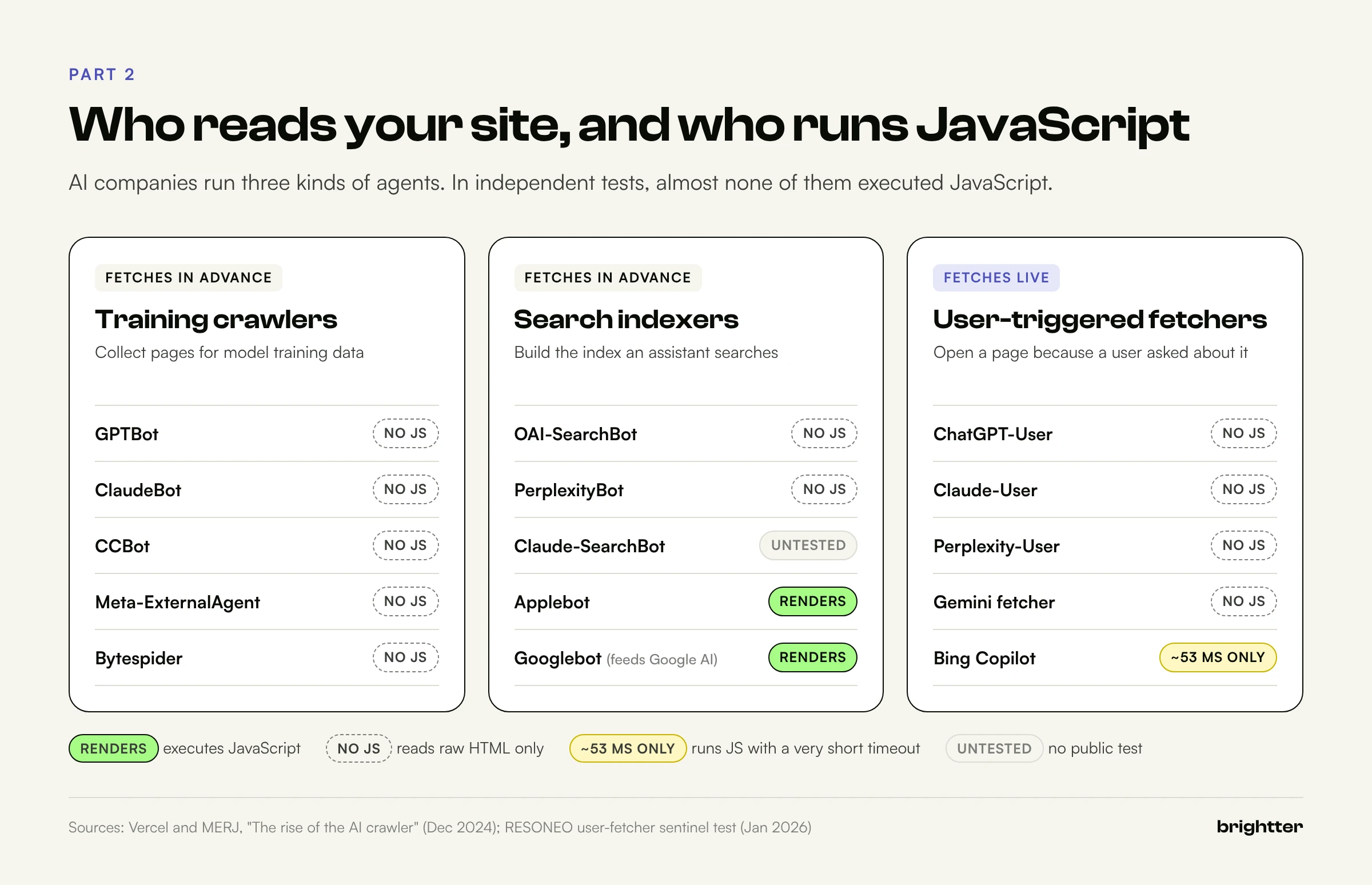
| Training crawlers | Collect pages for model training datasets | GPTBot (OpenAI), ClaudeBot (Anthropic), CCBot (Common Crawl), Meta-ExternalAgent, Bytespider | Continuously, in advance |
| Search and retrieval indexers | Build the index an assistant searches when it answers | OAI-SearchBot (OpenAI), Claude-SearchBot (Anthropic), PerplexityBot, Bingbot (which feeds Copilot and other Bing-grounded products), Googlebot (which feeds AI Overviews, AI Mode, and Gemini grounding) | Continuously, in advance |
| User-triggered fetchers | Fetch a specific page because a user asked about it, pasted a link, or the assistant decided to open a result | ChatGPT-User, Claude-User, Perplexity-User | Live, during a conversation |
Two robots.txt tokens are worth knowing even though they are not separate crawlers. Google-Extended controls whether content crawled by Googlebot can be used for Gemini model training and grounding, and it has no effect on Google Search inclusion. Applebot-Extended plays a similar role for Apple's models.
Vendors also document that some user-triggered fetchers may not follow robots.txt in the same way crawlers do, because they act on behalf of a person who requested a specific page. OpenAI's documentation notes this for ChatGPT-User, and Perplexity says the same about Perplexity-User. For rendering, the important point is that these fetchers are typically fast, single-request readers. They fetch a URL, take the HTML, and pass the text to the model.
The evidence: what the tests found
No major AI vendor publicly documents whether its crawlers execute JavaScript. What we have is independent testing. Two studies carry most of the weight.
Vercel and MERJ, December 2024. Vercel and the data consultancy MERJ analyzed crawler traffic across nextjs.org and the Vercel network, and cross-checked the patterns against two large job board sites, one built on Next.js and one on a custom framework. Their findings:
- OpenAI's agents (OAI-SearchBot, ChatGPT-User, GPTBot), Anthropic's ClaudeBot, Meta-ExternalAgent, ByteDance's Bytespider, and PerplexityBot did not render JavaScript. Common Crawl's CCBot did not either.
- Gemini (through Googlebot's infrastructure) and AppleBot did render JavaScript.
- The non-rendering crawlers still requested JavaScript files: about 11.5 percent of ChatGPT's fetches and 23.8 percent of Claude's were JavaScript. They download the files, likely for training data, but do not execute them.
- AI crawlers were inefficient. About 34.8 percent of ChatGPT's fetches and 34.2 percent of Claude's hit 404 pages, compared with 8.2 percent for Googlebot. ChatGPT also spent 14.4 percent of its fetches on redirects.
- Volume was meaningful. In the month measured, GPTBot, Claude, AppleBot, and PerplexityBot together made about 1.3 billion requests across the Vercel network, roughly 28 percent of Googlebot's 4.5 billion.

RESONEO, January 2026. The French agency RESONEO built a test page with 15 different content-injection methods (static HTML, delayed JavaScript, fetch() calls, shadow DOM, iframes, and others), each carrying a unique "sentinel" string. They asked AI assistants to visit the page and report which strings they could see. This study tested user-triggered fetchers only, not training or indexing crawlers. The results:
- ChatGPT (ChatGPT-User), Claude (Claude-User), Gemini, and Perplexity (Perplexity-User) executed no JavaScript.
- Bing Copilot executed JavaScript, but with a very short timeout of about 53 milliseconds. Anything that takes longer than that to appear is effectively invisible to it.
- Grok and DeepSeek executed JavaScript with longer waits (about 2 seconds and 1 second, respectively), using browser user agents that don't identify themselves as bots.
- Google's AI Mode could not fetch the URL live at all. It relies on Google's existing index, which means it inherits whatever Googlebot rendered earlier.
- JSON-LD inside
<script>tags was not extracted by the HTML-only user fetchers in the test. The test did not cover training or indexing bots, which may treat structured data differently.
What the evidence does and doesn't prove
Be precise about the limits here, because a lot of 2026 content about AI crawlers overstates them.
The Vercel data is now almost two years old and comes mostly from one network. The RESONEO test covers user-triggered fetchers on a single test page. Neither proves how every AI crawler behaves today, and vendors can change their infrastructure without announcing it. OpenAI's agent products and the ChatGPT Atlas browser, for example, run a full browser when a user asks them to complete a task, which is a different pathway from the crawlers above.
But the direction of the evidence is consistent, and the engineering reasons behind it are sound. Rendering JavaScript is expensive. Running headless Chromium on billions of URLs costs far more compute and time than fetching HTML, and a user-triggered fetcher has a person waiting on the other end of the conversation. Google built and funded a rendering pipeline over many years because it had to. Most AI companies have so far chosen not to.
The practical rule for 2026: assume every AI crawler and fetcher reads only your initial HTML, unless you have tested otherwise. Treat Googlebot (and, through it, AI Overviews, AI Mode, and Gemini) as the one major exception, and treat Bing Copilot's rendering as too brief to rely on.
Why this matters more than it seems
It's tempting to think of AI crawlers as a secondary audience. Three trends make that a risky assumption.
AI answers are shaping the shortlist. When a buyer asks an assistant to name vendors in a category, the brands named in that answer get considered and the rest often do not. We covered how engines choose what to cite in How AI Engines Decide What to Cite, and crawlability is the first gate in that pipeline. A page an engine cannot read cannot be retrieved, cited, or recommended.
User-triggered fetches happen at the worst moment to fail. When someone pastes your pricing page into ChatGPT and asks "Is this a good deal?", the assistant fetches that URL live. If the pricing table is rendered client-side, the model either says it can't find pricing or, worse, fills the gap from older training data or a third-party site. You lose the one conversation where the user was already looking at you.
Training data has a long memory. Content that training crawlers cannot read today is content the next generation of models will not know. That gap compounds quietly.
Part 3: Rendering Strategies Compared
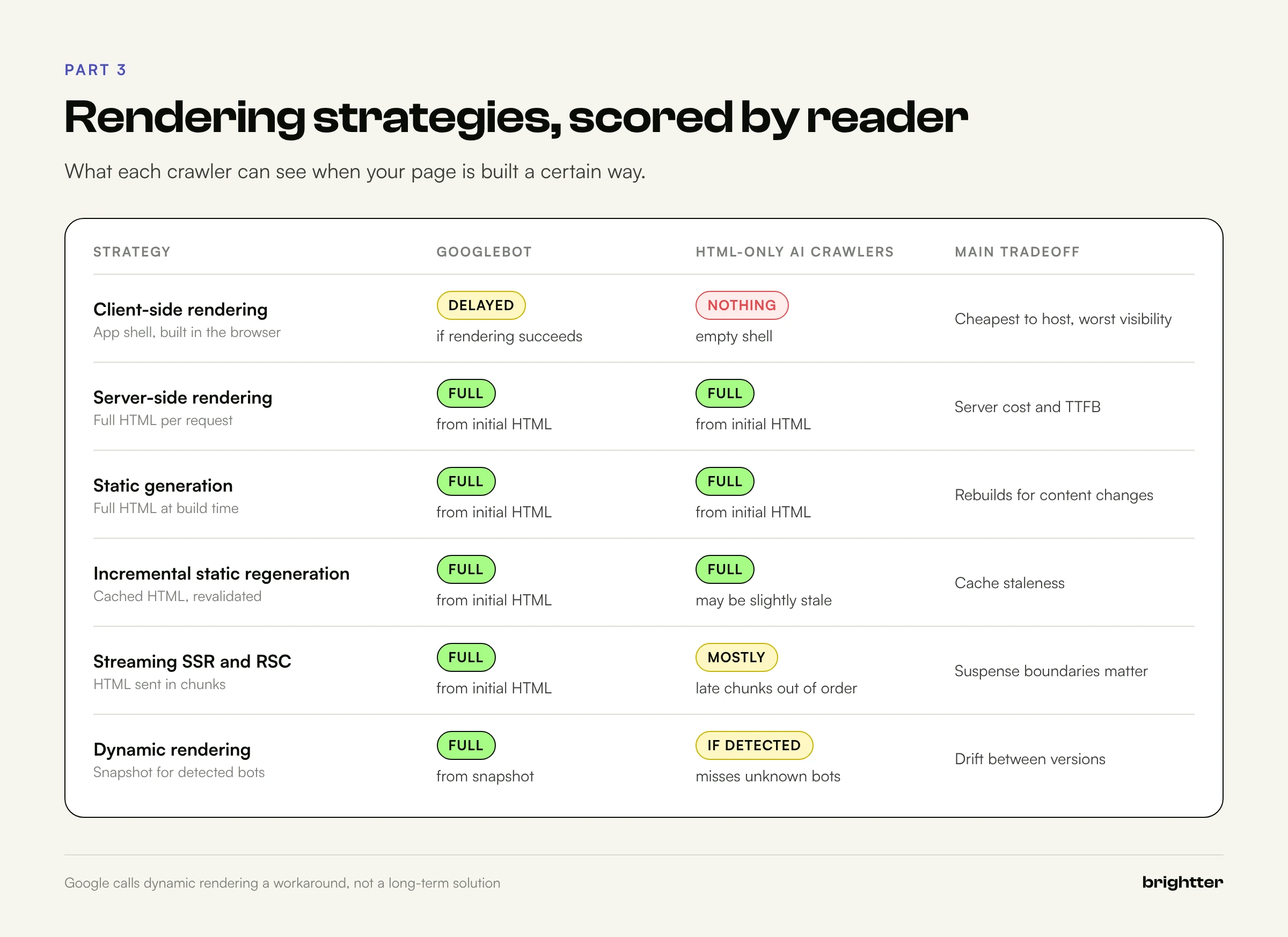
"Use server-side rendering" is the standard advice, and it's correct as far as it goes. But modern frameworks offer at least six distinct rendering strategies, and they behave differently for each type of machine reader. Here is how they compare.
| Strategy | What the server sends | Googlebot | HTML-only AI crawlers | Typical tradeoff |
|---|---|---|---|---|
| Client-side rendering (CSR) | An app shell; content built in the browser | Indexed after rendering, with delay and risk | Sees almost nothing | Cheapest hosting, worst visibility |
| Server-side rendering (SSR) | Full HTML generated per request | Indexed from initial HTML | Sees full content | Server cost and time to first byte (TTFB) |
| Static site generation (SSG) | Full HTML generated at build time | Indexed from initial HTML | Sees full content | Rebuilds needed for content changes |
| Incremental static regeneration (ISR) | Cached static HTML, regenerated on a schedule or on demand | Indexed from initial HTML | Sees full content (possibly slightly stale) | Cache staleness to manage |
| Streaming SSR and React Server Components | HTML sent in chunks as data resolves | Indexed from initial HTML | Sees content, with caveats below | Complexity; Suspense boundaries matter |
| Prerendering / dynamic rendering | Static snapshot served to bots, app served to users | Indexed from snapshot | Sees snapshot if the bot is detected | Drift between versions; maintenance |
Client-side rendering
A pure CSR application (a classic Create React App or a default Vite React build) returns an HTML file with an empty root element and a bundle of JavaScript. Everything the user sees is built in the browser after the bundle downloads, parses, executes, and usually calls one or more APIs.
For Googlebot, this works when everything goes right: the bundle loads, the API responds quickly during rendering, nothing throws an error, and the routes return meaningful status codes. In practice, CSR sites routinely lose content to failed API calls during rendering, soft 404s, missing per-route metadata, and render delays on large sites.
For HTML-only AI crawlers, a CSR site is close to invisible. The crawler gets a title tag (often the same generic title on every route), maybe a meta description, and no body content. If your marketing site is a pure CSR application in 2026, fixing that is the single highest-impact technical SEO change available to you.
CSR is still a fine choice for logged-in application screens, dashboards, and tools that have no business being indexed. The mistake is using it for public, content-bearing pages.
Server-side rendering, static generation, and ISR
SSR, SSG, and ISR all put the full content in the initial HTML, so all three are equally visible to every crawler. The choice between them is about freshness and cost, not SEO:
- SSG is the fastest and cheapest to serve and the best default for marketing pages, documentation, and blog content.
- ISR extends SSG to large catalogs (thousands of product or location pages) where full rebuilds are too slow. The one SEO consideration is staleness: a crawler can receive a cached page with a price or availability that has since changed. Set revalidation windows according to how fast your facts change, and use on-demand revalidation for prices and inventory.
- SSR fits pages that must reflect request-time data. Watch time to first byte: a slow SSR response hurts users and Core Web Vitals, and very slow responses risk timeouts with impatient fetchers.
Hydration: the part people forget
SSR frameworks send HTML and then "hydrate" it, attaching JavaScript event handlers to the existing markup so the page becomes interactive. Two hydration problems affect SEO:
- Hydration mismatches. If the client renders something different from what the server sent (often because the component reads
window, the current time, a random value, or the user's locale), React may discard the server markup and re-render on the client. Googlebot indexes whatever ends up in the DOM, which may differ from what AI crawlers saw in the HTML. Two crawlers, two versions of your page. - Content that only loads after hydration. A component that renders a skeleton on the server and fetches its real content in a
useEffecthook is effectively client-rendered, even though the page as a whole is "SSR." This is the most common way an SSR site ends up with a JavaScript visibility gap, and it hides well, because the page looks server-rendered in every other respect.
A common misconception in Next.js: marking a component with "use client" does not make it client-rendered. Client Components in the App Router are still pre-rendered to HTML on the server. What makes content invisible to HTML-only crawlers is not the directive; it's data fetched in the browser (in useEffect, SWR, or React Query without server prefetching) or output that depends on browser-only APIs.
Streaming SSR and React Server Components
Streaming changes the shape of the HTML response. Instead of waiting for all data before sending anything, the server sends the page shell immediately and streams in sections as their data resolves. In React, each <Suspense> boundary first sends its fallback (a skeleton or spinner), then later sends the real content in the same HTTP response, inside a hidden element, along with a small inline script that swaps it into place.
That last detail has a useful consequence. Because the streamed content arrives in the same response, an HTML-only crawler that reads the full response body does receive the text, even though it never runs the swap script. The content just appears near the end of the document, out of visual order, inside a hidden container.
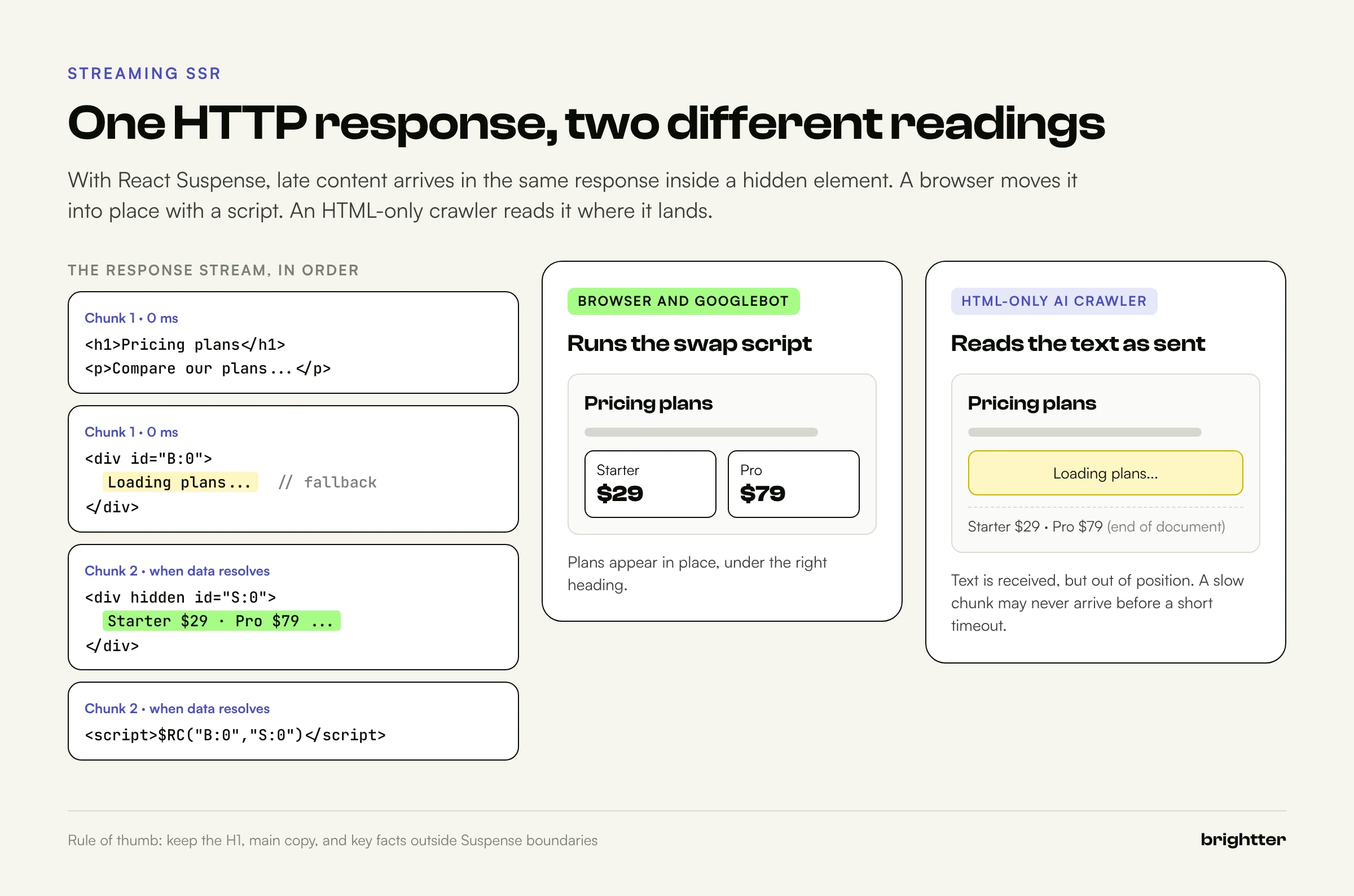
Three caveats keep this from being a free pass:
- The fallback is what's in position. A crawler that reads the document in order sees your skeleton where the content should be. Most extraction pipelines will still pick up the later text, but its structural context (which heading it sits under) is weaker.
- Slow boundaries are risky. If a Suspense boundary waits on a slow API, the response stays open until it resolves. A fetcher with a short timeout may stop reading before the content arrives.
- Client-side Suspense is different. A Suspense boundary wrapping data fetched in the browser streams nothing from the server. Only server-side data resolution is streamed.
Practical rule: put your primary content (the H1, the main copy, key facts) above or outside Suspense boundaries, and use streaming for secondary sections such as related products, reviews, and personalization.
Prerendering and dynamic rendering
Dynamic rendering means detecting crawlers by user agent and serving them a prerendered HTML snapshot, while users get the normal client-side application. Prerendering services and self-hosted headless Chrome setups do this.
Google's documentation now describes dynamic rendering as a workaround rather than a recommended long-term solution, and recommends server-side rendering, static rendering, or hydration instead. Bing has historically been more supportive, recommending dynamic rendering for JavaScript-heavy sites and stating it is not cloaking as long as you make a good-faith effort to return the same content to all visitors.
For AI crawlers, dynamic rendering has one extra weakness: it only helps the bots you detect. Your bot list must include GPTBot, OAI-SearchBot, ChatGPT-User, ClaudeBot, Claude-SearchBot, Claude-User, PerplexityBot, Perplexity-User, and the rest, and it must keep up as vendors add new agents. Fetchers that use browser user agents won't be detected at all.
Use dynamic rendering as a bridge for a legacy CSR application you cannot rebuild this quarter. Don't use it as the architecture for a new build.
Part 4: Platform-Specific Traps
Every framework can produce crawlable HTML. Every framework can also produce an empty shell. These are the patterns to check on the most common platforms.
Next.js
- App Router: Server Components render on the server by default, which is good. Check for
useEffectdata fetching in Client Components on public pages, and for important content wrapped in Suspense boundaries that depend on slow data. - Metadata: Use the Metadata API (
generateMetadata) so titles, descriptions, canonicals, and robots directives are in the server HTML. Avoid client-side head libraries that change these after load. notFound()and status codes: CallnotFound()in server code so missing pages return a real 404. A page that renders "Not found" text with a 200 is a soft 404.- Payload size: Large serialized props (in the Pages Router's
__NEXT_DATA__or the App Router's RSC payload) inflate the HTML. Pass only the fields the page needs. - Middleware: Middleware that redirects based on cookies, geolocation, or user agent can send crawlers somewhere different from users. Test with crawler user agents.
React single-page applications (Vite, Create React App)
- Public pages should move to a framework with server rendering (Next.js, Remix, React Router's framework mode, or Astro for content-heavy sites), or be prerendered at build time.
- Until then, add per-route static HTML for your most important pages, return real 404s from the server for unknown routes, and make sure every route has unique metadata in the initial HTML.
Vue and Nuxt
- Nuxt renders on the server by default. Watch for
client-onlywrappers andonMounteddata fetching on public pages, which have the same effect asuseEffectfetching in React. - Use
useHeadoruseSeoMetawith server-side data so metadata is present in the HTML.
Angular
- Angular's built-in SSR and hydration support has matured. Older Angular applications without SSR are pure CSR and should be treated as such.
- Check route-level status codes. Angular SSR needs explicit handling to return a 404 for unknown routes.
Webflow
Webflow publishes server-rendered static HTML, including CMS collection pages, so the core of a Webflow site is readable by every crawler. As a Webflow Certified Partner, we see the JavaScript risk come almost entirely from what gets added on top:
- Client-side CMS libraries. Tools that load, filter, sort, or paginate CMS items in the browser (infinite "load more," client-side filtering, nested collections assembled with JavaScript) can leave items out of the initial HTML. Webflow's native pagination produces real, crawlable URLs. Client-side "load more" usually does not.
- Custom code embeds. Pricing calculators, review widgets, and comparison tables built in an embed and populated by an external API are invisible to HTML-only crawlers. If the information matters, put the key facts in a CMS field or static text as well.
- Third-party widgets. Reviews, testimonials, and job listings injected by widgets often never appear in your HTML. Many vendors offer a server-side or static export option.
- Overlays and challenges. Consent banners and bot protection should never replace page content. A bot challenge page served to an AI crawler is the content that crawler sees.
For the broader tradeoffs between Webflow, headless, and custom builds, see Webflow vs Headless vs Custom in 2026.
WordPress
Traditional WordPress renders on the server, so classic themes are crawler-friendly by default. The JavaScript risks are:
- Page builder and block widgets that fetch content with JavaScript (some sliders, tabs, review blocks, and pricing tables).
- Headless WordPress with a React or Next.js front end, which inherits every framework risk above.
- Optimization plugins that delay all JavaScript until user interaction. These are good for performance, but test them: if any content is built by a delayed script, it now waits for an interaction that crawlers never make.
Headless commerce
Commerce front ends (Shopify Hydrogen, commercetools, BigCommerce with a custom front end) carry high stakes because prices, availability, and reviews are exactly the facts AI shopping answers depend on. Confirm that price, availability, product attributes, and a review summary are present in the initial HTML, in visible text as well as in Product structured data.
Part 5: How to Measure Your JavaScript Visibility Gap
You don't need an enterprise crawler to find out how much of your site depends on JavaScript. The method below takes an afternoon, works on any stack, and gives you a number you can track.

Step 1: See what an HTML-only crawler sees
Start with curl. Request a page with a crawler user agent and look at what comes back:
# Fetch the raw HTML the way an HTML-only AI crawler would
curl -sL -A "Mozilla/5.0 (compatible; GPTBot/1.1; +https://openai.com/gptbot)" \
  -o raw.html -w "status=%{http_code} bytes=%{size_download} time=%{time_total}s\n" \
  https://www.example.com/pricing

# Strip tags and count the words in the body
python3 -c "import re,html;t=open('raw.html',encoding='utf-8').read();t=re.sub(r'(?is)<(script|style|noscript)[^>]*>.*?</\1>',' ',t);t=html.unescape(re.sub(r'<[^>]+>',' ',t));print(len(t.split()),'words')"

# Check the elements that matter most
grep -oiE '<title>[^<]*</title>' raw.html
grep -oiE '<link[^>]+rel="canonical"[^>]*>' raw.html
grep -oiE '<meta[^>]+name="robots"[^>]*>' raw.html
grep -oiE '<h1[^>]*>.*</h1>' raw.html | head -3
Three things to look for:
- The status code and final URL. If a crawler user agent gets a 403, a challenge page, or a redirect that a browser doesn't get, your firewall or CDN is the problem, not your rendering. Since July 2025, Cloudflare has blocked known AI crawlers by default for newly onboarded domains, and bot protection features can serve challenge pages to automated clients. Decide deliberately which AI agents you allow.
- The word count. A content page with 40 words in its raw HTML is a client-rendered page.
- Metadata. The title, canonical, and robots directives in the raw HTML are the ones every crawler will see. If they're generic, missing, or different from what the browser shows, fix that first.
Note that the user agent string alone doesn't make you an AI crawler. Some sites verify crawlers by IP range, so a curl request with a bot user agent may be treated differently from the real bot. Use this test for rendering, and use server logs (Step 4) for access.
Step 2: Compare raw HTML with the rendered DOM
The real measure is the difference between what the server sends and what the browser builds. This Python script uses Playwright to fetch both versions of a list of URLs and reports the gap for each one.
# js_gap.py: compare raw HTML with the rendered DOM for a list of URLs
# Requires: pip install playwright beautifulsoup4 requests && playwright install chromium
import json, re, sys
import requests
from bs4 import BeautifulSoup
from playwright.sync_api import sync_playwright

UA_BOT = "Mozilla/5.0 (compatible; GPTBot/1.1; +https://openai.com/gptbot)"

def visible_words(html):
    soup = BeautifulSoup(html, "html.parser")
    for tag in soup(["script", "style", "noscript", "template"]):
        tag.decompose()
    return soup.get_text(" ", strip=True).split()

def signals(html):
    soup = BeautifulSoup(html, "html.parser")
    def attr(selector, name):
        el = soup.select_one(selector)
        return el.get(name) if el else None
    return {
        "title": soup.title.get_text(strip=True) if soup.title else None,
        "meta_description": attr('meta[name="description"]', "content"),
        "canonical": attr('link[rel="canonical"]', "href"),
        "robots": attr('meta[name="robots"]', "content"),
        "h1": [h.get_text(" ", strip=True) for h in soup.find_all("h1")],
        "links": len({a["href"] for a in soup.find_all("a", href=True)}),
        "jsonld_blocks": len(soup.select('script[type="application/ld+json"]')),
    }

def audit(urls):
    results = []
    with sync_playwright() as p:
        browser = p.chromium.launch()
        page = browser.new_page(viewport={"width": 1280, "height": 4000})
        for url in urls:
            raw = requests.get(url, headers={"User-Agent": UA_BOT}, timeout=30)
            page.goto(url, wait_until="networkidle", timeout=60000)
            rendered = page.content()
            raw_words = visible_words(raw.text)
            ren_words = visible_words(rendered)
            gap = 1 - (len(raw_words) / len(ren_words)) if ren_words else 0
            raw_sig, ren_sig = signals(raw.text), signals(rendered)
            changed = [k for k in raw_sig if raw_sig[k] != ren_sig[k]]
            results.append({
                "url": url,
                "status": raw.status_code,
                "raw_bytes": len(raw.content),
                "raw_words": len(raw_words),
                "rendered_words": len(ren_words),
                "js_dependency": round(max(gap, 0) * 100, 1),
                "signals_changed_by_js": changed,
                "raw": raw_sig,
                "rendered": ren_sig,
            })
        browser.close()
    return results

if __name__ == "__main__":
    urls = [line.strip() for line in open(sys.argv[1]) if line.strip()]
    report = audit(urls)
    for r in report:
        flag = "HIGH" if r["js_dependency"] > 20 else "ok"
        print(f'{flag:4} {r["js_dependency"]:5}%  {r["raw_words"]:6} -> {r["rendered_words"]:6} words  '
              f'changed={r["signals_changed_by_js"]}  {r["url"]}')
    json.dump(report, open("js_gap_report.json", "w"), indent=2)
Run it against a sample of each page template, not every URL: the homepage, a service or product page, a category or listing page, a blog article, a location page, the pricing page, and any page built with a special component.
python3 js_gap.py urls.txtHow to read the results:
- JavaScript dependency under 10 percent: normal. Small differences come from cookie banners, chat widgets, and footer scripts.
- 10 to 20 percent: look closer. Something meaningful, often reviews, FAQs, or related content, is client-rendered.
- Over 20 percent: a real visibility gap for AI crawlers. Find out which sections are missing from the raw HTML.
- Any value in
signals_changed_by_js: a priority fix. A title, canonical, robots directive, or H1 that changes after JavaScript runs means different crawlers see different pages. A change inlinksmeans your internal linking partly depends on rendering.
Two refinements make the test sharper. Run the rendered fetch a second time with JavaScript disabled (browser.new_context(java_script_enabled=False)) to confirm the raw view. And on pages where the gap is high, save both versions and diff the text to see exactly which sections are missing.
Step 3: Confirm what Google rendered
For Google specifically, use the tools that show Google's own output:
- URL Inspection in Search Console shows the crawled HTML and a rendered screenshot, and the live test shows JavaScript console errors and blocked resources. Compare the rendered HTML with your browser.
- The Rich Results Test renders the page the same way and shows the rendered HTML, which helps when structured data is injected by JavaScript.
- Search Console's page indexing report reveals patterns. A cluster of "Crawled, currently not indexed" or "Soft 404" on JavaScript-heavy templates often points to rendering problems.
- A quoted-text search (
"an exact sentence from the client-rendered section"withsite:yourdomain.com) is a rough but quick check on whether Google indexed content that only exists after rendering.
Step 4: Check your logs for AI crawler activity
Rendering tests show what a crawler would see. Server or CDN logs show whether crawlers are coming at all, which pages they request, and what status codes they get. Filter your access logs for the main AI user agents:
# Count AI crawler requests and status codes from a combined-format access log
grep -E "GPTBot|OAI-SearchBot|ChatGPT-User|ClaudeBot|Claude-SearchBot|Claude-User|PerplexityBot|Perplexity-User|CCBot|Bytespider|Meta-ExternalAgent|Applebot" access.log \
  | awk -F'"' '{split($3,s," "); ua=$6; match(ua,/(GPTBot|OAI-SearchBot|ChatGPT-User|ClaudeBot|Claude-SearchBot|Claude-User|PerplexityBot|Perplexity-User|CCBot|Bytespider|Meta-ExternalAgent|Applebot)/,m); print m[1], s[1]}' \
  | sort | uniq -c | sort -rn
(The match() call with an array argument requires GNU awk.) Look for agents that are absent entirely (often a firewall block), high rates of 403 or 404 responses, and whether the pages AI crawlers request are the pages you care about. User agents can be spoofed, so verify important patterns against the vendors' published IP ranges before you act on them.
Step 5: Run a sentinel test on AI assistants
You can borrow RESONEO's method to test the AI fetchers directly. Publish a test page (it can be noindex for search engines) with several unique, meaningless strings placed in different ways:
- One string in the server HTML body
- One inserted by JavaScript immediately on load
- One inserted by JavaScript after a 2-second delay
- One loaded by a
fetch()call to a JSON endpoint - One only in JSON-LD
Then ask ChatGPT, Claude, Perplexity, Gemini, and Copilot to open the URL and list every unusual string they find. The strings they report show you exactly which rendering paths each assistant supports today. Re-run the test every quarter, because these systems change without notice.
A caution on interpreting results: assistants sometimes guess at page content instead of fetching it. Ask the assistant to quote the page verbatim and confirm in your logs that its fetcher actually requested the URL.
Part 6: The Fix, in Priority Order
Most sites don't need a rebuild. They need a short list of specific changes, made in the right order. Work through these from the top.
1. Put critical content in the initial HTML
Define "critical" for each page template before touching code. For most sites, it's this list:
- The H1 and main body copy
- Title tag, meta description, canonical, and robots directives
- Internal links in navigation, breadcrumbs, body copy, and related-content modules
- Commercial facts: prices, plans, availability, specifications, service areas, hours
- Proof: review counts and ratings, case study results, certifications, client names
- FAQ questions and answers
- Author, published date, and updated date on articles
- Structured data (JSON-LD)
Everything on that list should exist in the server response. Interactive behavior (filtering, sorting, calculators, carousels, live chat, personalization) can stay in JavaScript, as long as the facts it presents also appear somewhere in static HTML.
The easiest framing for a development team: if the page would be wrong or incomplete with JavaScript turned off, the missing part is a candidate for server rendering.
2. Make metadata server-side and single-source
Titles, descriptions, canonicals, hreflang, and robots directives should be generated on the server, once, by one system. Remove client-side libraries that rewrite them after load. If your CMS and your front-end framework both emit a canonical tag, pick one and remove the other. Google's December 2025 guidance is unambiguous: set the canonical in the HTML and don't change it with JavaScript.
3. Use real links and real URLs
- Every navigable destination should be an
<a href="/real/path">. - Use the History API for client-side routing. No hash-based routes for content.
- Filters and facets that create indexable pages need real URLs (
/shoes/running/or/shoes?type=running) rendered as links, not JavaScript state. - Replace infinite scroll with paginated URLs (
/blog/page/2), linked from the page. An infinite scroll can stay as the user experience, layered on top of real pagination.
4. Return honest status codes from the server
- Unknown routes return 404 from the server, not a 200 with "Page not found" text.
- Moved content returns a 301 from the server or CDN, not a JavaScript redirect.
- Gated content returns 401 or 403 where appropriate.
For single-page applications where server status codes are impractical, Google documents two fallbacks: redirect with JavaScript to a URL that returns a real 404 (such as /not-found), or add a noindex robots meta tag to error states with JavaScript. Remember that rendering is only guaranteed for 200 responses, so a real error page should not depend on rendering to communicate anything important.
5. Never rely on JavaScript to remove noindex
If a page should be indexed, its original HTML must not contain noindex. Google may skip rendering entirely when it sees one, so the script that would remove it never runs. The reverse (adding noindex with JavaScript) is also unreliable, because Google may index the page before rendering, and HTML-only crawlers never see the change. Make indexing decisions on the server.
6. Fix lazy loading and on-demand content
- Use native
loading="lazy"orIntersectionObserverfor images below the fold. Never lazy-load the LCP image or the first screen of content. - Don't lazy-load text. Article bodies, product descriptions, and FAQ answers should be in the HTML at load.
- Tabs and accordions are fine when their content is in the DOM at load and only hidden with CSS. They are a problem when each tab fetches its content on click.
- "Read more" buttons should expand content that is already in the HTML, not fetch it.
7. Serve structured data in the HTML, and mirror it in visible text
Generate JSON-LD on the server. Google can process JSON-LD injected with JavaScript, but HTML-only crawlers cannot, and the RESONEO test found that user-triggered AI fetchers did not extract JSON-LD at all. The facts in your structured data (price, rating, address, author, dates) should also appear in visible HTML text. Structured data reinforces content; it shouldn't be the only place a fact exists.
8. Watch payload size
- Keep HTML under Google's 2MB uncompressed limit with plenty of room to spare. Check your largest templates, especially long listing pages.
- Trim serialized framework state. Pass only the fields a page needs.
- Inline SVG sprites, base64 images, and large inline CSS also count toward the HTML limit.
- Each JavaScript and CSS file has its own 2MB limit. A single bundle beyond that size risks a broken render.
9. Make resources crawlable and cache-safe
- Don't block JavaScript, CSS, API endpoints, or image paths that pages need for rendering in
robots.txt. - Use fingerprinted filenames for JavaScript and CSS, since Google's renderer may ignore cache headers.
- Make sure APIs that pages call during rendering respond quickly and don't rate-limit Googlebot. A timeout during rendering is missing content.
10. Make deliberate decisions about AI crawler access
Rendering fixes are wasted if your firewall blocks the crawlers. Review your CDN and WAF settings, bot protection mode, and robots.txt together, and choose per agent:
- Allow search and user-triggered agents (OAI-SearchBot, ChatGPT-User, Claude-SearchBot, Claude-User, PerplexityBot, Perplexity-User) if you want to appear in AI answers.
- Decide separately on training crawlers (GPTBot, ClaudeBot, CCBot, Google-Extended, Applebot-Extended). Blocking training does not have to mean blocking search.
- Consider publishing an
llms.txtfile that points AI systems to your most important pages in plain text. Its adoption by AI vendors is still limited, so treat it as low-cost supplemental guidance, not a replacement for crawlable HTML.
When you can't rebuild: three bridge options
If your public pages run on a client-rendered application that won't be rebuilt soon:
- Build-time prerendering. Generate static HTML for your important routes at build time and serve it to everyone. Users get faster first paint, and every crawler gets content. This is usually the best bridge.
- Edge rendering or HTML rewriting. A CDN worker can inject server-generated content, metadata, and structured data into the HTML response before it reaches any client. This is a powerful pattern for sites where the origin can't be changed easily.
- Dynamic rendering. Serve prerendered snapshots to detected bots. It works, but Google calls it a workaround, it only helps bots you can identify, and snapshots drift from the live page. Monitor it closely.
Part 7: Failure Patterns That Show Up Again and Again
These are the patterns that most often cause a JavaScript visibility gap on sites that otherwise look healthy. Check your own templates for each one.
The API-loaded pricing table. The pricing page is server-rendered, but the plan table comes from a pricing API so it can stay current. Googlebot sees the prices after rendering. AI crawlers see a heading that says "Pricing" and nothing under it. When users ask an assistant what you charge, it answers from a review site or an old snapshot. Fix: render the current prices on the server and refresh them through ISR or on-demand revalidation.
The reviews widget. A third-party script injects star ratings and testimonials after load. None of it exists in the HTML, and the AggregateRating markup is injected too. Fix: use the vendor's server-side or static option, or sync reviews into your CMS.
The FAQ fetched on click. An accordion component loads each answer from an API when a user opens it. The questions are crawlable; the answers are not. This is exactly the content answer engines want to quote. Fix: put every answer in the HTML and hide them with CSS.
The personalized hero. A script swaps the H1 and opening copy based on location, industry, or campaign. Crawlers see the default version, or worse, a blank placeholder that flickers until the script runs. Fix: server-render a strong default H1 and personalize secondary elements.
The A/B testing tool that rewrites headings. Client-side testing tools change titles, H1s, and copy after load. Googlebot may render a test variant, and HTML-only crawlers always see the original. Fix: run SEO-relevant tests on the server or at the edge, and keep tests short.
The client-side "load more" on category pages. Only the first 12 products, articles, or locations are in the HTML. The rest load on scroll or on click. Crawlers find a fraction of the catalog through that page. Fix: add paginated URLs with real links.
The soft 404 factory. A single-page application returns 200 for every path, including typos and deleted products. Search engines index "not found" pages, crawl budget is wasted, and Google flags soft 404s. Fix: return real 404s from the server.
The challenge page. Bot protection serves a JavaScript challenge to anything that looks automated. Browsers pass it. AI crawlers that don't execute JavaScript cannot, so they index the challenge page, or nothing. Fix: allowlist the verified crawlers you want, and test with Step 1.
The duplicate canonical. The CMS outputs one canonical in the HTML, and a client-side SEO component adds a second, different one after hydration. Google sees conflicting signals before and after rendering. Fix: one canonical, generated on the server.
Part 8: A 30-Day Remediation Plan
Here is a realistic sequence for a team that wants to close the gap without stopping other work.
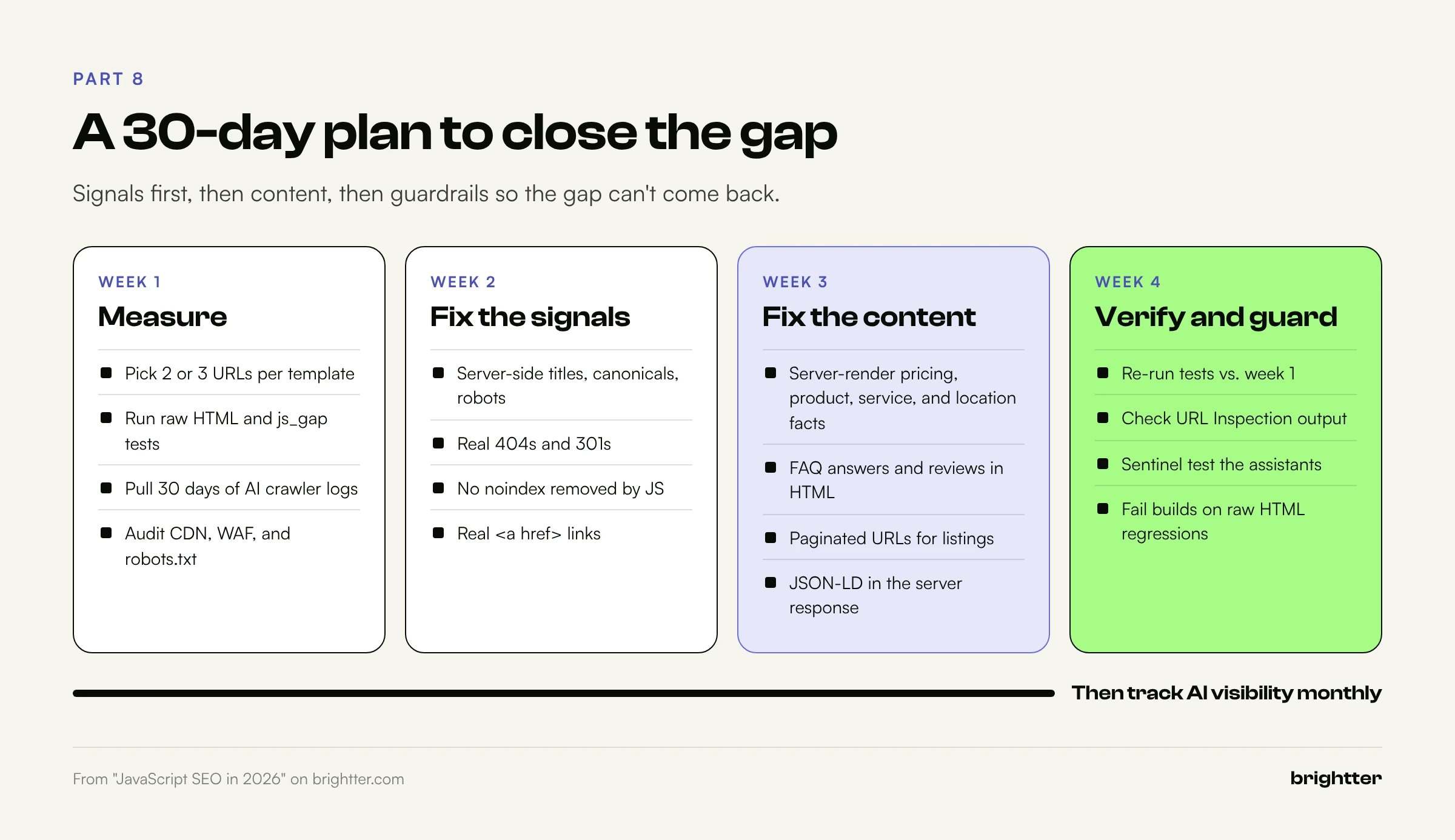
Week 1: Measure.
- List your page templates and pick two or three representative URLs for each.
- Run the raw HTML and
js_gap.pytests (Steps 1 and 2). Record the JavaScript dependency percentage and the signals that change. - Pull 30 days of AI crawler activity from your logs or CDN analytics (Step 4).
- Check CDN, WAF, and
robots.txtsettings for unintended AI crawler blocks.
Week 2: Fix the signals.
- Move titles, meta descriptions, canonicals, and robots directives into server output on every template.
- Fix status codes for unknown and removed routes.
- Remove any
noindexthat JavaScript is expected to remove. - Convert JavaScript-only navigation to real
<a href>links.
Week 3: Fix the content.
- Server-render the critical content for the templates with the highest JavaScript dependency, starting with the pages that carry commercial facts: pricing, products, services, and locations.
- Move FAQ answers, reviews, and key facts into the HTML.
- Add paginated URLs where listings rely on "load more" or infinite scroll.
- Move JSON-LD into the server response and mirror its facts in visible text.
Week 4: Verify and monitor.
- Re-run the tests and compare against week 1.
- Use URL Inspection to confirm Google's rendered output on fixed templates.
- Run the sentinel test across the major assistants.
- Add the raw HTML checks to your deployment pipeline so a future release can't quietly reintroduce the gap. A simple test that fails the build when a template's raw word count drops below a threshold, or when its title or canonical is missing from the raw HTML, catches most regressions.
After the fixes, track AI visibility directly. Our guide on measuring AI search visibility covers how to build a repeatable prompt set and measure presence, accuracy, and share of voice across ChatGPT, Claude, and Perplexity.
Conclusion: Build for the Strictest Reader
For years, the standard for JavaScript SEO was "can Google render it?" That standard was always a little risky, because it depended on a queue, a renderer, and a long list of conditions working perfectly. In 2026 it's no longer enough, because the fastest-growing readers of your website don't render at all.
The good news is that the fix is the same for every machine reader, and it makes your site better for people too. Server-rendered HTML loads faster, holds up on slow devices and networks, and gives every crawler, Google's or anyone else's, the same complete page. JavaScript remains the right tool for interaction. It just shouldn't be the only place your content exists.
Run the raw HTML test on your most important page this week. If what comes back is an empty shell, you've found your highest-value technical SEO project for the quarter.
Need help finding your gap? Brightter, Inc. runs technical SEO and GEO audits that compare raw and rendered output across every template, review crawler access at the CDN and firewall, and deliver a prioritized fix list your developers can act on. As a Webflow Certified Partner that also builds on WordPress and modern JavaScript frameworks, we fix rendering issues at the platform level, not just in a report. Talk to our team about an audit.