.avif)

Programmatic SEO Without Index Bloat: What Happens When 200 City Pages Meet Google's Quality Systems
Key Takeaways
- Google's scaled content abuse policy (March 2024) targets "many pages generated for the primary purpose of manipulating search rankings," and it applies no matter how the content is created: AI, human writers, templates, or a mix.
- The doorway abuse policy names the exact pattern most programmatic location builds follow: "multiple domain names or pages targeted at specific regions or cities that funnel users to one page."
- The helpful content system became part of Google's core ranking systems in March 2024. Google says ranking works at the page level, but site-wide signals and classifiers are also used, so a large block of thin pages can weigh on the pages that deserve to rank.
- "Unique" does not mean a different city name in the H1. It means facts that change from page to page: local proof, local data, prices, people, and answers that would be wrong if you pasted them onto another city's page.
- Measure your program by template, not by site: the share of submitted URLs that get indexed, the share of indexed URLs that earn impressions, and the share that earn qualified clicks. "Crawled, currently not indexed" in bulk is a quality verdict, not a technical bug.
- Pruning, consolidation, noindex, and 410 solve different problems. Use redirects when a better page exists, noindex when users need the page but searchers do not, 404 or 410 when the page has no reason to exist, and improvement when the page has demand and a real story to tell.
- On our own Webflow site, 192 of about 199 programmatic city pages earned no qualified traffic, and the opportunity sat in a few striking-distance cities led by Chicago and Atlanta. The fix is to concentrate effort there, not to publish 200 more pages.
Introduction: The 200 City Page Problem
Programmatic SEO has a seductive spreadsheet. Take a list of services, cross it with a list of cities, and generate a page for every row. Twenty services times fifty cities is a thousand landing pages, each one targeting a query like "Webflow agency in Denver" and, in theory, capturing long-tail demand a single services page never could.
Then the pages go live, and very little happens.
Search Console fills up with URLs labeled "Discovered, currently not indexed" and "Crawled, currently not indexed." The pages that do get indexed collect a trickle of impressions on page two or three. A few cities, usually the ones where the business has real customers, start to rank. The rest sit there, inflating the sitemap and quietly telling Google something about the site as a whole.
This is not Google punishing a clever tactic. It is Google's quality systems doing what they were built to do. When 200 pages share the same structure, the same claims, and the same paragraphs with a different city name dropped in, the honest answer to "which of these is the best result for this query?" is often "none of them." The policies Google published in March 2024 put that judgment into writing.
This guide covers what those policies actually say, what "unique" means in practice, how to measure crawl-to-index ratios by template, how to choose between pruning, consolidation, noindex, and 410, how to structure internal links, how to find striking-distance pages with the Search Console API, and which content models make programmatic pages worth indexing. It includes what we found on Brightter, Inc.'s own site, and it ends with a prioritized plan.
One framing note. Programmatic SEO is not inherently spam. Real estate portals, travel sites, and marketplaces run on templated pages. What separates them from a doorway farm is not the template. It is the data that fills it. A template is a delivery mechanism, and the question Google keeps asking, in every policy and every core update, is whether there is something worth delivering.
Part 1: What Google's Policies Actually Say
Most advice paraphrases Google's policies as "don't make thin pages." The real wording, on Google Search Central's spam policies page (last updated August 2026), is more specific and maps uncomfortably well onto the typical city page build.
Scaled content abuse
Google introduced the scaled content abuse policy in March 2024, alongside the March 2024 core update, replacing the narrower "spammy automatically generated content" policy. The definition:
Scaled content abuse is when many pages are generated for the primary purpose of manipulating search rankings and not helping users. This abusive practice is typically focused on creating large amounts of unoriginal content that provides little to no value to users, no matter how it's created.
The phrase that matters most is "no matter how it's created." At launch, Google described the target as producing content at scale to boost search ranking, "whether automation, humans or a combination are involved." The old policy focused on automated text. The new one focuses on intent and value. A team of freelancers writing 200 near-identical city pages by hand is inside the policy just as much as a script calling a language model.
Google's examples include using generative AI tools "to generate many pages without adding value for users," scraping feeds or search results to generate many pages, "stitching or combining content from different web pages without adding value," and creating many pages that make little sense to a reader but contain search keywords. Notice what is not on the list: templates, databases, or page counts. Scale is not the violation. Scale without value, produced primarily to rank, is.
Google expected the March 2024 changes to cut low-quality, unoriginal content in results by 40 percent, and after the April 2024 rollout put the figure at 45 percent.
Doorway abuse
The doorway policy is older (Google announced a ranking adjustment for doorway pages in March 2015), and it speaks most directly to location pages. Google defines doorway abuse as "when sites or pages are created to rank for specific, similar search queries," and says doorways "lead users to intermediate pages that aren't as useful as the final destination." Two of its four examples:
- "Having multiple domain names or pages targeted at specific regions or cities that funnel users to one page"
- "Creating substantially similar pages that are closer to search results than a clearly defined, browseable hierarchy"
The first is the city page program in one sentence. The second explains why so many fail even without spammy intent: pages that exist only to catch one query each, then funnel visitors to the same contact form, are "substantially similar pages" with no hierarchy behind them.
The test implied by the policy is useful. If a visitor who lands on your Denver page would be equally well served by your main services page, the Denver page is an intermediate page. It adds a step without adding information.
Helpful content is now part of core ranking
Google launched the helpful content system in 2022 as a separate classifier. Its ranking systems guide now lists it under retired systems and says that in March 2024 it "became part of our core ranking systems." There is no longer a separate update to wait out. Quality signals move with core ranking itself.
That makes the self-assessment questions on Google's "Creating helpful, reliable, people-first content" page (updated October 2026) a direct description of what core ranking is trying to reward. Three read like an audit checklist for programmatic pages:
- "Does the content provide original information, reporting, research, or analysis?"
- "Does the content provide insightful analysis or interesting information that is beyond the obvious?"
- "Are you producing lots of content on many different topics in hopes that some of it might perform well in search results?"
Page-level and site-wide signals
Can 190 weak city pages hurt the ten good ones? Google's ranking systems guide says its systems "are designed to work on the page level," and adds: "Site-wide signals and classifiers are also used and contribute to our understanding of pages." It cautions that good site-wide signals do not mean "that all content from a site will always rank highly."
Read that both ways. Strong site-wide signals don't rescue weak pages, and weak pages are part of the evidence those signals are built from. Google's core updates documentation says that removing unhelpful content "can help the good content on your site perform better," while also calling deletion "a last resort." We'll come back to that tension in Part 5.
How enforcement shows up
Algorithmic. Most city page programs never get a manual action. Their pages simply don't get indexed, or don't rank, and you see it in the page indexing report rather than a warning.
Manual. Search Console's manual actions include "Thin content with little or no added value," and Google's help page for it lists doorway pages among the common examples, with the remediation step "Check for doorway pages on your site." There is no separate manual action named for scaled content abuse; Google mentions it inside the "Major spam problems" action.
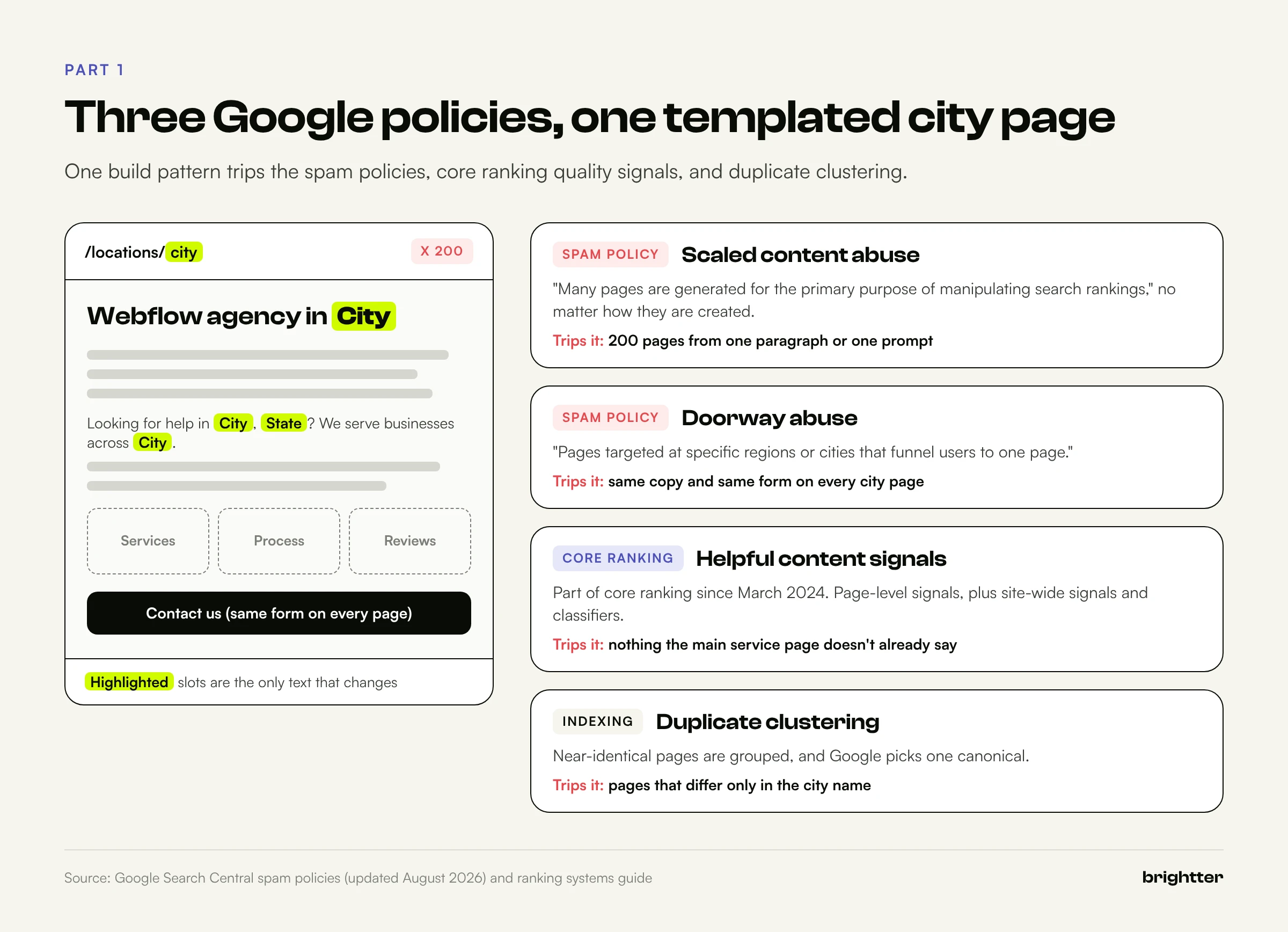
| Policy or system | What it targets | The city page pattern that trips it | Where you see it |
|---|---|---|---|
| Scaled content abuse | Many pages made primarily to rank, with little value, however produced | 200 pages from one prompt or one paragraph with the city name swapped | Low indexing rates; in severe cases a "Major spam problems" manual action |
| Doorway abuse | Similar pages for similar queries that funnel users to one destination | Same copy and same CTA on every city page, all leading to one form | Pages outranked by your own main page; thin content manual action |
| Core ranking (helpful content signals) | Unoriginal content made for search engines first | No local facts, no proof, nothing the main services page doesn't say | Pages stuck on page two or beyond; site-wide drag in core updates |
| Duplicate clustering | Pages Google treats as duplicates of each other | Near-identical pages where Google picks one canonical | "Duplicate without user-selected canonical" and "Duplicate, Google chose different canonical than user" |
Part 2: What "Unique" Means in Practice
Google publishes no uniqueness threshold. No percentage of distinct text makes a page safe, and anyone who quotes one is guessing. What Google does publish is a set of questions about originality and value, and they point to a practical definition.
The swap test
Here is the simplest test we know for a programmatic page. Take your Denver page. Replace every instance of "Denver" and "Colorado" with "Tulsa" and "Oklahoma." Read it again.
- If the page is still completely accurate, it has no local content. It is a template with a variable.
- If the page now contains claims that are false (a project that didn't happen in Tulsa, a price that doesn't apply there, a team member who doesn't work there, a statistic about the wrong market), it has local content.
A unique page is one that would become wrong if you moved it to another city. Swapping the city name, rewriting the intro with a language model, or adding a paragraph of city history does not pass the test. The history paragraph is unique text, but not unique value: it answers a question nobody searching for your service asked.
Three kinds of uniqueness
People mean three different things by "unique," and only one of them earns rankings.
| Type | What it looks like | Does it pass the swap test? | Value to the searcher |
|---|---|---|---|
| Lexical uniqueness | Spun or rewritten paragraphs, synonyms, reordered sentences, AI rewrites of one master page | No. The facts are identical. | None. It hides duplication from a diff tool, not from a quality system. |
| Decorative uniqueness | City trivia, population, weather, landmarks, a stock skyline photo, a generic map embed | Partly. The facts change, but they aren't about the service. | Low. It is true and local but irrelevant to the decision. |
| Decision uniqueness | Local projects and clients, local prices or price ranges, service coverage and response times, local team, local regulations or permits, local reviews, local FAQs | Yes. Moving the page would make it false. | High. It helps the visitor decide. |
Most failing city page programs are built entirely from the first two rows. The pages that rank are built from the third.
What decision-unique data looks like
It depends on what the searcher is deciding:
- Agencies and consultancies: clients and case studies in that metro, the industries concentrated there, whether you have people on the ground, and local pricing if it differs.
- Home services: service area boundaries, permit requirements, typical job costs in that market, response times, and reviews from local customers.
- Software and SaaS: usually none. A "project management software in Phoenix" page rarely has anything local to say, which is a signal it shouldn't exist.
If you can't name three decision-relevant facts that differ for a city, don't build a page for that city. Build a better national page instead.
Measuring uniqueness across a template
You can quantify how much of each page is template. The script below fetches a list of city pages, extracts the main text, replaces the city and state names with a placeholder (so a swapped name doesn't count as unique), breaks the text into five-word shingles, and reports two numbers per page:
- Unique share: the percentage of the page's shingles that don't appear on most of the other pages in the set. This is the page-specific content.
- Nearest neighbor similarity: the Jaccard similarity between this page and the most similar other page. This finds near-duplicates.
# page_uniqueness.py: estimate how much of each programmatic page is page-specific
# Requires: pip install requests beautifulsoup4
# Input CSV columns: url,city,state
import csv, re, sys
from collections import Counter
import requests
from bs4 import BeautifulSoup

UA = "Mozilla/5.0 (compatible; uniqueness-audit/1.0)"
K = 5                 # shingle size in words
TEMPLATE_SHARE = 0.5  # a shingle on at least half the pages counts as template

def main_text(html, selector=None):
    soup = BeautifulSoup(html, "html.parser")
    for tag in soup(["script", "style", "noscript", "template", "nav", "header", "footer"]):
        tag.decompose()
    root = soup.select_one(selector) if selector else None
    root = root or soup.body or soup
    return root.get_text(" ", strip=True)

def tokens(text, entity_terms):
    text = text.lower()
    for term in sorted(entity_terms, key=len, reverse=True):
        if term:
            text = text.replace(term.lower(), " xentityx ")
    return re.findall(r"[a-z0-9$%]+", text)

def shingles(words, k=K):
    return {tuple(words[i:i + k]) for i in range(len(words) - k + 1)}

def jaccard(a, b):
    return len(a & b) / len(a | b) if a and b else 0.0

def main(csv_path, selector=None):
    rows = list(csv.DictReader(open(csv_path, newline="", encoding="utf-8")))
    pages = {}
    for row in rows:
        resp = requests.get(row["url"], headers={"User-Agent": UA}, timeout=30)
        words = tokens(main_text(resp.text, selector), [row["city"], row["state"]])
        pages[row["url"]] = {"words": len(words), "sh": shingles(words), "status": resp.status_code}

    doc_freq = Counter(s for p in pages.values() for s in p["sh"])
    cutoff = max(2, int(len(pages) * TEMPLATE_SHARE))
    template = {s for s, n in doc_freq.items() if n >= cutoff}

    print("unique%  nearest%  words  status  url  (nearest)")
    for url, p in pages.items():
        own = p["sh"] - template
        unique_share = 100 * len(own) / len(p["sh"]) if p["sh"] else 0
        best_url, best = None, 0.0
        for other_url, q in pages.items():
            if other_url != url:
                sim = jaccard(p["sh"], q["sh"])
                if sim > best:
                    best_url, best = other_url, sim
        print(f"{unique_share:6.1f}  {100 * best:7.1f}  {p['words']:5}  {p['status']:6}  {url}  ({best_url})")

if __name__ == "__main__":
    main(sys.argv[1], sys.argv[2] if len(sys.argv) > 2 else None)
Run it with an optional CSS selector for the main content area, so the navigation and footer don't dilute the numbers:
python3 page_uniqueness.py city_pages.csv "main"
How to read it. These are internal heuristics, not Google thresholds, so calibrate them against your own pages that rank:
- A unique share under about 20 percent means the page is mostly template. Combined with a nearest-neighbor similarity above about 80 percent, it is effectively a duplicate of another city page.
- Compare your ranking and non-ranking pages. The gap in page-specific content between them is your target.
- A high unique share is necessary but not sufficient. Ten paragraphs of city trivia score well here and still fail the swap test, so review a sample by hand.

Templates are fine. Thin data is the problem.
None of this means abandoning templates. A real estate listing, a flight route page, and a product page are all templates. They work because the data in each slot is specific, current, and useful.
The practical rule: design the data model first and the template second. List the fields each page needs to be genuinely useful, check how many cities you can actually fill them for, and build pages only for those cities. If the answer is "the city name and nothing else," the data model is telling you not to build the page.
Part 3: Crawl-to-Index Ratios and How to Measure Them
The most useful number in programmatic SEO is not traffic. It is how far each template's URLs get through Google's pipeline. A healthy template moves most of its URLs through every stage. An unhealthy one loses them early.
The five-stage funnel
Measure each template separately through five stages:
- Submitted: URLs in your sitemap for that template.
- Crawled: URLs Google has fetched at least once.
- Indexed: URLs Google chose to keep in its index.
- With impressions: indexed URLs that appeared in search results at least once in the measurement window.
- With qualified clicks: URLs that sent visitors who did something you care about (a form submission, a call, a meaningful engaged session).
From those stages, three ratios tell you most of what you need to know:
- Index rate = indexed / submitted. How much of the template Google thinks is worth keeping.
- Visibility rate = URLs with impressions / indexed. How much of what's indexed actually competes.
- Yield = URLs with qualified clicks / submitted. How much of the program pays for itself.
There's no universal benchmark for these ratios. Compare templates against each other on the same site, and each template against itself over time. If your articles have a high index rate and your city pages a low one, the gap is about the city pages, not your domain.

Reading the page indexing report
Search Console's page indexing report is the starting point. Two features make it work at the template level.
The sitemap filter. Above the chart, the filter can show "All known pages," "All submitted pages," "Unsubmitted pages only," or a specific sitemap URL. If each template has its own sitemap (each can hold up to 50,000 URLs or 50MB uncompressed), select it to see that template's indexed and not indexed counts in isolation.
Folder-level properties. If you can't split sitemaps (Webflow's auto-generated sitemap, for example, is a single file for the whole site), add a URL-prefix property in Search Console for the template's folder, such as https://www.example.com/locations/. That property gets its own indexing and performance reports scoped to the path.
One caution: each status's example URL list is capped at 1,000 rows and may not show every affected URL. For an exact list, use the URL Inspection API.
The two statuses that matter most
Two "not indexed" statuses account for most losses in programmatic programs, and two duplicate statuses explain much of the rest.
| Status | What Google's documentation says | What it usually means for a programmatic template | What to do |
|---|---|---|---|
| Discovered, currently not indexed | The page was found by Google but not crawled yet. Typically Google wanted to crawl it but expected that to overload the site, so it rescheduled the crawl. | Google knows the URL exists but hasn't judged it worth fetching. On small and mid-size sites this is usually about perceived value and weak internal links, not server capacity. | Strengthen internal links from crawled, indexed pages; reduce the number of low-value URLs competing for attention; check server health. |
| Crawled, currently not indexed | The page was crawled by Google but not indexed. It may or may not be indexed in the future, and there is no need to resubmit it. | Google fetched the page, looked at it, and decided not to keep it. In bulk on one template, this is a quality and duplication signal. | Improve the content with decision-unique data, consolidate near-duplicates, or remove the pages. Requesting indexing rarely fixes it on its own. |
| Duplicate without user-selected canonical | The page is a duplicate of another page and doesn't declare a preferred canonical. | Google has clustered several city pages together as duplicates. | Make the pages genuinely different or consolidate them into one URL. |
| Duplicate, Google chose different canonical than user | Google picked a different canonical than the one you declared. | Your self-referencing canonical says "I'm unique," and Google disagrees. | Treat it as a duplicate problem, not a tag problem. |
Discovered, currently not indexed is the one people misread most. Google's documentation describes it in terms of server load, and on a large or slow site that is what it means. But Google's crawl budget guide is written for very large sites (roughly a million or more pages, or 10,000 or more that change daily). A healthy 200-page site is rarely near its crawl capacity, so when its city pages sit in "Discovered" for months, crawl demand is the more likely constraint: Google hasn't judged them worth fetching. The guide says you can influence demand most by managing your perceived inventory, meaning the duplicate or unwanted URLs Google knows about.
Crawled, currently not indexed in bulk is the clearest quality signal Search Console gives you. One URL in this status is normal. Sixty city pages from the same template is Google telling you the template doesn't produce pages worth indexing.
Checking every URL with the URL Inspection API
For a complete per-URL view, use the URL Inspection API. It returns the coverage state, last crawl time, Google's chosen canonical, your declared canonical, the sitemaps that list the URL, and fetch and indexing states. The limits are 2,000 queries per day and 600 per minute per property, plenty for a 200-page template.
# inspect_urls.py: pull index status for every URL in a template
# Requires: pip install google-api-python-client google-auth
# Add the service account's email as a user on the Search Console property first.
import csv, sys, time
from google.oauth2 import service_account
from googleapiclient.discovery import build

SITE = "sc-domain:example.com"   # or "https://www.example.com/" for a URL-prefix property
SCOPES = ["https://www.googleapis.com/auth/webmasters.readonly"]
DAILY_LIMIT = 2000

creds = service_account.Credentials.from_service_account_file("service-account.json", scopes=SCOPES)
svc = build("searchconsole", "v1", credentials=creds, cache_discovery=False)

urls = [u.strip() for u in open(sys.argv[1]) if u.strip()][:DAILY_LIMIT]
fields = ["url", "verdict", "coverageState", "lastCrawlTime", "pageFetchState",
          "indexingState", "robotsTxtState", "userCanonical", "googleCanonical", "canonical_match", "sitemap"]

with open("inspection.csv", "w", newline="") as f:
    out = csv.DictWriter(f, fieldnames=fields)
    out.writeheader()
    for url in urls:
        body = {"inspectionUrl": url, "siteUrl": SITE}
        r = svc.urlInspection().index().inspect(body=body).execute()
        s = r["inspectionResult"].get("indexStatusResult", {})
        out.writerow({
            "url": url,
            "verdict": s.get("verdict"),
            "coverageState": s.get("coverageState"),
            "lastCrawlTime": s.get("lastCrawlTime"),
            "pageFetchState": s.get("pageFetchState"),
            "indexingState": s.get("indexingState"),
            "robotsTxtState": s.get("robotsTxtState"),
            "userCanonical": s.get("userCanonical"),
            "googleCanonical": s.get("googleCanonical"),
            "canonical_match": s.get("userCanonical") == s.get("googleCanonical"),
            "sitemap": ";".join(s.get("sitemap", [])),
        })
        time.sleep(0.2)   # stays well under 600 queries per minute
print("wrote inspection.csv")
Count the rows by coverageState, then look at two more columns. An old lastCrawlTime across many URLs means Google has lost interest in them. A googleCanonical that differs from userCanonical means Google has clustered the page with another URL, often another city page or the main service page, which tells you exactly what Google thinks it duplicates.
A quick technical baseline
Before blaming quality, rule out mechanical causes:
# Check status, final URL, canonical, and robots meta for every city page
while read -r url; do
  meta=$(curl -sL -o page.html -w "%{http_code} %{url_effective}" "$url")
  canon=$(grep -oiE '<link[^>]+rel="canonical"[^>]*>' page.html | grep -oiE 'href="[^"]+"' | head -1)
  robots=$(grep -oiE '<meta[^>]+name="robots"[^>]*>' page.html | grep -oiE 'content="[^"]+"' | head -1)
  echo "$meta | ${canon:-no canonical} | ${robots:-no robots meta}"
done < city_urls.txt
Look for unexpected redirects, canonicals pointing elsewhere, accidental noindex directives, and soft 404s. If all are clean and the index rate is still low, the problem is the content.
Joining index status with performance data
Finally, connect inspection data to performance data so each URL has index status, impressions, clicks, and position in one row. With Search Console's bulk export to BigQuery, this query gives template-level totals. sum_position is zero-based, so average position is SUM(sum_position) / SUM(impressions) + 1.
-- Template-level visibility from the Search Console bulk export (BigQuery)
DECLARE start_date DATE DEFAULT DATE_SUB(CURRENT_DATE(), INTERVAL 93 DAY);
DECLARE end_date   DATE DEFAULT DATE_SUB(CURRENT_DATE(), INTERVAL 3 DAY);

SELECT
  CASE
    WHEN REGEXP_CONTAINS(url, r'/locations/') THEN 'city pages'
    WHEN REGEXP_CONTAINS(url, r'/services/')  THEN 'service pages'
    WHEN REGEXP_CONTAINS(url, r'/articles/')  THEN 'articles'
    ELSE 'other'
  END AS template,
  COUNT(DISTINCT url)                                     AS urls_with_impressions,
  SUM(impressions)                                        AS impressions,
  SUM(clicks)                                             AS clicks,
  ROUND(SAFE_DIVIDE(SUM(sum_position), SUM(impressions)) + 1, 1) AS avg_position
FROM `my_project.searchconsole.searchdata_url_impression`
WHERE data_date BETWEEN start_date AND end_date
  AND search_type = 'WEB'
GROUP BY template
ORDER BY impressions DESC;
Divide each template's urls_with_impressions by its submitted URL count for the visibility side of the funnel. Without the export, the Part 7 script pulls the same data from the API.
Part 4: What We Saw on Our Own Site
It is easy to give advice about programmatic SEO and harder to apply it to your own pages, so we ran this analysis on Brightter, Inc.'s own Webflow site.
Like many agencies, we built a set of programmatic city landing pages: about 199 of them, generated from a Webflow CMS collection. Rendering was not a factor. Webflow publishes static HTML for CMS pages, so every crawler received the full page, which rules out the kind of JavaScript problem we covered in JavaScript SEO in 2026.
When we pulled the Search Console data, the result was blunt. 192 of the 199 city pages generated no qualified traffic. That leaves seven pages doing any work for the business.
The opportunity was concentrated, not spread. Chicago and Atlanta stood out as the main striking-distance opportunities: city pages ranking close enough to the first page that targeted improvement could plausibly move them into positions that earn clicks.

Three lessons from our own data shaped the rest of this guide:
- Technical cleanliness is not the same as value. A page can be fast, crawlable, and correctly tagged and still give Google no reason to prefer it. The swap test from Part 2 is the question that matters once the technical baseline is clean.
- Effort should follow evidence. The Search Console data identified which cities Google was already willing to rank. Improving two pages with real demand is a better use of a week than writing new copy for 190 pages that have shown no demand.
- The rest of the set needed a decision, not more content. For cities with no demand and no local story, the honest options are consolidation, noindex, or removal. Part 5 lays out how to make that call.
We share this because it is a common shape for a city page program: a small number of pages that matter and a large number that don't. The work is figuring out which is which, then acting on it.
Part 5: Prune, Consolidate, Noindex, or 410
For each page that earns nothing, you can improve it, consolidate it with a redirect, keep it out of the index with noindex, remove it with a 404 or 410, or leave it alone. Each solves a different problem, and the wrong choice creates new ones.
What each option actually does
Improve. Add decision-unique content until the page deserves to rank. This is right when the page has demand (impressions, a striking-distance position, a market you genuinely serve) and you have real local material. Google's core updates guidance leans this way, calling deletion "a last resort."
Consolidate with a 301 redirect. Merge the page into a better one (a regional hub, a state page, or the main service page) and permanently redirect the old URL. Google's canonicalization documentation ranks redirects as the strongest signal, ahead of rel="canonical" and sitemap inclusion. This is right when a better page covers the same intent.
Noindex. Keep the page live for users but out of the index. Once Googlebot sees the directive, Google says it "will drop that page entirely from Google Search results." The page must not be blocked in robots.txt, or Google never sees the noindex. Google still crawls noindexed pages, so its crawl budget guide says not to use noindex to manage crawling, and its canonicalization guide advises against using it to pick a canonical between duplicates.
Use noindex when the page has a real job for users (sales sends prospects to it, or an email campaign links to it) but no job in search.
404 or 410. Remove the page entirely. Google's documentation treats 404 and 410 like other 4xx codes (except 429): a previously indexed URL is removed from the index, and crawl frequency gradually drops. Google representatives have said in the past that a 410 may be processed slightly faster, but the documentation draws no distinction. Use this when the page has no demand, no links worth keeping, no user job, and no better page to send people to.
Leave it. For an indexed page with some impressions that isn't a near-duplicate, doing nothing is legitimate while you handle pages that matter more.
What not to do
- Don't block thin pages in
robots.txt. Blocking stops crawling, not indexing. A blocked URL can still appear in results if linked, and Google can't see anoindexon a page it can't fetch. - Don't canonicalize 190 city pages to the home page. A canonical pointing to different content is a signal Google is likely to ignore.
- Don't redirect everything to the home page. Redirects to unrelated pages may be treated as soft 404s. Redirect only to a page with the same intent.
- Don't delete pages with backlinks without redirecting them. A city page with a local news link has value worth keeping.
Decision rules
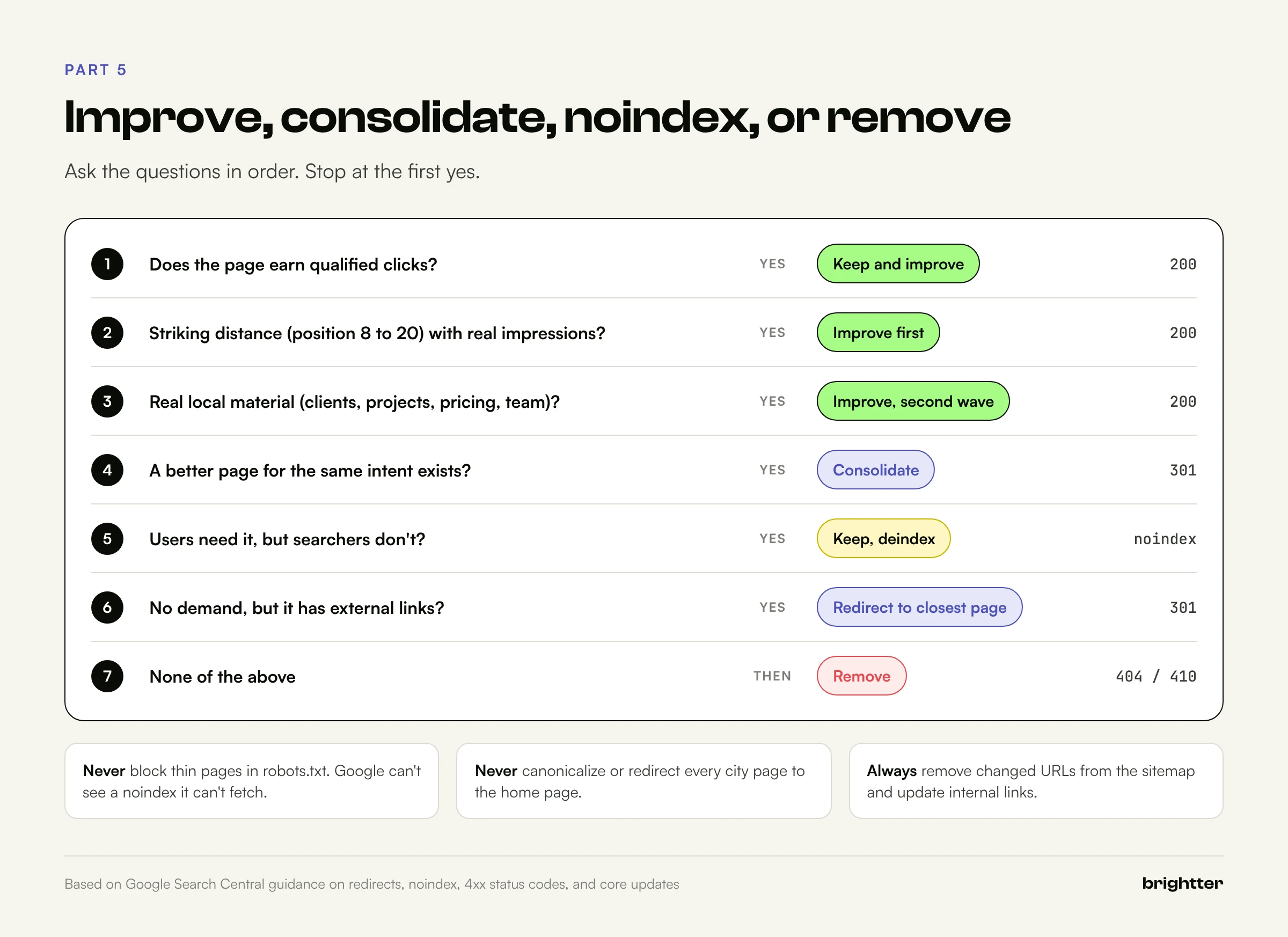
Work down this table for each page and stop at the first row that fits. The order matters: demand and real local material come first, and removal is the last resort.
| Situation | Action | Status code or tag | Remove from sitemap? | Remove internal links? |
|---|---|---|---|---|
| Earns qualified clicks | Keep and improve | 200 | No | No |
| Striking distance, real demand | Improve first | 200 | No | No; add more |
| Real local material, no rankings yet | Improve, second wave | 200 | No | No |
| Better page exists for the same intent | Consolidate | 301 to the better page | Yes | Yes; point to the destination |
| Users need it, searchers don't | Keep, deindex | 200 with noindex | Yes | Reduce |
| No demand, but has backlinks | Redirect | 301 to the closest relevant page | Yes | Yes |
| No demand, no links, no user job | Remove | 404 or 410 | Yes | Yes |
Doing this on Webflow
Webflow handles most of these natively:
- Noindex per CMS item. The item's "Sitemap Indexing" toggle adds a
noindexmeta tag and removes the page from the auto-generated sitemap. Webflow's help center says this requires a paid Site plan, and it doesn't remove already indexed content until Google recrawls. - Redirects. Add 301 redirects in the site's publishing settings before unpublishing the CMS items, so no URL is a 404 in between.
- Removal. Unpublishing or deleting an item makes its URL return a 404. Webflow hosting doesn't offer a native 410 setting, which is fine, since Google treats them the same.
- Sitemap. The auto-generated sitemap updates when items are unpublished or excluded. A custom sitemap you must update yourself.
Pace the changes
Make the decisions at once, but roll them out in batches: redirects and removals first, then noindex, then improvements in priority order. Date each batch. Google's core updates documentation notes that some changes take effect in days, but confirming a lasting quality improvement can take several months.
Part 6: Internal Linking Architecture
Internal links tell Google which URLs exist, how they relate, and which ones you consider important. Most city page programs get this wrong the same way: every city page is linked from one giant footer list or one flat "areas we serve" page, and nothing else. To Google, that looks like 200 pages of equal, low importance.
Hub and spoke
The structure that works mirrors how people browse:
- National service page: explains the service and links to regional hubs and the strongest city pages.
- Regional or state hubs: list the cities with real pages and carry their own content (regional case studies, pricing notes, coverage).
- City pages: link up to their hub and the service page, and across to a few genuinely related cities.
This is what Google's doorway policy means by a "clearly defined, browseable hierarchy." Every level has its own reason to exist. A hub that is just a list of 40 links is not a hub; give it content someone in that region would find useful on its own. Hubs are also the natural consolidation target from Part 5: when a city page doesn't earn its place, redirect it to its regional hub and mention that city's coverage in the hub's text.

Breadcrumbs
Breadcrumbs make the hierarchy explicit. Use real <a href> links in the HTML (Home, Services, Illinois, Chicago) and mark them up with BreadcrumbList. Since January 2025, Google shows only the domain instead of breadcrumbs in mobile results, but desktop results still use them, and the links remain one of the clearest hierarchy signals you can give.
Related-location modules
A "nearby locations" module helps when it is selective:
- Link to three to six related pages, not 50, chosen by geography, market similarity, or service overlap.
- Only link to pages you want indexed. Prominent links to
noindexpages send contradictory signals. - Use descriptive anchor text that names the city and service naturally, not one exact-match pattern repeated across 200 pages.
- Generate the module from data. In Webflow, a multi-reference field on each city item ("related cities") feeds a collection list on the template.
Links from pages that already rank
The fastest way to give a striking-distance city page more weight is to link to it from pages Google already values: case studies set in that city, articles about work in that market, and the national service page. A contextual link in a relevant paragraph carries more meaning than a footer link. If you have a Chicago case study, the Chicago page should link to it and the case study should link back.
What to remove
- Footer link farms. A footer listing every city makes the set look like a doorway network. Replace it with one link to the locations hub.
- Orphaned pages. A city page linked only from the sitemap is telling Google it isn't important. Link it properly or apply the Part 5 rules.
- Links to removed pages. After a consolidation, point internal links at the destination directly.
Part 7: Finding Striking-Distance Pages with the Search Console API
"Striking distance" means pages ranking near the first page, typically at an average position of about 8 to 20 for queries with real impressions. They've passed the indexing gate and Google considers them relevant. Moving one from position 14 to 6 is usually far easier than getting an unindexed page to rank at all.
Why the Search Analytics API
The performance report's exports are capped and awkward to combine. The Search Analytics API returns up to 25,000 rows per request (default 1,000), paginates with startRow, and accepts regular-expression page filters (includingRegex, RE2 syntax).
Two data caveats before the script:
- Position is an average of your topmost position across impressions, so "12" might mean 5th for some searches and 30th for others.
- Query-level rows are incomplete. Grouping by query omits anonymized queries, so page-and-query totals run lower than page-level totals. Use page-level requests for totals and page-and-query requests for targeting.
The script
This script pulls 90 days of page and query data for a template folder, finds each page's striking-distance queries, and ranks pages by the impressions in that range.
# striking_distance.py: find programmatic pages ranking around positions 8 to 20
# Requires: pip install google-api-python-client google-auth
import csv, datetime as dt
from collections import defaultdict
from google.oauth2 import service_account
from googleapiclient.discovery import build

SITE = "sc-domain:example.com"
PAGE_REGEX = r"/locations/"      # the template you want to analyze (RE2 syntax)
POS_MIN, POS_MAX = 8.0, 20.0
MIN_IMPRESSIONS = 20             # per page-and-query pair; tune to your volume
SCOPES = ["https://www.googleapis.com/auth/webmasters.readonly"]

creds = service_account.Credentials.from_service_account_file("service-account.json", scopes=SCOPES)
svc = build("searchconsole", "v1", credentials=creds, cache_discovery=False)

end = dt.date.today() - dt.timedelta(days=3)     # final data lags by a few days
start = end - dt.timedelta(days=90)

def fetch(dimensions):
    rows, start_row = [], 0
    while True:
        body = {
            "startDate": start.isoformat(),
            "endDate": end.isoformat(),
            "dimensions": dimensions,
            "type": "web",
            "dimensionFilterGroups": [{"filters": [
                {"dimension": "page", "operator": "includingRegex", "expression": PAGE_REGEX}
            ]}],
            "rowLimit": 25000,
            "startRow": start_row,
        }
        batch = svc.searchanalytics().query(siteUrl=SITE, body=body).execute().get("rows", [])
        rows.extend(batch)
        if len(batch) < 25000:
            return rows
        start_row += 25000

# 1. Page-level totals (includes anonymized queries)
pages = {r["keys"][0]: r for r in fetch(["page"])}

# 2. Page-and-query rows for targeting
targets = defaultdict(list)
for r in fetch(["page", "query"]):
    page, query = r["keys"]
    if POS_MIN <= r["position"] <= POS_MAX and r["impressions"] >= MIN_IMPRESSIONS:
        targets[page].append((query, r["impressions"], r["clicks"], r["position"]))

report = []
for page, queries in targets.items():
    total = pages.get(page, {})
    striking_impr = sum(q[1] for q in queries)
    report.append({
        "page": page,
        "page_impressions": int(total.get("impressions", 0)),
        "page_clicks": int(total.get("clicks", 0)),
        "page_avg_position": round(total.get("position", 0), 1),
        "striking_queries": len(queries),
        "striking_impressions": int(striking_impr),
        "top_queries": " | ".join(f"{q} ({int(i)} impr, pos {p:.1f})"
                                  for q, i, c, p in sorted(queries, key=lambda x: -x[1])[:5]),
    })

report.sort(key=lambda r: -r["striking_impressions"])
with open("striking_distance.csv", "w", newline="") as f:
    w = csv.DictWriter(f, fieldnames=list(report[0].keys()) if report else ["page"])
    w.writeheader()
    w.writerows(report)

print(f"{len(pages)} pages with impressions, {len(report)} with striking-distance queries")
for r in report[:15]:
    print(f'{r["striking_impressions"]:7}  pos {r["page_avg_position"]:5}  {r["page"]}')
Any template URL missing from pages had zero impressions in the window, which gives you the visibility side of the Part 3 funnel.
Reading the output
The top_queries column shows what Google already associates each page with. For the top pages, check three things:
- Is the intent right? A page ranking for "Webflow agency Chicago" when you serve Chicago is a target. One ranking for an informational query you can't serve isn't.
- Is another of your pages competing? If your national service page also earns impressions for the same city queries, decide which page owns them and align copy and links.
- What does page one show? If the results above you are firms with local offices, reviews, and case studies, you know the level of evidence the query needs.
If you use the BigQuery bulk export, the same analysis is a GROUP BY url, query over searchdata_url_impression with NOT is_anonymized_query, filtered with HAVING on the computed average position.
What to do with a striking-distance page
On our own site, this process pointed to Chicago and Atlanta. The playbook for a page like that is specific:
- Match the page to the queries it already earns. Check that the title, H1, and opening paragraph speak to the exact service and city phrasing in the top queries.
- Add the decision-unique content from Part 8: local proof, local data, specific pricing or engagement details, and answers to the questions people in that market actually ask.
- Add internal links from your strongest relevant pages (Part 6).
- Earn local signals where you genuinely have them: local partnerships, events, and directory listings.
- Measure in four to eight week windows against the same queries, not total traffic, which swings with seasonality.
Part 8: Content Models That Make Programmatic Pages Useful
A programmatic page is only as good as the data model behind it. These are the blocks that make city and service pages genuinely useful, roughly in order of impact.
Local proof
Proof is the strongest decision-unique content, because a competitor can't copy it and a template can't fake it.
- Local case studies: a short summary of a project for a client in that city (problem, approach, outcome), linked to the full story. One strong case study changes the character of a page.
- Local clients, with permission, and local reviews shown as visible text.
- Local people: the team members who serve that market, and their real connection to it.
If you have no proof for a city, that is important information. The page probably belongs in the "consolidate" or "remove" column, or under a regional hub.
Local data, pricing, and FAQs
Local data should change by city and matter to the decision: service areas, response times, on-site availability, time zones, local regulations or permits, and averages from your own projects in that market, stated honestly with the sample size. Population and median income tables are local, but unless they change what the visitor should buy, they are decoration.
Pricing is a fact buyers look for and many service pages leave out. If it varies by market, say how. If it doesn't, give realistic ranges and explain what drives cost. A page that answers "how much will this cost me here?" beats ten that say "contact us for a quote."
FAQs work when they answer questions specific to the location or the local buyer. Pull them from sales calls, support inboxes, and the queries in your Search Console data. Note that Google stopped showing FAQ rich results in 2026: its documentation records the deprecation starting May 7, 2026, and full removal in June. FAQ content still helps readers and AI systems that read your HTML, but FAQPage markup won't change how your listing looks in Google.
Structured data, used carefully
Location pages are where programmatic sites most often overstate things in structured data. Three rules:
Use LocalBusiness only for real locations. Google's documentation requires a name and address, recommends geo, telephone, url, openingHoursSpecification, and priceRange, and says each location should be marked up as its own LocalBusiness. That assumes a real place. A LocalBusiness block with a Chicago address you don't have is a false statement. Mark up the real office, and describe coverage another way.
Use Service with areaServed for coverage. Schema.org's Service type, with a provider and an areaServed naming the city, says "we provide this service here" without implying an office. Google offers no rich result for Service, so this is about clarity, not appearance.
Don't mark up your own reviews for stars. Google's review snippet guidelines say that if the entity being reviewed controls the reviews about itself, its pages using LocalBusiness or other Organization markup are ineligible for the star review feature.
A Service block for a city page served without a local office:
<script type="application/ld+json">
{
  "@context": "https://schema.org",
  "@type": "Service",
  "name": "Webflow development in Chicago",
  "serviceType": "Webflow website design and development",
  "url": "https://www.example.com/locations/chicago",
  "description": "Webflow design, development, and CMS migration for Chicago businesses, delivered remotely with on-site workshops on request.",
  "provider": {
    "@type": "Organization",
    "name": "Example Agency",
    "url": "https://www.example.com"
  },
  "areaServed": {
    "@type": "City",
    "name": "Chicago",
    "containedInPlace": { "@type": "State", "name": "Illinois" }
  }
}
</script>
Generate JSON-LD in the server HTML (in Webflow, the collection template's custom code with CMS field bindings does this) and mirror its facts in visible text. For more, see our guide to schema.org rich snippets in Webflow.
A content model for a city page
Fields marked "Yes" under Required are the ones that, if you can't fill them, should stop you from publishing the page.
| Block | Example content | Required? | Changes per city? |
|---|---|---|---|
| Title, H1, and intro | Service and city, with a one-sentence summary of what you do there | Yes | Yes |
| Local proof | Case studies or client examples from that metro | Yes | Yes |
| Coverage and logistics | Service area, on-site availability, response times | Yes | Yes |
| Pricing or engagement model | Typical ranges and what changes them there | Recommended | Sometimes |
| Local team | The people who serve that market | Recommended | Yes |
| Local FAQs | Three to five questions specific to that city's buyers | Recommended | Yes |
| Service description and process | What the service includes and how it works | Yes | No (shared) |
| Related locations | Three to six nearby or similar cities with real pages | Yes | Yes |
| Structured data | Service with areaServed; LocalBusiness only for real offices | Yes | Yes |
Shared blocks are fine. What matters is that the blocks that change per city are substantial enough to make the page worth visiting on its own.
Where AI generation fits
Generative AI is useful for structuring data you already have: turning a project record into a readable case study summary, drafting FAQ answers from a sales call transcript, or normalizing fields. It is risky as the source of local content. A model asked to "write about our Webflow services in Tulsa" produces fluent, plausible, empty text, which is the first example on Google's scaled content abuse list. The rule we use: AI can write up facts, but it can't supply them.
Part 9: Failure Patterns That Show Up Again and Again
These are the patterns we see most often in programmatic location programs that underperform. Most sites have more than one.
The city name swap. One master page cloned for every city, with the name substituted in the title, H1, and a few sentences. Google indexes a few, clusters the rest as duplicates, and leaves many in "Crawled, currently not indexed." Fix: define required local fields and publish only the cities that can fill them.
The AI-rewritten clones. The same master page run through a language model to make "unique" versions. A diff tool says the pages differ; the facts say they're identical. This is the pattern the scaled content abuse policy was written for. Fix: replace rewritten text with real local data, or consolidate.
The city trivia page. Each page opens with the city's history or landmarks: unique, true, and irrelevant to a buyer. Fix: spend the space on proof and logistics.
The service by city multiplication. Fifteen services times 100 cities is 1,500 pages, and the combinations grow much faster than the evidence to fill them. Fix: build combinations only where you deliver that service in that market with proof.
The phantom office. LocalBusiness markup with a city address the business doesn't have. It is a false statement, and the kind of thing a manual reviewer notices. Fix: Service with areaServed for coverage.
The footer link farm and the orphan set. Either every page links to every city from the footer, or city pages exist only in the sitemap. One looks like a doorway network; the other sits in "Discovered, currently not indexed" indefinitely. Fix: hub and spoke, plus contextual links.
The self-cannibalizing hub. The national service page and the city pages compete for the same city queries. Fix: use the page-and-query data from Part 7 to assign each query an owner, then align titles, copy, and links.
Noindex plus robots.txt. Weak pages get noindex and a robots.txt block "to save crawl budget." Google can't see the noindex, so indexed pages linger. Fix: noindex with crawling allowed, or removal.
The mass deletion. 150 city pages removed in one release, including pages with backlinks, with internal links still pointing at them. Fix: run the Part 5 rules, redirect pages with value, and update links before unpublishing.
Measuring the site instead of the template. Site-wide traffic rises because the blog grows, and the city program looks fine in aggregate. Fix: give every template its own funnel.
Part 10: A Measurement Plan
A programmatic program needs its own scorecard, measured at the template level on a fixed schedule with stable definitions.
| Metric | Definition | Source | Cadence |
|---|---|---|---|
| Index rate | Indexed URLs / submitted URLs | Page indexing report (sitemap filter or folder property), URL Inspection API | Monthly |
| Not indexed by reason | URLs in each "not indexed" status | Page indexing report, URL Inspection API | Monthly |
| Canonical mismatches | URLs where Google's canonical differs from yours | URL Inspection API | Monthly |
| Visibility rate | URLs with impressions / indexed URLs | Search Analytics API or BigQuery export | Monthly |
| Striking-distance pages | Pages with queries at average position 8 to 20 above an impressions floor | Part 7 script | Monthly |
| Qualified click yield | Pages with qualified conversions / submitted URLs | Analytics and CRM, by landing page | Monthly |
| Crawl recency | Median days since last crawl | URL Inspection API | Quarterly |
Define "qualified" before you start. Visits from outside your market, job seekers, or students are not the goal. Decide what counts (a form submission, a booked call, a pricing page visit followed by contact), tag those events, and report them by landing page.
Keep a change log. Record every batch from Part 5 and every improvement from Part 8 with a date and a URL list. Since November 2025, Search Console's performance report supports custom chart annotations, so add a note there on each release date too. Three months later, you'll know which change moved which number.
Expect slow feedback. Index status changes on recrawl, and Google's noindex documentation notes it may take months for Googlebot to revisit a less important page. Read the scorecard monthly, but judge the program quarterly.
For AI search, add a separate check: programmatic pages are increasingly read by assistants answering "who does this near me" questions. Our guide to measuring AI search visibility explains how to track whether your locations appear in those answers.
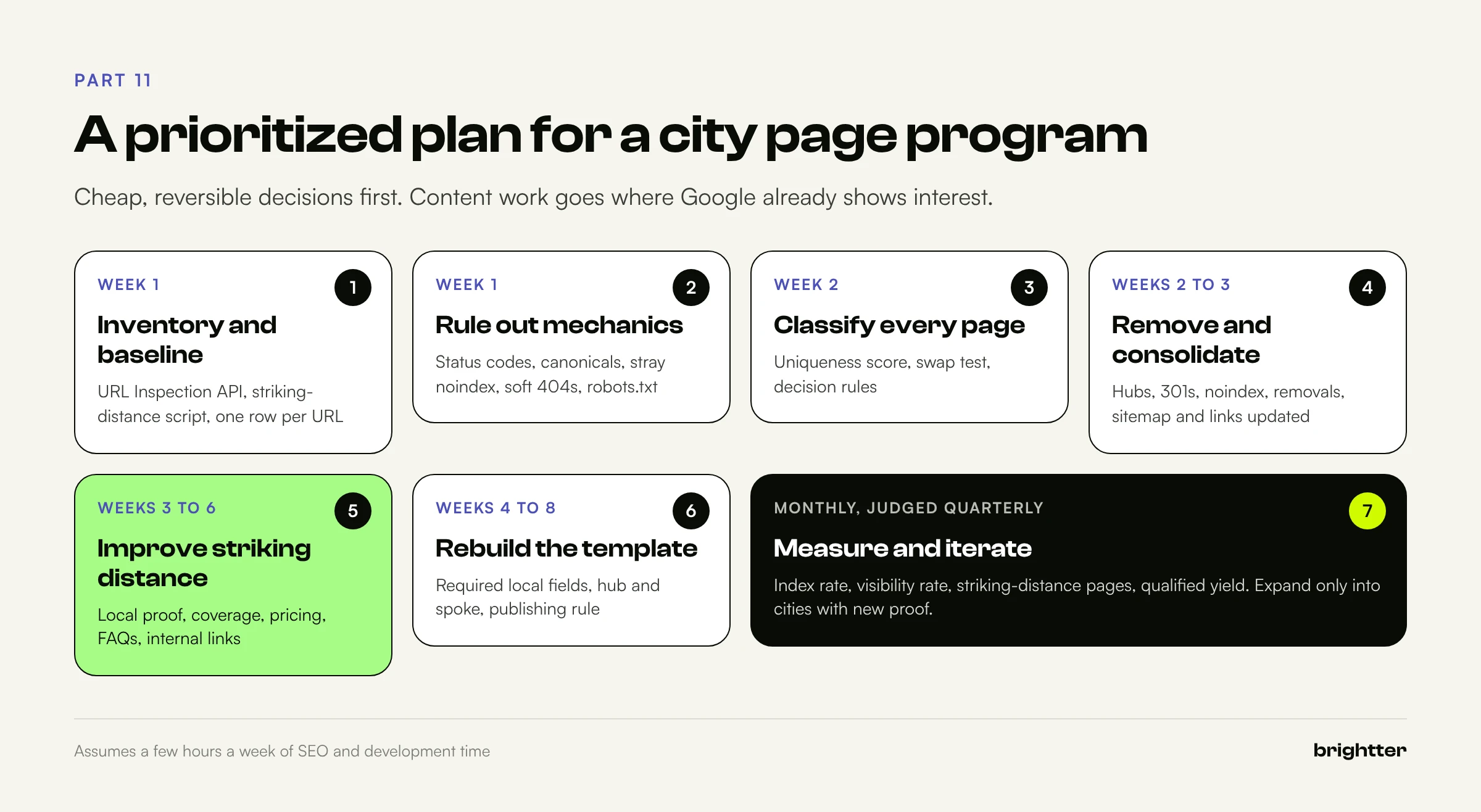
Part 11: A Prioritized Plan
This sequence assumes a few hours a week of SEO and development time, and front-loads the decisions that are cheap to make and easy to reverse.
Step 1: Inventory and baseline (week 1).
- Export every URL in the template from your CMS, with its publish date and the fields it has filled.
- Add a folder-level Search Console property or a template-specific sitemap.
- Run the URL Inspection script (Part 3) and the striking-distance script (Part 7).
- Join everything into one sheet: one row per URL, with index status, impressions, clicks, position, qualified conversions, backlinks, and internal link count.
Step 2: Rule out mechanical problems (week 1).
- Run the status and canonical check. Fix unintended redirects, wrong canonicals, stray
noindextags, and soft 404s. - Confirm the template isn't blocked in
robots.txtand its sitemap lists only canonical, indexable URLs.
Step 3: Classify every page (week 2).
- Run the uniqueness script (Part 2) and hand-check a sample with the swap test.
- Apply the Part 5 decision rules to every URL. Mark your striking-distance pages; on our own site, that list started with Chicago and Atlanta.
Step 4: Remove and consolidate (weeks 2 to 3).
- Build regional hubs with real regional content where you need consolidation targets.
- Add 301 redirects, then unpublish consolidated pages. Set
noindexon pages that serve users but not search. Remove the rest. - Update the sitemap and every internal link to changed URLs, and log the batch.
Step 5: Improve the striking-distance pages (weeks 3 to 6).
- Add the required content blocks from Part 8: local proof, coverage, pricing, and local FAQs.
- Align the title, H1, and intro with the queries each page already earns.
- Add contextual links from case studies, articles, and the national service page, plus
Servicestructured data.
Step 6: Rebuild the template and the publishing rule (weeks 4 to 8).
- Make the required local fields mandatory in the CMS collection.
- Replace footer link lists with hub and spoke navigation, breadcrumbs, and a selective related-locations module.
- Write the rule down: a city page gets built only when the business can fill its required fields with real local material.
Step 7: Measure and iterate (monthly, judged quarterly).
- Run the Part 10 scorecard monthly. Each quarter, promote improved pages that start earning and consolidate those that still don't.
- Expand only into cities where you have new proof.
Conclusion: Fewer Pages, Each One Worth Indexing
Programmatic SEO works when the program publishes real data at scale. It fails when it publishes the same page many times. Google's policies say this plainly: scaled content abuse is about value "no matter how it's created," doorway abuse is about pages "targeted at specific regions or cities that funnel users to one page," and core ranking now carries the helpful content signals that ask whether a page offers anything "beyond the obvious."
The numbers on many city page programs, including our own, say the same thing from the other direction. A handful of pages earn almost everything, and the rest sit in the index, or outside it, as evidence about the site.
The fix is not a trick. Measure each template's funnel. Find the pages Google is already willing to rank. Give them local proof and data that would be false anywhere else. Consolidate or remove the pages that can't get there. Then publish new pages only when you have something real to put on them.
Start with the striking-distance script this week. The list it produces is the shortest path from 200 pages that earn nothing to a set of pages that earn their place.
Need help with your programmatic pages? Brightter, Inc. runs technical SEO audits for programmatic and multi-location sites: template-level index analysis, uniqueness scoring, striking-distance targeting, and a page-by-page plan for improving, consolidating, or removing what isn't working. As a Webflow Certified Partner that also builds on WordPress and custom stacks, we implement the CMS changes, redirects, and content models ourselves, not just recommend them. Talk to our team about an audit.