.avif)
Edge SEO with Cloudflare Workers: Redirects, Headers, llms.txt, and IndexNow Without Touching Your CMS
Key Takeaways
- A Cloudflare Worker on a route runs in front of your origin and can change requests, response headers, and HTML before any crawler sees them. Nothing in the CMS changes, and nothing has to be republished.
- Pick the simplest redirect tool that fits. Single Redirects (10 to 300 rules per zone) handle patterns, Bulk Redirects handle static lists (10,000 URL redirects on Free up to 1,000,000 on Enterprise), and a Worker with a KV map handles anything that needs logic.
- Headers are the fastest fixes you can ship.
X-Robots-Tag,Linkheaders for canonicals and hreflang, andCache-Controlcan all be set at the edge, which matters on platforms like Webflow that don't expose response headers. - HTMLRewriter edits HTML as it streams, so a Worker can fix titles, duplicate canonicals, missing alt text, and JSON-LD in the server response. To Google and to HTML-only AI crawlers, that is server-rendered markup.
/robots.txt,/llms.txt,/llms-full.txt, and your IndexNow key file can all be served from a Worker. Google says it ignores llms.txt for Search, so treat it as low-cost guidance for other AI systems.- IndexNow reaches Bing, Yandex, Naver, Seznam.cz, Yep, and Amazon with one POST of up to 10,000 URLs. Google does not participate. A Worker that diffs your sitemap on publish automates it.
- The cloaking line is simple: same URL, same content, for users and bots. Edge title tests should bucket by page, never by visitor or user agent.
Introduction: When the CMS Says No
Every technical SEO has a list of fixes that are obviously right and practically impossible. A thousand legacy URLs that need 301s. A canonical the theme prints twice. A PDF that needs noindex on a platform with no header controls. JSON-LD for 400 location pages in a template another team owns. The usual answer is a ticket and a wait, and sometimes the answer is "the platform doesn't support that."
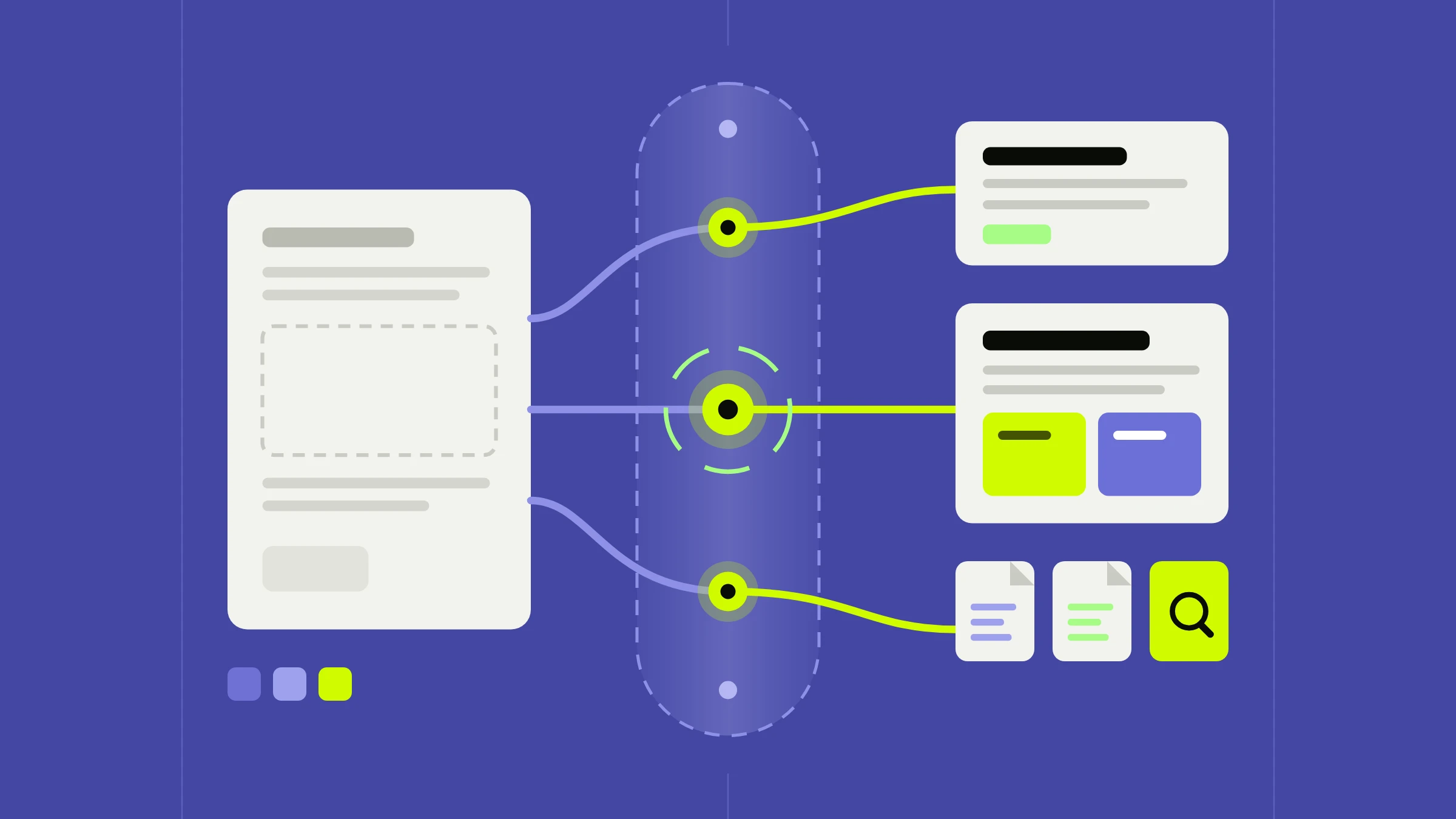
If your site is proxied through Cloudflare, there's a third option: ship the fix at the edge, in a Worker that sits between the origin and every visitor. It can answer a request directly (a redirect, a text file) or fetch the page from your origin and change headers, status codes, and HTML on the way out.
Edge SEO isn't new, but it matters more in 2026 for three reasons. First, as we covered in JavaScript SEO in 2026, most AI crawlers read only the HTML your server returns, so fixes made with client-side JavaScript are invisible to them while fixes in the HTTP response are not. Second, Cloudflare's redirect products, Transform Rules, HTMLRewriter, Workers KV, and Wrangler now have documented limits and a real local development loop. Third, hosted platforms have limits. Webflow publishes fast, server-rendered HTML, but it doesn't let you set custom response headers, recommends keeping native redirects to roughly 1,000, and supports llms.txt as a single uploaded file. As a Webflow Certified Partner, this is where we use edge fixes most.
Limits and API details below were checked against Cloudflare's and Google's documentation in October 2026; confirm them for your plan before designing around them.
Part 1: How a Worker Sits in Front of Your Origin
Routes and Custom Domains
Cloudflare offers two ways to attach a Worker to traffic:
| Routes | Custom Domains | |
|---|---|---|
| Meaning | The Worker runs in front of an existing origin | The Worker is the origin |
| DNS | A proxied (orange-cloud) record must already exist | Cloudflare creates the record and certificate |
fetch(request) | Goes on to the origin in your DNS | No origin unless you fetch one |
| Matching | URL patterns with a * wildcard | A whole hostname |
| Limit per zone | 1,000 routes | 100 custom domains |
For edge SEO on a CMS, you want routes. Cloudflare's matching rules affect SEO logic directly:
- The only operator is
*, matching zero or more of any character. No infix wildcards (example.com/*.jpg) and no query strings. - The most specific pattern wins, so
www.example.com/blog/*beats*example.com/*. - The path is case sensitive.
/Images/*and/images/*are different routes. - A route with no Worker attached negates less specific routes, a clean way to exclude a checkout flow from your SEO Worker.
The request and response flow
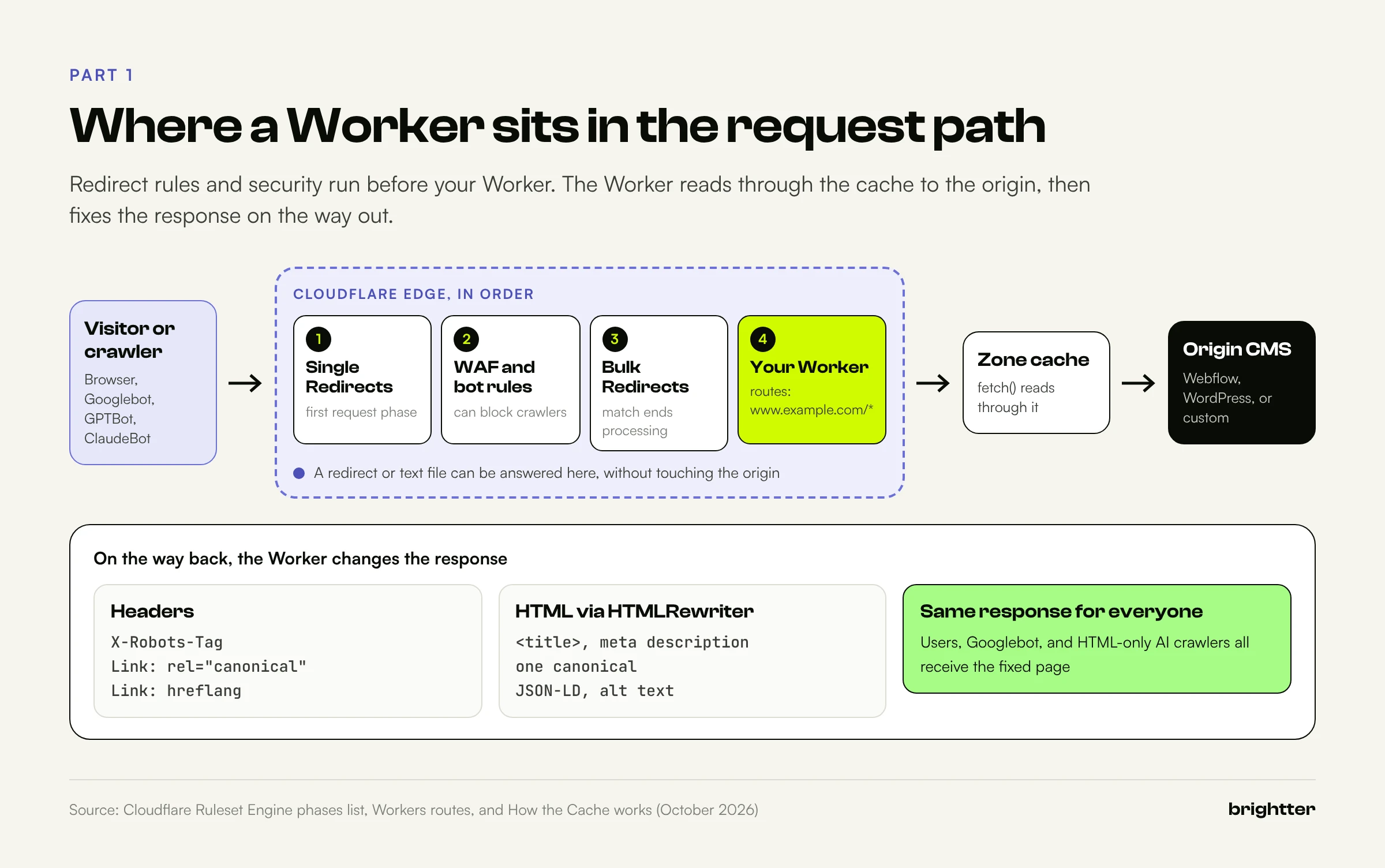
Cloudflare processes a request in phases. The ones that matter here, in order:
- Single Redirects run first, in the
http_request_dynamic_redirectphase. - URL normalization, URL Rewrite Rules, Configuration Rules, and Origin Rules.
- Security: DDoS protection, WAF custom and managed rules, rate limiting, and Super Bot Fight Mode.
- Bulk Redirects, in the
http_request_redirectphase. When one matches, Cloudflare performs no further processing. - Request header Transform Rules, Cache Rules, and Snippets, which Cloudflare notes "can modify incoming requests before they reach a Worker."
- Your Worker. Its
fetch(request)subrequest reads through the zone cache and, on a miss, reaches the origin.
Three consequences follow. A matching redirect rule answers before your Worker runs, so delete old rules when you move logic into code. WAF and bot settings apply first, so a rule that challenges AI crawlers means your fixed HTML never reaches them. And Workers run in front of the cache; Cloudflare's documentation says they "run before the cache but can also be utilized to modify assets once they are returned from the cache," which is what makes rewriting cheap.
One runtime detail matters for redirects: the incoming request has redirect mode manual, so when the origin returns a 301, fetch(request) hands it back unchanged instead of following it.
Webflow as the origin
Webflow hosting runs on Cloudflare, and sites created after April 21, 2025 are already on its network. To put your own zone (with your Workers, WAF rules, and redirects) in front, Webflow documents Orange-to-Orange (O2O): a paid Webflow Site plan, your domain on a Cloudflare zone (the Free plan works), and proxied CNAME records to cdn.webflow.com for the root and www.
Cloudflare's O2O compatibility table lists Workers as supported on the customer zone, with a caution that Workers matching the O2O hostname "may block or interfere with the flow of visitors." It also says caching on the customer zone is "generally discouraged (especially for HTML)," because the provider caches on its side. Our own HTML responses on brightter.com show cf-cache-status: DYNAMIC on our zone and a separate O2O cache status from Webflow. The rule: let Webflow cache HTML, and let your Worker transform it.
One more Webflow specific: uploaded images and PDFs are served from Webflow's asset CDN (cdn.prod.website-files.com), not your domain, so a Worker on www.example.com/* can't add headers to them.
Limits that shape the design
| Limit | Workers Free | Workers Paid |
|---|---|---|
| Requests | 100,000 per day | No limit |
| CPU time per HTTP request | 10 ms | 30 seconds default, up to 5 minutes |
| Subrequests per request | 50 | 10,000 by default |
| Worker size | 64 MiB uncompressed | 64 MiB uncompressed |
| Global scope startup time | 1 second | 1 second |
| Cron Triggers per account | 5 | 250 |
CPU time excludes waiting on fetch() and KV, and Cloudflare says the average Worker uses about 2.2 ms per request, so streaming rewrites usually fit even the Free plan. The bigger issue is the daily cap: each route has a fail open or fail closed setting. Fail open means that past 100,000 requests, visitors get the unmodified origin page and your fixes silently disappear until midnight UTC. Production SEO logic belongs on the Paid plan.
Part 2: Redirects at the Edge
Redirects are the most common reason teams reach for the edge. Cloudflare gives you three ways to do them, and choosing well saves you from maintaining code you don't need.
Option 1: Single Redirects
Single Redirects are zone-level rules with a filter expression and a target. They can be static or dynamic, where the target is built from parts of the original request using a wildcard-based interface, so one rule can move a whole directory.
| Plan | Rules per zone | Wildcard | Regex |
|---|---|---|---|
| Free | 10 | Yes | No |
| Pro | 25 | Yes | No |
| Business | 50 | Yes | Yes |
| Enterprise | 300 | Yes | Yes |
Use them for patterns: forcing www, moving /blog/* to /articles/*, or retiring a subdomain.
Option 2: Bulk Redirects
Bulk Redirects are account-level and built for long static lists: a Bulk Redirect List of source and target URLs, enabled by a Bulk Redirect Rule. No regex or string replacement, which is why they scale.
| Plan (highest on the account) | Rules | Lists | URL redirects across lists |
|---|---|---|---|
| Free | 15 | 5 | 10,000 |
| Pro | 15 | 5 | 25,000 |
| Business | 15 | 5 | 50,000 |
| Enterprise | 50 | 25 | 1,000,000 |
The per-redirect defaults deserve attention:
- Status code defaults to 301; 302, 307, and 308 are also allowed.
- Preserve query string defaults to false, so
/old?utm_source=newsletterloses its campaign parameters unless you turn it on. - Subpath matching defaults to false. When enabled,
/docs/also matches/docs/setup/install, and preserve path suffix (default true) carries the remainder to the target. - Include subdomains defaults to false.
When several redirects match, the most specific path wins and an exact hostname beats an "include subdomains" match. Lists can be managed in the dashboard or the Lists API. Whatever you use, validate the list first. This script refuses to upload a CSV containing chains or loops:
# bulk_redirects.py: refuse chains and loops, then upload to a Bulk Redirect List
# CSV columns: source,target,status  |  Usage: python3 bulk_redirects.py redirects.csv <list_id>
import csv, json, os, sys, urllib.request
from urllib.parse import urlsplit

def key(u):  # compare without scheme and trailing slash
    p = urlsplit(u if "://" in u else "https://" + u)
    return (p.netloc + p.path).rstrip("/").lower()

rows = [(r["source"].strip(), r["target"].strip(), int(r.get("status") or 301))
        for r in csv.DictReader(open(sys.argv[1], newline="", encoding="utf-8"))]
targets = {key(s): d for s, d, _ in rows}
problems = []
for s, d, _ in rows:
    seen, cur = {key(s)}, key(d)
    while cur in targets:  # the target is itself redirected
        if cur in seen:
            problems.append(f"loop: {s}")
            break
        seen.add(cur)
        cur = key(targets[cur])
    else:
        if len(seen) > 1:
            problems.append(f"chain: {s} -> ... -> {cur}")
if problems:
    sys.exit("\n".join(problems + ["point every source straight at its final target"]))

url = (f"https://api.cloudflare.com/client/v4/accounts/{os.environ['CF_ACCOUNT_ID']}"
       f"/rules/lists/{sys.argv[2]}/items")
items = [{"redirect": {"source_url": s, "target_url": d, "status_code": st,
                       "preserve_query_string": True}} for s, d, st in rows]
for i in range(0, len(items), 1000):
    req = urllib.request.Request(url, data=json.dumps(items[i:i + 1000]).encode(), method="POST",
          headers={"Authorization": f"Bearer {os.environ['CF_API_TOKEN']}",
                   "Content-Type": "application/json"})
    print(json.load(urllib.request.urlopen(req))["result"])  # an operation_id to poll
The upload is asynchronous: poll the returned operation_id before assuming the list is live.
Option 3: A Worker with a KV redirect map
When a redirect depends on a lookup, a computed slug, or data a non-engineer edits, use a Worker with Workers KV, keyed by normalized path:
type Redirect = { to: string; status?: 301 | 302 | 307 | 308 };

function normalizePath(pathname: string): string {
  const p = pathname.toLowerCase().replace(/\/{2,}/g, "/");
  return p.length > 1 ? p.replace(/\/+$/, "") : p;
}

async function findRedirect(request: Request, url: URL, env: Env): Promise<Response | null> {
  if (request.method !== "GET" && request.method !== "HEAD") return null;
  const key = normalizePath(url.pathname);
  const hit = await env.REDIRECTS.get<Redirect>(key, { type: "json", cacheTtl: 300 });
  if (hit) {
    const target = new URL(hit.to, url);
    if (!target.search) target.search = url.search; // keep campaign parameters
    return Response.redirect(target.toString(), hit.status ?? 301);
  }
  // Normalize case, duplicate slashes, and trailing slashes in one hop
  if (key !== url.pathname) {
    const target = new URL(url);
    target.pathname = key;
    return Response.redirect(target.toString(), 301);
  }
  return null;
}
The map lookup runs before normalization, so /Old-Page/ reaches its final target in one hop, not two. Normalization assumes lowercase slugs without trailing slashes, which is how Webflow publishes. If your origin adds trailing slashes, the Worker and origin will bounce crawlers between two URLs forever, so check first.
wrangler kv bulk put loads a JSON array of {"key", "value"} objects, up to 10,000 pairs per request:
npx wrangler kv namespace create REDIRECTS
npx wrangler kv bulk put redirects.json --binding REDIRECTS --remote
Know KV's consistency model. Cloudflare describes it as eventually consistent: other locations may take up to 60 seconds or more to see a write, and negative lookups are cached too, so a new redirect can take as long to appear as an edited one. cacheTtl (minimum 30 seconds, default 60) trades freshness for fewer cold reads. The Free plan allows 100,000 KV reads per day, and this design reads KV on every page request, so busy sites need the Paid plan. If the map only changes with releases, bundle it as a JSON import instead: no reads, no delay, but every change is a deploy.
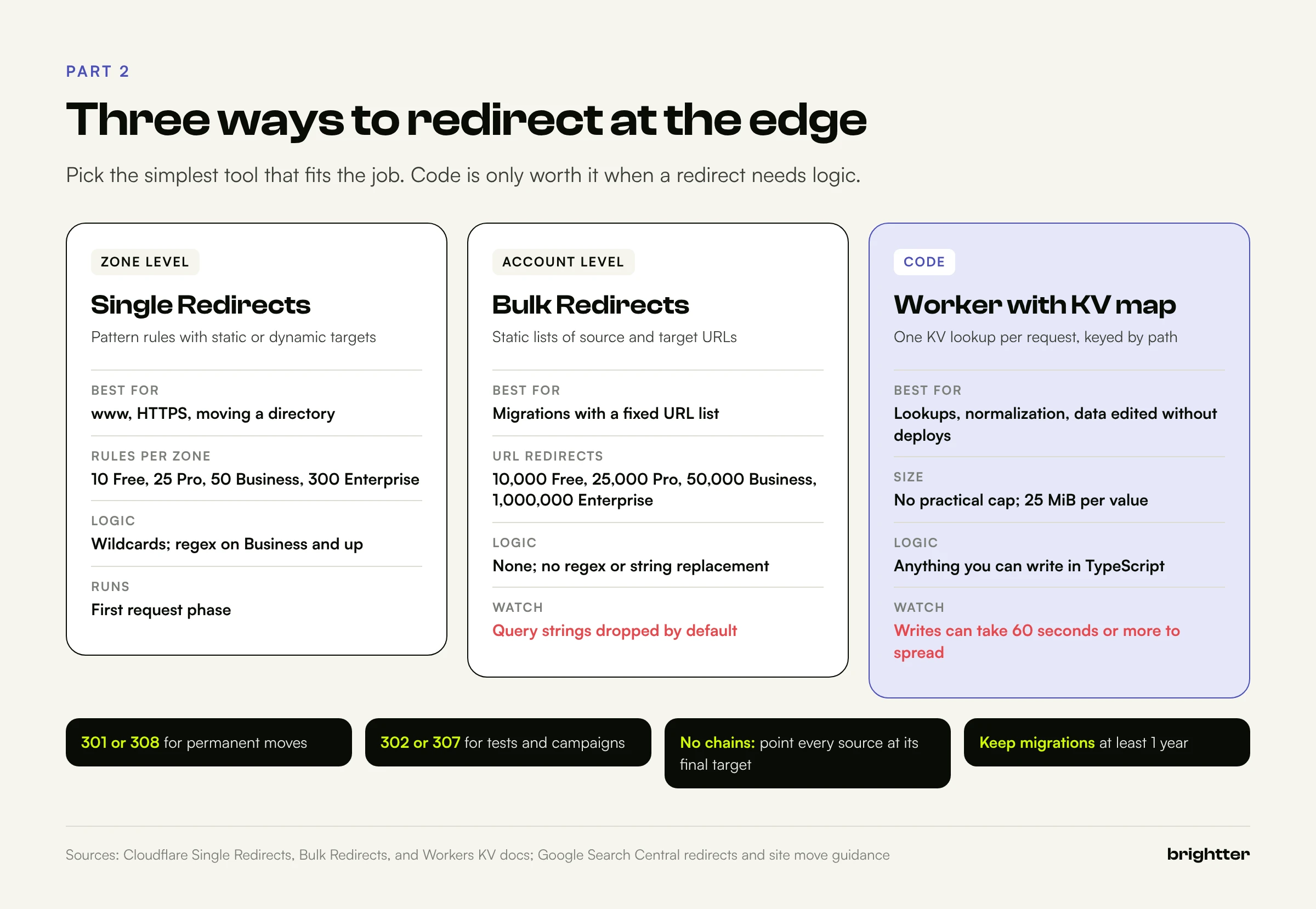
Which tool to use
| Situation | Best tool |
|---|---|
Force www, move a directory, retire a subdomain | Single Redirects |
| Migration with a fixed list of old and new URLs | Bulk Redirects |
| More entries than your plan allows | Higher plan, or Worker with KV |
| Redirects that need logic (lookups, computed slugs, normalization) | Worker with KV |
| Fewer than about 1,000 simple redirects on Webflow | Webflow's native 301 settings |
Webflow's redirects support (.*) capture groups referenced as %1, %2, and run in creation order, but each rule is added to the site's manifest file, so Webflow recommends roughly 1,000 at most. Above that, the edge is the better home.
Redirect hygiene
Google's documentation sets the rules regardless of tool:
- 301 and 308 are permanent and signal the target should be canonical. 302, 303, and 307 are temporary and don't.
- Avoid chains. Googlebot follows up to 10 hops, but Google recommends pointing every source straight at its final destination.
- Keep migration redirects "for as long as possible, generally at least 1 year," in Google's words.
- Preserve query strings deliberately, and update internal links anyway. A redirect is a safety net, not a substitute for the right link.
Part 3: SEO Headers at the Edge
Headers apply to any file type, are read before the body, and on many hosted platforms can't be edited. At the edge, they're a few lines of code.
X-Robots-Tag
X-Robots-Tag carries robots meta rules in the HTTP response, so it works on PDFs, images, and feeds. Google documents these forms:
X-Robots-Tag: noindex
X-Robots-Tag: unavailable_after: 25 Jun 2010 15:00:00 PST
X-Robots-Tag: googlebot: nofollow
X-Robots-Tag: otherbot: noindex, nofollow
Rules without a user agent prefix apply to all crawlers, and when rules conflict, Google applies the more restrictive one. The critical caveat: Google says these rules "can be read and followed only if crawlers are allowed to access the pages." Block a URL in robots.txt and its noindex is never seen, so the URL can still be indexed from links. That's the classic staging mistake, and why the staging robots.txt in our Worker stays crawlable while every staging response carries noindex, nofollow.
Good edge uses: noindex, nofollow on staging and preview hosts by environment, noindex, follow on internal search paths, unavailable_after on expiring pages, and noindex on machine-facing text files. We send X-Robots-Tag: noindex on /llms.txt and /llms-full.txt on brightter.com so they're available to systems that request them without appearing as search results.
Canonical and hreflang Link headers
Google supports rel="canonical" in a Link header for non-HTML documents such as PDFs:
Link: <https://www.example.com/downloads/white-paper.pdf>; rel="canonical"Use absolute URLs, and don't declare canonicals in more than one way. Google calls combining the header and the HTML element "more error prone." For HTML pages, fix the <link rel="canonical"> element (Part 4) instead of adding a header beside it.
For hreflang, Google accepts HTML elements, HTTP headers, and sitemaps, and says the three methods "are equivalent from Google's perspective." Pick one per resource. The header form is the only option for files:
Link: <https://example.com/file.pdf>; rel="alternate"; hreflang="en",
      <https://example.com/de/file.pdf>; rel="alternate"; hreflang="de"
Add an x-default entry when you have a fallback version. Webflow Localization already adds hreflang to each page's <head> and to the auto-generated sitemap, so use the edge for what Webflow doesn't annotate, such as localized PDFs served from your hostname.
Cache-Control
Cache headers shape how quickly crawlers and users get fresh content. Text files that change with releases can carry Cache-Control: public, max-age=3600, which is what our llms.txt Worker sends. Leave HTML caching to the origin, especially on Webflow (Part 8).
Transform Rules or a Worker?
For static header changes, Response Header Transform Rules are enough, and Cloudflare's Crawler Hints documentation suggests one for adding X-Robots-Tag: noindex. Active Transform Rules are limited to 10 on Free, 25 on Pro, 50 on Business, and 300 on Enterprise. Use a Worker when values depend on data, such as a canonical or hreflang map per file:
// SEO headers for files the CMS cannot annotate
const HREFLANG: Record<string, Record<string, string>> = {
  "/files/pricing-guide.pdf": {
    en: "https://www.example.com/files/pricing-guide.pdf",
    de: "https://www.example.com/de/files/preisleitfaden.pdf",
    "x-default": "https://www.example.com/files/pricing-guide.pdf",
  },
};

const CANONICAL: Record<string, string> = {
  "/files/pricing-guide-print.pdf": "https://www.example.com/files/pricing-guide.pdf",
};

export default {
  async fetch(request): Promise<Response> {
    const url = new URL(request.url);
    const origin = await fetch(request);
    const response = new Response(origin.body, origin);
    const h = response.headers;

    const canonical = CANONICAL[url.pathname];
    if (canonical) h.append("link", `<${canonical}>; rel="canonical"`);

    const alternates = HREFLANG[url.pathname];
    if (alternates) {
      const value = Object.entries(alternates)
        .map(([lang, href]) => `<${href}>; rel="alternate"; hreflang="${lang}"`)
        .join(", ");
      h.append("link", value);
    }

    if (url.pathname.startsWith("/files/internal/")) h.set("x-robots-tag", "noindex, nofollow");
    if (url.pathname.endsWith(".pdf")) h.set("cache-control", "public, max-age=86400");
    return response;
  },
} satisfies ExportedHandler;
Headers on a fetched response are immutable, so new Response(origin.body, origin) copies it (streaming the body, not buffering it) first. Use append, not set, for Link: origins often send Link headers for preloading (Webflow HTML responses include rel=preconnect and rel=preload entries), and overwriting them breaks performance hints.
Part 4: Rewriting HTML with HTMLRewriter
The problems technical SEOs find most often live in the HTML: a badly generated title, a canonical printed twice, empty alt attributes, missing structured data. HTMLRewriter, the Workers runtime's streaming HTML parser, fixes them without the CMS.
How it works
Register handlers with .on(selector, handler) and .onDocument(handler), then call .transform(response). Cloudflare describes the parser as zero-copy streaming: the page is never fully buffered, so time to first byte stays close to the origin's.
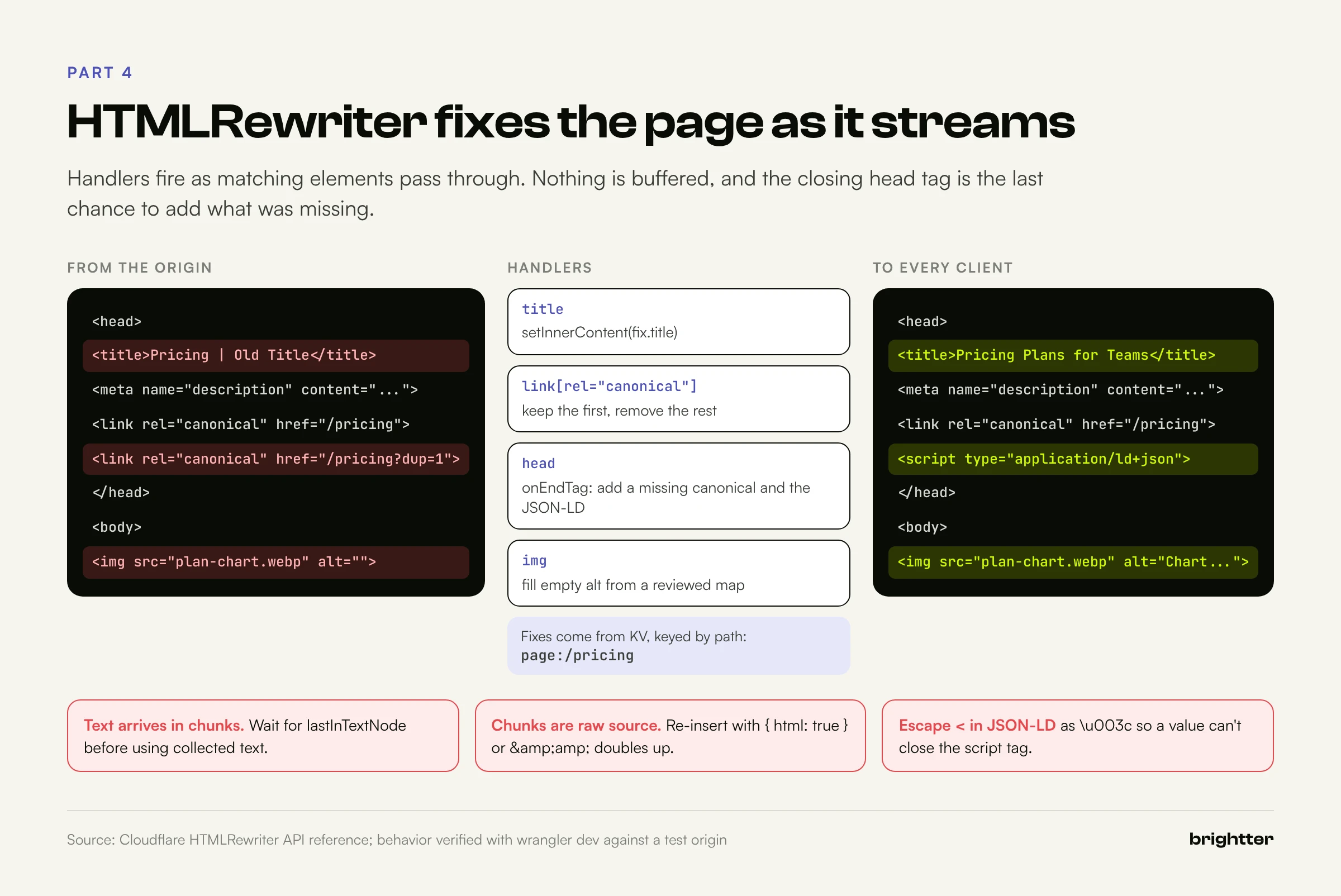
Elements support getAttribute, setAttribute, removeAttribute, before, after, prepend, append, replace, setInnerContent, remove, and onEndTag. Insertion methods take an optional { html: true } flag; without it, content is escaped as text. Selectors include type, class, and ID, attribute operators (=, ~=, ^=, $=, *=, |=), :nth-child, :first-of-type, :not(), and descendant and child combinators.
Two behaviors cause most bugs:
- Text arrives in chunks. Cloudflare warns that "text chunks are not the same thing as text nodes." Use
lastInTextNodeto know when a node is complete. - Chunks contain raw source text, entities included. Collect
Pricing & Plansand re-insert it as text, and it becomes&amp;. We hit exactly this testing the title experiment in Part 7. Re-insert source text with{ html: true }; insert your own plain strings without it.
Fixing metadata, canonicals, and alt text
The pattern is "fix what exists, add what's missing." Handlers run in document order, so you can track what you've seen and use the </head> end tag to insert anything never found:
type PageFix = {
title?: string;
description?: string;
canonical?: string;
robots?: string;
jsonld?: object[];
alts?: Record<string, string>; // image file name -> alt text
};
const escapeAttr = (s: string) =>
s.replace(/&/g, "&").replace(/"/g, """).replace(/</g, "<").replace(/>/g, ">");
const safeJson = (o: object) => JSON.stringify(o).replace(/</g, "\\u003c");
function rewriteHtml(res: Response, url: URL, env: Env, fix: PageFix | null): Response {
let hasCanonical = false;
let hasDescription = false;
const selfCanonical = `https://${env.CANONICAL_HOST}${url.pathname}`;
return new HTMLRewriter()
.on("title", {
element(el) {
if (fix?.title) el.setInnerContent(fix.title);
},
})
.on('meta[name="description"]', {
element(el) {
hasDescription = true;
if (fix?.description) el.setAttribute("content", fix.description);
},
})
.on('meta[name="robots"]', {
element(el) {
if (fix?.robots) el.setAttribute("content", fix.robots);
},
})
.on('link[rel="canonical"]', {
element(el) {
if (hasCanonical) {
el.remove(); // keep exactly one canonical
return;
}
hasCanonical = true;
if (fix?.canonical) el.setAttribute("href", fix.canonical);
},
})
.on("img", {
element(el) {
const current = el.getAttribute("alt");
if (current && current.trim()) return; // never overwrite real alt text
const file = (el.getAttribute("src") ?? "").split("?")[0].split("/").pop() ?? "";
const alt = fix?.alts?.[file];
if (alt) el.setAttribute("alt", alt);
},
})
.on("head", {
element(el) {
el.onEndTag((end) => {
if (!hasCanonical) {
const href = fix?.canonical ?? selfCanonical;
end.before(`<link rel="canonical" href="${escapeAttr(href)}">`, { html: true });
}
if (!hasDescription && fix?.description) {
end.before(`<meta name="description" content="${escapeAttr(fix.description)}">`, { html: true });
}
for (const block of fix?.jsonld ?? []) {
end.before(`<script type="application/ld+json">${safeJson(block)}</script>`, { html: true });
}
});
},
})
.transform(res);
}Page fixes live in KV, keyed by path, so an SEO lead can change a title or add structured data without a deploy:
npx wrangler kv key put "page:/pricing" \
  '{"title":"Pricing Plans for Teams | Example Co","alts":{"plan-chart.webp":"Chart comparing plan limits"}}' \
  --binding SEO --remote
Run locally against a test page with two canonicals, an outdated title, and an image with alt="", this Worker returned one canonical, the new title, the new alt text, and the JSON-LD, all in the HTML.
JSON-LD and alt text, safely
JSON-LD injected this way is server-side to every crawler, which matters because HTML-only AI fetchers don't run the tag manager scripts that usually inject it. Two rules are built in. Escape < inside the JSON: a value containing </script> would close the element early, and in our test it came through as \u003c/script>. And mirror the facts in visible content, since Google expects markup to describe what's on the page. Google's 2026 guide to AI features in Search also says structured data "isn't required for generative AI search," while it still helps rich result eligibility. Our guide to how AI engines decide what to cite explains why visible, consistent facts matter more than markup.
For alt text, the handler never overwrites existing alt text and only fills an empty one when a human-reviewed mapping exists. An empty alt="" can be an intentional decorative image, and unreviewed machine-generated alt text ships inaccurate descriptions to screen reader users.
Finally, rewrite only 200 text/html responses to GET requests, never vary the rewrite by who is asking (Part 7), and keep every override in a reviewed register (Part 10).
Part 5: Serving robots.txt, llms.txt, and llms-full.txt from a Worker
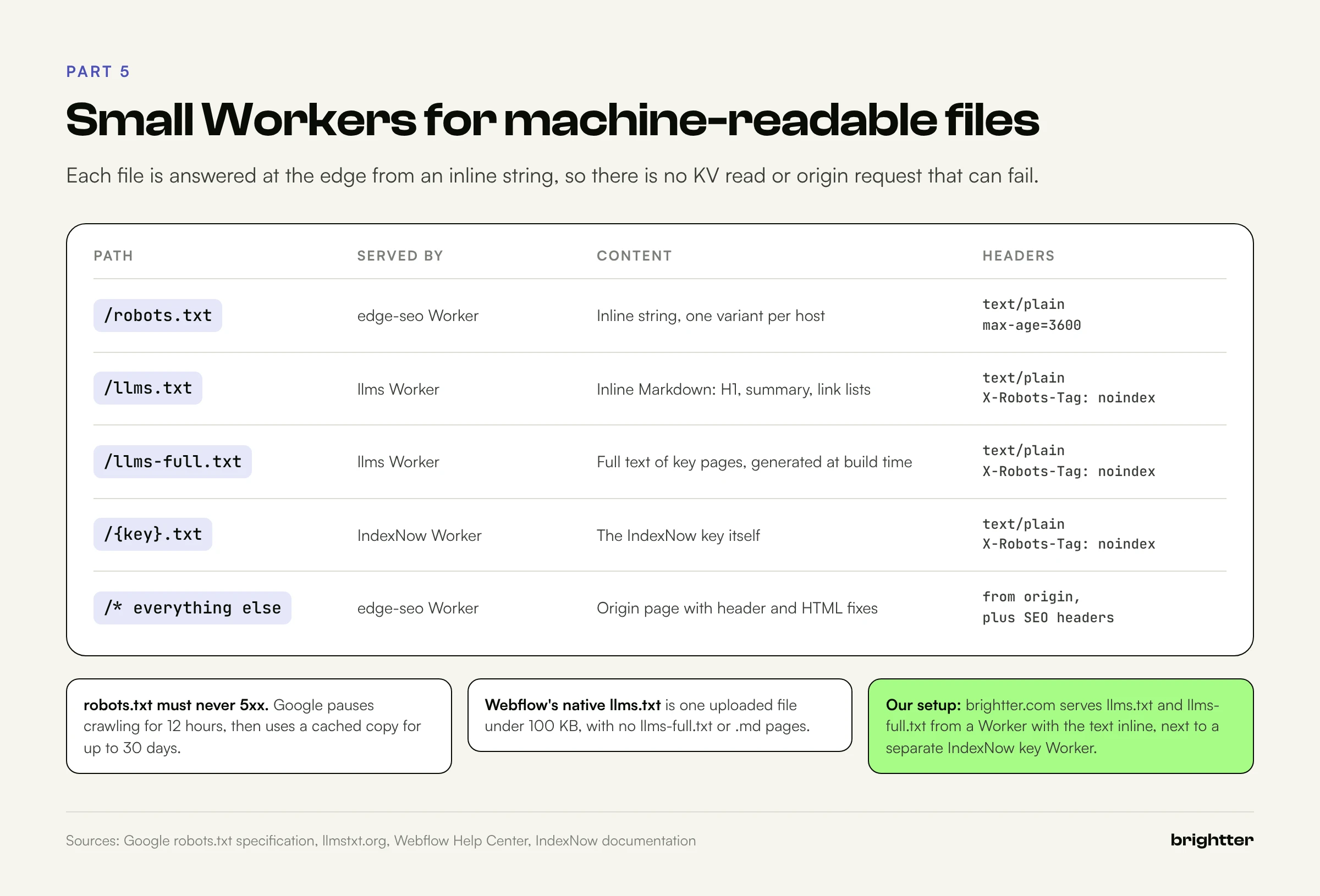
Text files at fixed paths are the easiest thing to serve from the edge: match the path, return a response, never call the origin.
robots.txt variants
Most CMSs, Webflow included, let you edit robots.txt. The edge earns its place when you need different files per host, or want the file versioned like code. Google's rules set the constraints:
- Rules apply only to the protocol, host, and port that serve the file, so staging and production need separate files.
- Google enforces a 500 KiB limit and generally caches the file for up to 24 hours.
- A 4xx (other than 429) means "no restrictions." A 5xx makes Google stop crawling the site for the first 12 hours, then fall back to the last good copy for up to 30 days.
That last rule is why robots.txt should be served from an inline string with no dependency on KV or the origin. An edge bug that makes it return a 500 is a site-wide crawl outage.
What llms.txt is, and isn't
The /llms.txt proposal was published by Jeremy Howard on September 3, 2024, and is maintained at llmstxt.org. It's Markdown in a fixed order: an H1 with the site name (the only required part), a blockquote summary, optional detail without headings, H2 sections of Markdown links with optional notes, and an "Optional" H2 for links an agent can skip. The spec also proposes .md versions of pages. llms-full.txt is not in the spec; it's a convention for one file containing the full text of key pages.
On value: Google's May 2026 guide, "Optimizing your website for generative AI features on Google Search," says: "You don't need to create new machine readable files, AI text files, markup, or Markdown to appear in Google Search," and that Search ignores them. Separately, Lighthouse's agentic browsing category audits llms.txt, flagging pages when fetching it causes a server error and marking a missing file not applicable. So llms.txt has no role in Google ranking, browser agents may read it, and it must never return a 5xx.
Webflow supports llms.txt natively: upload a UTF-8 file under 100 KB in Site settings > SEO > LLMs.txt. Webflow says the support is "intentionally scoped to the llms.txt file itself," so there's no llms-full.txt and no .md variants. For those, or for a file generated at build time and versioned in git, use the edge.
Our setup on brightter.com
Our site runs on Webflow behind our Cloudflare zone. A Worker named brightter-llms serves /llms.txt and /llms-full.txt with the text embedded inline, so serving them needs no KV read or origin request. Responses are text/plain; charset=utf-8 with Cache-Control: public, max-age=3600 and X-Robots-Tag: noindex. A separate small Worker serves the IndexNow key file. Each Worker has one job and its own route, so each fails and rolls back independently.
The main Worker in this guide follows the same pattern:
const ROBOTS_PRODUCTION = `User-agent: *
Allow: /
Disallow: /search
Disallow: /checkout

Sitemap: https://www.example.com/sitemap.xml
`;

const ROBOTS_STAGING = `User-agent: *
Allow: /
`; // staging stays crawlable so the X-Robots-Tag noindex header can be seen

const LLMS_TXT = `# Example Co

> Example Co is a B2B analytics company. This file lists the pages that best describe what we do.

## Product
- [Platform overview](https://www.example.com/platform): What the product does and who it is for
- [Pricing](https://www.example.com/pricing): Plans, limits, and billing terms

## Optional
- [Blog](https://www.example.com/blog): Articles and release notes
`;

const LLMS_FULL_TXT = `# Example Co

> Full plain-text reference for AI systems. Generated from the CMS on each release.

## Platform overview
Example Co collects product usage data and turns it into weekly reports...
`;

function textResponse(body: string, extra: Record<string, string> = {}): Response {
  return new Response(body, {
    headers: {
      "content-type": "text/plain; charset=utf-8",
      "cache-control": "public, max-age=3600",
      ...extra,
    },
  });
}

function serveTextFile(url: URL, env: Env): Response | null {
  switch (url.pathname) {
    case "/robots.txt":
      return textResponse(env.ENVIRONMENT === "production" ? ROBOTS_PRODUCTION : ROBOTS_STAGING);
    case "/llms.txt":
      return textResponse(LLMS_TXT, { "x-robots-tag": "noindex" });
    case "/llms-full.txt":
      return textResponse(LLMS_FULL_TXT, { "x-robots-tag": "noindex" });
    default:
      return null;
  }
}
Generate llms-full.txt at build time: a short script that pulls published items from the CMS API, strips them to clean text, and writes the string into the Worker source before wrangler deploy.
Markdown for Agents
Cloudflare's Markdown for Agents setting (Pro, Business, and Enterprise) converts HTML to Markdown when a client sends Accept: text/markdown. It adds Accept to Vary so caches keep both versions, keeps JSON-LD as a fenced block, and builds front matter from the title, description, and Open Graph tags. If your origin sends no Content-Signal header, Cloudflare adds one allowing AI training, search, and AI input, so set your own if you want a different policy. This is content negotiation, not cloaking: same URL, same content, different format chosen by an explicit header.
Part 6: IndexNow from the Edge
IndexNow lets you tell search engines a URL changed instead of waiting for a recrawl.
The protocol
- Key: 8 to 128 characters (letters, numbers, dashes), verified by a UTF-8 file named
{key}.txtat the host root, or at akeyLocationyou specify (which then only covers URLs under that directory). - Requests:
GET /indexnow?url=...&key=...for one URL, or a JSONPOSTwithhost,key,keyLocation, andurlListfor up to 10,000 URLs. - Responses: 200 (submitted), 202 (key validation pending), 400 (bad format), 403 (invalid key), 422 (URLs don't match the host or key), 429 (too many requests).
Participating engines are Amazon, Bing, Naver, Seznam.cz, Yandex, and Yep, and a submission to any endpoint, including api.indexnow.org, is shared with all of them. Google is not a participant; sitemaps with accurate lastmod values remain its discovery mechanism. IndexNow's FAQ says submission "does not guarantee immediate indexing," asks you to submit added, meaningfully updated, deleted, and redirected URLs, and to avoid resubmitting the same URL many times a day or backfilling old changes.
Crawler Hints, or build it
Cloudflare's Crawler Hints, available on every plan, sends IndexNow notifications for you, using cache misses as a signal that content likely changed. It's one toggle, but cache misses happen for many reasons besides edits, and on an O2O Webflow setup where HTML isn't cached on your zone, the signal is weaker. If you want notifications exactly on publish, for exactly the URLs that changed, build it:
- Webflow sends a
site_publishwebhook to the Worker. - The Worker verifies the signature, answers immediately, and continues with
ctx.waitUntil(), which can extend execution up to 30 seconds after the response. - It fetches the sitemap, compares each URL's
lastmodwith the copy in KV, and collects new, changed, and removed URLs. - It POSTs them to
api.indexnow.organd advances its stored state only on success. - A Cron Trigger runs the same sync every six hours as a safety net.
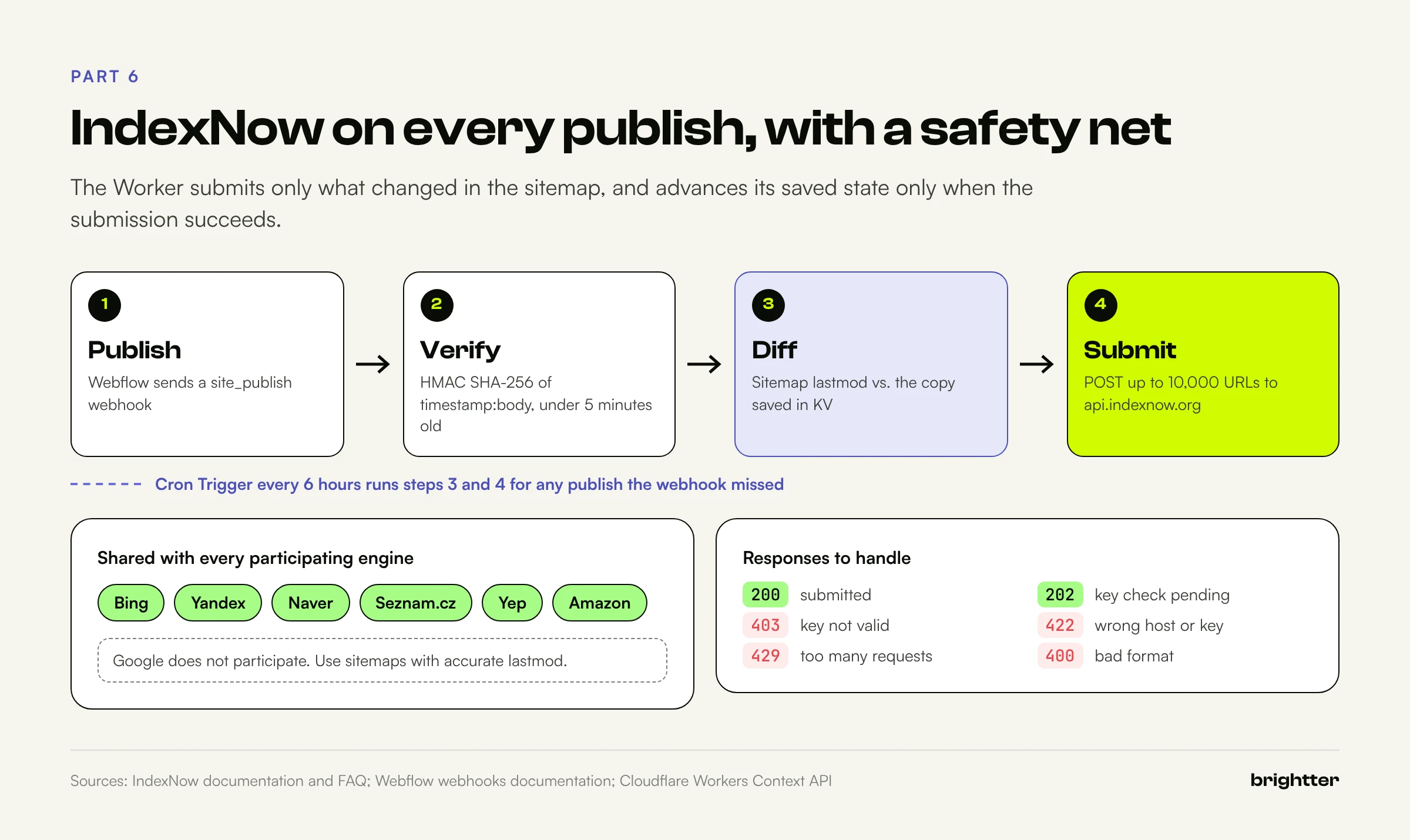
Webflow's sitemap includes lastmod for every URL, which makes the diff reliable. Webflow signs webhooks with an HMAC SHA-256 of timestamp:body in x-webflow-signature, with the time in x-webflow-timestamp, and recommends rejecting anything older than five minutes. Only webhooks created through the API are signed, so create this one with the Webflow Data API.
// indexnow: serves the key file and submits changed sitemap URLs to IndexNow
export interface Env {
STATE: KVNamespace; // stores the last seen sitemap (url -> lastmod)
INDEXNOW_KEY: string; // 8 to 128 characters: a-z, A-Z, 0-9, and dashes
WEBFLOW_WEBHOOK_SECRET: string; // secret from the API-created site_publish webhook
SITE_HOST: string; // e.g. "www.example.com"
SITEMAP_URL: string; // e.g. "https://www.example.com/sitemap.xml"
INDEXNOW_ENDPOINT: string; // "https://api.indexnow.org/indexnow"
}
type SitemapState = Record<string, string>; // url -> lastmod
async function readSitemap(env: Env): Promise<SitemapState> {
const res = await fetch(env.SITEMAP_URL, { headers: { "cache-control": "no-cache" } });
if (!res.ok) throw new Error(`sitemap ${res.status}`);
const xml = await res.text();
const state: SitemapState = {};
for (const block of xml.match(/<url>[\s\S]*?<\/url>/g) ?? []) {
const loc = block.match(/<loc>\s*([^<\s]+)\s*<\/loc>/)?.[1];
const lastmod = block.match(/<lastmod>\s*([^<\s]+)\s*<\/lastmod>/)?.[1] ?? "";
if (loc) state[loc.replace(/&/g, "&")] = lastmod;
}
return state;
}
async function submit(env: Env, urls: string[]): Promise<number[]> {
const statuses: number[] = [];
for (let i = 0; i < urls.length; i += 10000) { // protocol limit: 10,000 URLs per POST
const res = await fetch(env.INDEXNOW_ENDPOINT, {
method: "POST",
headers: { "content-type": "application/json; charset=utf-8" },
body: JSON.stringify({
host: env.SITE_HOST,
key: env.INDEXNOW_KEY,
keyLocation: `https://${env.SITE_HOST}/${env.INDEXNOW_KEY}.txt`,
urlList: urls.slice(i, i + 10000),
}),
});
statuses.push(res.status); // 200 or 202 is success; 403 bad key; 422 wrong host; 429 slow down
}
return statuses;
}
async function syncSitemap(env: Env): Promise<{ changed: number; removed: number; statuses: number[] }> {
const current = await readSitemap(env);
const previous = (await env.STATE.get<SitemapState>("sitemap", "json")) ?? null;
if (!previous) {
// First run: record a baseline instead of pinging every URL on the site
await env.STATE.put("sitemap", JSON.stringify(current));
return { changed: 0, removed: 0, statuses: [] };
}
const changed = Object.keys(current).filter((u) => previous[u] !== current[u]);
const removed = Object.keys(previous).filter((u) => !(u in current)); // now 404, 410, or redirected
const urls = [...changed, ...removed];
const statuses = urls.length ? await submit(env, urls) : [];
if (statuses.every((s) => s === 200 || s === 202)) {
await env.STATE.put("sitemap", JSON.stringify(current)); // only advance state on success
}
console.log(JSON.stringify({ changed: changed.length, removed: removed.length, statuses }));
return { changed: changed.length, removed: removed.length, statuses };
}
const hex = (buf: ArrayBuffer) => [...new Uint8Array(buf)].map((b) => b.toString(16).padStart(2, "0")).join("");
async function validWebflowSignature(request: Request, body: string, secret: string): Promise<boolean> {
const timestamp = request.headers.get("x-webflow-timestamp") ?? "";
const signature = request.headers.get("x-webflow-signature") ?? "";
if (!timestamp || !signature || Math.abs(Date.now() - Number(timestamp)) > 300_000) return false;
const key = await crypto.subtle.importKey(
"raw", new TextEncoder().encode(secret), { name: "HMAC", hash: "SHA-256" }, false, ["sign"],
);
const enc = new TextEncoder();
const candidates = [body];
try {
candidates.push(JSON.stringify(JSON.parse(body))); // Webflow signs the re-serialized JSON body
} catch {
return false;
}
for (const payload of candidates) {
const expected = hex(await crypto.subtle.sign("HMAC", key, enc.encode(`${timestamp}:${payload}`)));
const a = enc.encode(expected);
const b = enc.encode(signature);
if (a.byteLength === b.byteLength && crypto.subtle.timingSafeEqual(a, b)) return true;
}
return false;
}
export default {
async fetch(request, env, ctx): Promise<Response> {
const url = new URL(request.url);
if (url.pathname === `/${env.INDEXNOW_KEY}.txt`) {
return new Response(env.INDEXNOW_KEY, {
headers: { "content-type": "text/plain; charset=utf-8", "x-robots-tag": "noindex" },
});
}
if (url.pathname === "/hooks/webflow-publish" && request.method === "POST") {
const body = await request.text();
if (!(await validWebflowSignature(request, body, env.WEBFLOW_WEBHOOK_SECRET))) {
return new Response("invalid signature", { status: 401 });
}
ctx.waitUntil(syncSitemap(env)); // answer Webflow fast, do the work after the response
return new Response("accepted", { status: 202 });
}
return new Response("not found", { status: 404 });
},
async scheduled(_controller, env, ctx) {
ctx.waitUntil(syncSitemap(env)); // safety net for publishes the webhook missed
},
} satisfies ExportedHandler<Env>;The configuration sends the webhook to the Worker's workers.dev URL and uses one exact-path route for the key file:
{
  "$schema": "./node_modules/wrangler/config-schema.json",
  "name": "indexnow",
  "main": "src/index.ts",
  "compatibility_date": "2026-10-01",
  "workers_dev": true,
  "routes": [
    { "pattern": "www.example.com/3f9c2a7e5b8d4e1fa6c0b9d27e4a1c58.txt", "zone_name": "example.com" }
  ],
  "kv_namespaces": [{ "binding": "STATE", "id": "<INDEXNOW_STATE_KV_ID>" }],
  "vars": {
    "INDEXNOW_KEY": "3f9c2a7e5b8d4e1fa6c0b9d27e4a1c58",
    "SITE_HOST": "www.example.com",
    "SITEMAP_URL": "https://www.example.com/sitemap.xml",
    "INDEXNOW_ENDPOINT": "https://api.indexnow.org/indexnow"
  },
  "triggers": { "crons": ["17 */6 * * *"] },
  "observability": { "enabled": true }
}
The key is public by design, so it lives in vars; store the webhook secret with npx wrangler secret put WEBFLOW_WEBHOOK_SECRET. Three choices matter. The first run records a baseline rather than submitting the whole site. Removed URLs are submitted, as IndexNow asks. And state advances only on 200 or 202, so a 429 means the next run retries the same diff. The signature check tries the raw body, then a re-serialized copy, because Webflow's example signs JSON.stringify of the parsed body.
In a local test with a mock sitemap and endpoint, a valid signature returned 202 and submitted only the changed homepage URL, an invalid one returned 401, and a URL removed from the sitemap appeared in the next submission. In production, watch wrangler tail during a publish and check IndexNow Insights in Bing Webmaster Tools.
Part 7: Testing Title Tags at the Edge, and the Cloaking Line
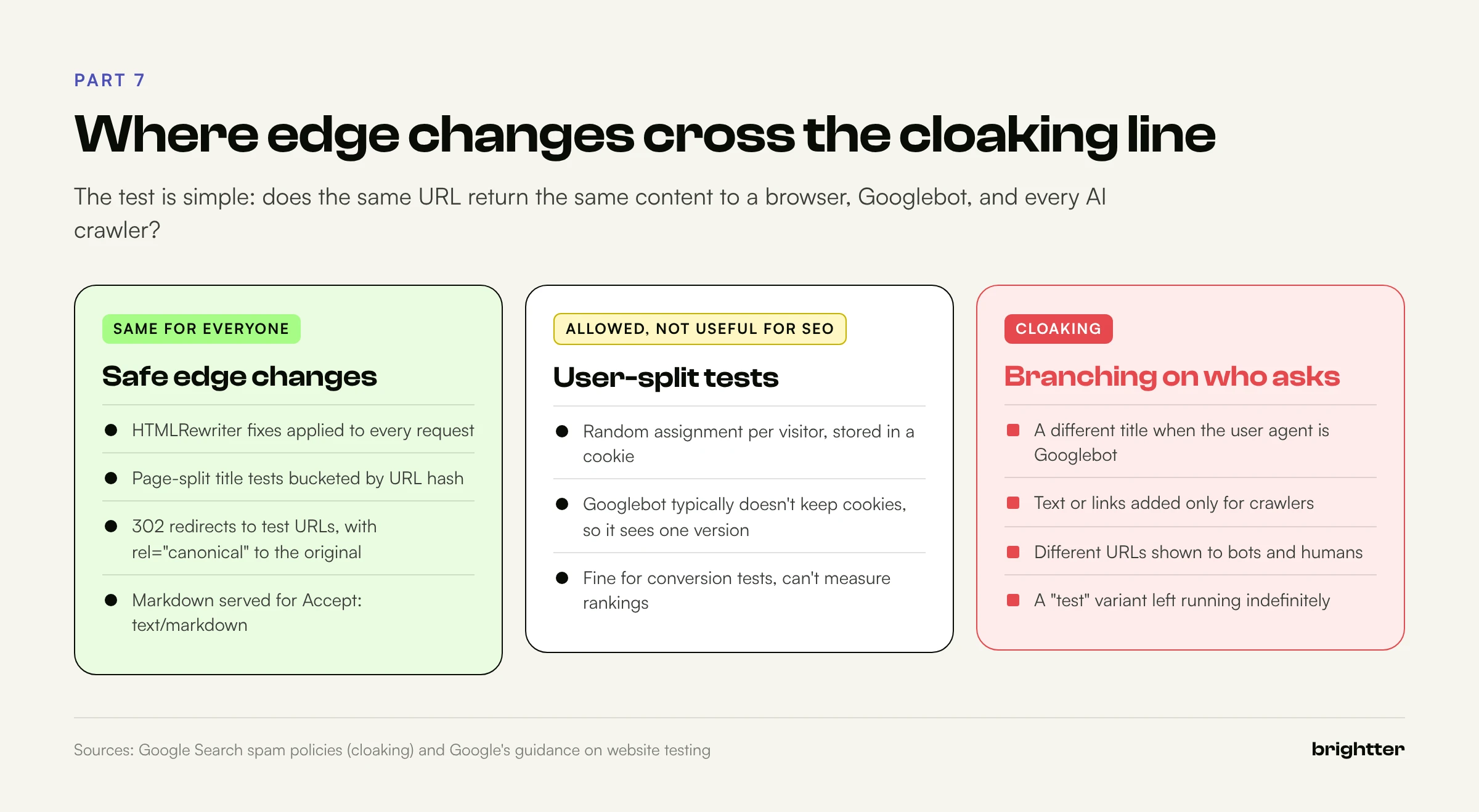
Edge code makes it easy to change titles for some requests and not others. That's useful for experiments, and it's also how cloaking works. The difference is how you decide which version a request gets.
Where Google draws the line
Google's spam policies define cloaking as "presenting different content to users and search engines with the intent to manipulate search rankings and mislead users," including "inserting text or keywords into a page only when the user agent that is requesting the page is a search engine." Its website testing guidance adds: "Don't show one set of URLs to Googlebot, and a different set to humans"; use 302 redirects and rel="canonical" on variant URLs; remember that Googlebot typically doesn't keep cookies; and run tests only as long as needed, since an unnecessarily long experiment may be treated as deceptive.
For edge work, that reduces to one rule: the same URL returns the same content to a browser, Googlebot, and any AI crawler. Branching on User-Agent to change content is out. Branching on the URL is fine.
Split pages, not users
Conversion tools split users, usually with a cookie. That's useless for SEO, because a search engine sees only one version of each page. SEO tests split pages: take a group of similar pages, assign each to A or B by its URL, serve that version to everyone, and compare organic performance between groups over time. Because assignment depends only on the URL, every visitor and crawler sees the same thing for a given page. That's what keeps it on the right side of the line.
This Worker hashes the path with a salt, puts roughly half the pages under /blog/ in variant B, and appends a suffix to their titles:
// Page-level title test: the bucket depends only on the URL, never on the visitor
const TEST = {
  id: "blog-title-2026-11",
  prefix: "/blog/",
  salt: "b7e1",
  suffixB: " (2026 Guide)",
};

async function bucket(path: string): Promise<"A" | "B"> {
  const data = new TextEncoder().encode(`${TEST.salt}:${path}`);
  const digest = new Uint8Array(await crypto.subtle.digest("SHA-256", data));
  return digest[0] % 2 === 0 ? "A" : "B";
}

export default {
  async fetch(request): Promise<Response> {
    const url = new URL(request.url);
    const origin = await fetch(request);
    const type = origin.headers.get("content-type") ?? "";
    if (!url.pathname.startsWith(TEST.prefix) || !type.includes("text/html") || origin.status !== 200) {
      return origin;
    }
    const variant = await bucket(url.pathname);
    const response = new Response(origin.body, origin);
    response.headers.set("x-title-test", `${TEST.id}:${variant}`);
    if (variant === "A") return response;

    let title = "";
    return new HTMLRewriter()
      .on("title", {
        text(chunk) {
          title += chunk.text; // text can arrive in several chunks
          chunk.remove();
          if (chunk.lastInTextNode) chunk.after(`${title.trim()}${TEST.suffixB}`, { html: true }); // raw source text
        },
      })
      .transform(response);
  },
} satisfies ExportedHandler;
The { html: true } flag on the re-inserted title fixes the double-escaping bug from Part 4; without it, & became &amp; in our local test.
To run it well: export each bucket's URLs at the start and freeze the salt and page group. Use enough similar pages with steady traffic, and compare page-level clicks and click-through rate in Search Console for both groups over the same period, so seasonality hits the control too. Check which title links Google actually displays, since it may not show your <title> as written. When the test ends, put the winner in the CMS template and delete the Worker logic.
Part 8: Caching, Cache Keys, Vary, and Purging
Edge SEO bugs that appear "sometimes" are almost always caching bugs. A Worker that modifies HTML touches three caches:
- The zone cache, through
fetch(). The subrequest reads through your zone cache per your Cache Rules and origin headers. Thecfobject adjusts it per request:cacheEverything,cacheTtl,cacheTtlByStatus(such as{ "200-299": 86400, "404": 1, "500-599": 0 }), andcacheTags. - The Cache API. Explicit storage of responses, but Cloudflare says it's local to one data center and not compatible with Tiered Cache;
cache.delete()only clears that data center. - Workers Cache. A newer option that caches the Worker's own responses so Cloudflare can serve them without running the Worker. It's tiered by default and honors your
Cache-Controlheaders.
For rewriting in front of a CMS, the clean pattern is to cache the origin response and run the rewrite on every request. HTMLRewriter is cheap, and a KV fix takes effect as soon as it propagates, with no purge. On Webflow O2O this is the default anyway: Webflow caches and purges HTML on publish, and your Worker transforms it.
Cache keys and Vary
Cache keys start from the URL and a few headers. Ignore query string, sort query string, cache by device type, and cache deception armor are available on every plan; custom keys built from specific query parameters, headers, cookies, or host are Enterprise-only. Tracking parameters fragment the cache, so sort or ignore query strings for HTML when no parameter changes content. And never put per-visitor variation in a shared cache: the next visitor or crawler gets someone else's version, which is a privacy bug and can look like cloaking.
Cloudflare now honors the Vary response header on every plan, configured in Cache Rules or per subrequest with cf.vary, with each header set to normalize, passthrough, or bypass. Vary: * always bypasses the cache. For SEO, vary content by URL, not headers: language versions belong on separate URLs with hreflang, because crawlers don't send the range of Accept-Language values users do. Format negotiation, such as the Vary: Accept from Markdown for Agents, is the legitimate header case.
Purging
Every plan can purge by URL, hostname, cache tag, prefix, or everything. Tag, hostname, prefix, and purge-everything requests are limited to 5 per minute on Free and 5 to 50 per second on paid plans. A 200 from the purge API only means the request was received; Cloudflare recommends confirming that CF-Cache-Status is no longer HIT. Three Worker-specific traps:
- Purge the URL the Worker fetched, not the one the visitor requested, if they differ.
- URLs cached with a custom cache key set by a Worker can't be purged individually. Use tags, host, prefix, or everything.
- Purges don't reach browser or crawler caches. Keep
max-agemodest on anything you're still changing.
Part 9: The Complete Worker, and How to Test It
Here is the full edge SEO Worker excerpted above, with its Wrangler configuration. It serves text files, applies redirects and normalization, sets headers, and rewrites HTML, in that order.
wrangler.jsonc
Cloudflare recommends wrangler.jsonc for new projects, and some newer Wrangler features require JSON. Bindings such as kv_namespaces and vars are not inherited by environments, so the staging block repeats them:
{
  "$schema": "./node_modules/wrangler/config-schema.json",
  "name": "edge-seo",
  "main": "src/index.ts",
  "compatibility_date": "2026-10-01",
  "workers_dev": false,
  "routes": [
    { "pattern": "www.example.com/*", "zone_name": "example.com" }
  ],
  "kv_namespaces": [
    { "binding": "REDIRECTS", "id": "<PRODUCTION_REDIRECTS_KV_ID>" },
    { "binding": "SEO", "id": "<PRODUCTION_SEO_KV_ID>" }
  ],
  "vars": {
    "CANONICAL_HOST": "www.example.com",
    "ENVIRONMENT": "production"
  },
  "observability": { "enabled": true },
  "env": {
    "staging": {
      "name": "edge-seo-staging",
      "routes": [
        { "pattern": "staging.example.com/*", "zone_name": "example.com" }
      ],
      "kv_namespaces": [
        { "binding": "REDIRECTS", "id": "<STAGING_REDIRECTS_KV_ID>" },
        { "binding": "SEO", "id": "<STAGING_SEO_KV_ID>" }
      ],
      "vars": {
        "CANONICAL_HOST": "www.example.com",
        "ENVIRONMENT": "staging"
      }
    }
  }
}
src/index.ts
The helpers (serveTextFile, normalizePath, findRedirect, rewriteHtml, and the escaping functions) are the ones shown in Parts 2 to 5. The rest of the file:
// edge-seo: redirects, SEO headers, text files, and HTML fixes in front of a CMS origin
export interface Env {
  REDIRECTS: KVNamespace; // key: normalized path, value: {"to": "...", "status": 301}
  SEO: KVNamespace;       // key: "page:/path", value: PageFix JSON
  CANONICAL_HOST: string; // e.g. "www.example.com"
  ENVIRONMENT: string;    // "production" or "staging"
}

const NOINDEX_PREFIXES = ["/search", "/thank-you", "/checkout"];

// ...serveTextFile, normalizePath, findRedirect, escapeAttr, safeJson, rewriteHtml (Parts 2 to 5)

function applyHeaders(url: URL, headers: Headers, env: Env): void {
  if (env.ENVIRONMENT !== "production") {
    headers.set("x-robots-tag", "noindex, nofollow");
  } else if (NOINDEX_PREFIXES.some((p) => url.pathname.startsWith(p))) {
    headers.set("x-robots-tag", "noindex, follow");
  }
  headers.set("x-edge-seo", "1"); // marker for debugging and monitoring
}

export default {
  async fetch(request, env, ctx): Promise<Response> {
    ctx.passThroughOnException(); // an uncaught error serves the plain origin page instead
    const url = new URL(request.url);

    const file = serveTextFile(url, env);
    if (file) return file;

    const redirect = await findRedirect(request, url, env);
    if (redirect) return redirect;

    let origin: Response;
    try {
      origin = await fetch(request);
    } catch (err) {
      console.error("origin fetch failed", err);
      return new Response("Bad Gateway", { status: 502 });
    }
    let response = new Response(origin.body, origin); // make headers mutable
    applyHeaders(url, response.headers, env);

    const type = response.headers.get("content-type") ?? "";
    if (request.method === "GET" && response.status === 200 && type.includes("text/html")) {
      const fix = await env.SEO.get<PageFix>(`page:${url.pathname}`, { type: "json", cacheTtl: 300 });
      response = rewriteHtml(response, url, env, fix);
    }
    return response;
  },
} satisfies ExportedHandler<Env>;
ctx.passThroughOnException() makes the Worker fail open: an uncaught exception passes the request to the origin instead of returning an error page. Cloudflare notes it doesn't cover CPU or memory limit failures and recommends catching origin fetch() errors yourself, as the code does. Assembled, the file type-checks under TypeScript strict mode with @cloudflare/workers-types; run npx wrangler types to generate types for your exact configuration.
Local development
wrangler dev runs the Worker locally on workerd, the same runtime Cloudflare uses in production, with local KV. For a route-based Worker, it forwards fetch(request) to your first route's host by default:
# Run locally and forward origin requests to production (read-only testing of real pages)
npx wrangler dev

# Or forward to a local mock origin, for testing edge cases you can't create in the CMS
npx wrangler dev --local-upstream 127.0.0.1:8000

# Seed local KV the same way you will in production
npx wrangler kv bulk put redirects.json --binding REDIRECTS --local
npx wrangler kv key put "page:/pricing" '{"title":"Pricing Plans for Teams | Example Co"}' --binding SEO --local

# Test Cron Triggers (the IndexNow safety net) on demand
npx wrangler dev --test-scheduled
curl "http://localhost:8787/cdn-cgi/local/scheduled"
--remote runs the session on Cloudflare with remote bindings (limited to 50 routes per zone). Build a local mock origin with deliberately broken pages: two canonicals, a title containing &, alt="", JSON-LD containing </script>, and trailing slash redirects. Those pages caught every bug we found while writing this guide.
Staging, rollouts, and live logs
npx wrangler deploy --env staging deploys to its own route and KV namespaces with ENVIRONMENT=staging, so every response carries X-Robots-Tag: noindex, nofollow. For hosts that should never be public, add Cloudflare Access rather than relying on noindex. In production, wrangler versions upload creates a version without traffic and wrangler versions deploy can shift traffic gradually; during a gradual rollout, crawlers may briefly see mixed output, so keep metadata rollouts short. wrangler rollback restores the previous version on all routes immediately.
wrangler tail streams live logs, and its filters make it usable on a busy site:
# Only errors, pretty printed
npx wrangler tail edge-seo --format pretty --status error

# Only requests from your own IP while you test
npx wrangler tail edge-seo --format pretty --ip self

# Only requests carrying a specific header, such as a debug header you add in curl
npx wrangler tail edge-seo --header "x-debug: 1"

# Search console.log output, for example from the IndexNow Worker
npx wrangler tail indexnow --search "statuses"
Logs are capped at 256 KB per request, so log decisions (which fix applied, which redirect matched), not HTML bodies.
Verifying what crawlers receive
The final check is always the raw response:
#!/usr/bin/env bash
# edge-check.sh: verify what crawlers receive after the Worker runs
# Usage: ./edge-check.sh https://www.example.com /pricing /old-pricing /llms.txt
set -u
BASE="$1"; shift
UA="Mozilla/5.0 (compatible; Googlebot/2.1; +http://www.google.com/bot.html)"
for path in "$@"; do
  url="${BASE}${path}"
  headers=$(curl -s -o /tmp/edge-body -D - -A "$UA" "$url")
  status=$(printf '%s' "$headers" | head -1 | awk '{print $2}')
  location=$(printf '%s' "$headers" | grep -i '^location:' | cut -d' ' -f2- | tr -d '\r')
  robots=$(printf '%s' "$headers" | grep -i '^x-robots-tag:' | cut -d' ' -f2- | tr -d '\r')
  canon=$(grep -o -i '<link[^>]*rel="canonical"[^>]*>' /tmp/edge-body | wc -l | tr -d ' ')
  title=$(grep -o -i '<title>[^<]*</title>' /tmp/edge-body | head -1)
  printf '%-28s %s  loc=%s  x-robots=%s  canonicals=%s  %s\n' \
    "$path" "$status" "${location:--}" "${robots:--}" "$canon" "$title"
done
Against our local test setup:
/pricing                     200  loc=-  x-robots=-  canonicals=1  <title>Pricing Plans for Teams | Example Co</title>
/old-pricing                 301  loc=http://localhost:8787/pricing  x-robots=-  canonicals=0
/Pricing/                    301  loc=http://localhost:8787/pricing  x-robots=-  canonicals=0
/search                      404  loc=-  x-robots=noindex, follow  canonicals=0
/llms.txt                    200  loc=-  x-robots=noindex  canonicals=0
Run it in CI after every deploy against fixed URLs per template, and fail the build if a canonical count isn't exactly 1 or a redirect target changes. Confirm Google's view with URL Inspection in Search Console. When a redirect misbehaves, Cloudflare Trace shows which rules matched a request, separating "my Worker didn't run" from "a rule answered first."
Part 10: Risks and Governance
Edge SEO changes what the site serves without changing what the CMS shows. Without governance, the edge becomes a second CMS that one person understands.
The risks:
- Invisible divergence. Editors see one title in the CMS, Google sees another, and a CMS "fix" six months later changes nothing.
- Single points of failure. A Worker on
/*is in the path of every page view, and a failingrobots.txthandler is a crawl outage. - Security. Anything that receives webhooks or writes to KV needs authentication, or it becomes an open redirect generator.
- Accidental cloaking through personalization, bot detection, or tests keyed on user agent.
Governance that works:
- Everything in git: Worker code, configuration, and exported KV data. KV is a cache of the source of truth, not the source.
- One job per Worker, one owner per Worker. Separate Workers for text files, IndexNow, redirects, and HTML fixes are easier to reason about and roll back.
- A fix register: every override with its URL or pattern, change, reason, requester, and review date. The
x-edge-seomarker header makes touched pages easy to crawl. - Push fixes back to the source. Each quarter, move what the CMS can handle into templates and delete it from the edge.
- Monitor outputs: schedule
edge-check.shagainst key URLs and alert on changes to status codes, canonicals, titles, androbots.txt. - Least privilege: scoped API tokens,
wrangler secret putfor secrets, and signature checks on every webhook.
Part 11: Failure Patterns That Show Up Again and Again
The redirect that never fires. An old Single or Bulk Redirect matches before the new Worker map. Fix: delete redundant rules when you migrate, and use Trace to see which layer answered.
The trailing slash tug of war. The Worker strips slashes, the origin adds them, and crawlers loop. Fix: match the origin's URL format exactly, and test with a mock origin that reproduces it.
The noindex nobody can see. Staging sends noindex but robots.txt blocks everything, so Google never sees the header and indexes the URLs from links. Fix: keep staging crawlable with noindex, or put it behind Access.
Two canonicals. The CMS prints one and an edge rule adds another. Fix: fix the existing element, remove duplicates, and insert only when none exists.
The double-escaped title. Collected text chunks are re-inserted as text, turning & into &amp;. Fix: re-insert raw source text with { html: true }.
The JSON-LD that broke the page. A value containing </script> ends the script early. Fix: escape < as \u003c in injected JSON.
The personalized page in a shared cache. Varied HTML is cached under the plain URL, and crawlers get whichever version landed first. Fix: vary after the cache, or don't cache varied responses.
The 5xx robots.txt. A Worker reads robots.txt from KV, the read fails, and Google pauses crawling. Fix: serve it from an inline string.
The IndexNow firehose. Every sitemap URL is submitted on every publish until engines return 429. Fix: submit only the diff, baseline the first run, and back off on 429.
The forgotten experiment. A title test ends, the code stays, and variant B becomes permanent with no record in the CMS. Fix: give every test an expiry in the fix register.
Part 12: A Prioritized Plan
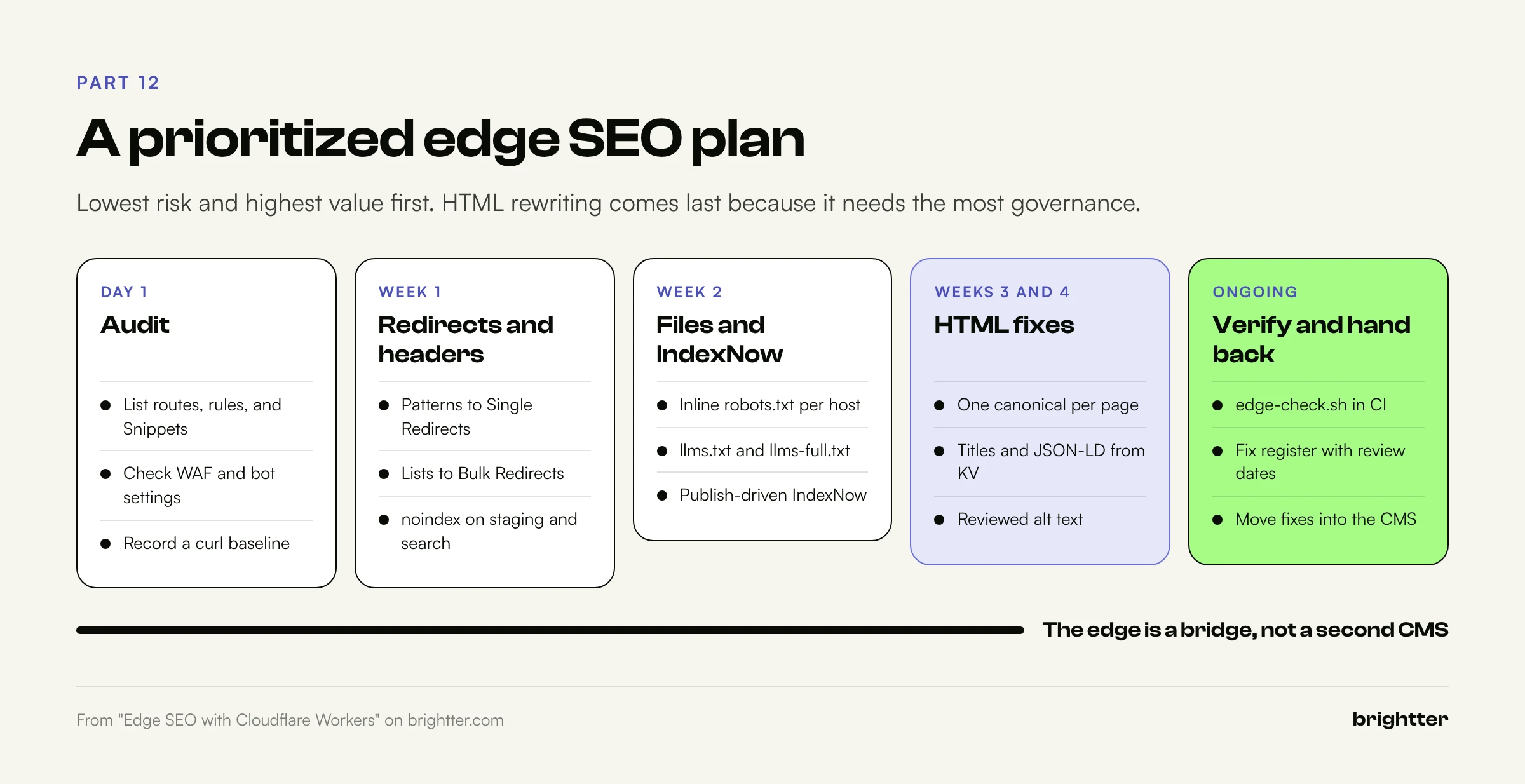
This order puts the highest-value, lowest-risk changes first and leaves the ones needing the most governance for last.
Step 1: Audit what the edge already does (day 1).
- List every Worker route, Single Redirect, Bulk Redirect list, Transform Rule, Cache Rule, and Snippet on the zone.
- Check WAF and bot settings for rules that challenge crawlers you want, including AI search and user-triggered agents.
- Record status codes, headers, canonicals, and titles for key URLs as a baseline.
Step 2: Fix redirects (week 1). Patterns go to Single Redirects, static migration lists to Bulk Redirects (validated for chains and loops), and logic-driven redirects to a Worker with KV.
Step 3: Ship header fixes (week 1). noindex, nofollow on staging by environment, noindex, follow on internal search, and Link canonical and hreflang headers for files on your hostname.
Step 4: Serve text files from the edge (week 2). Inline robots.txt per host, /llms.txt and a build-generated /llms-full.txt with X-Robots-Tag: noindex, and the IndexNow key file.
Step 5: Automate IndexNow (week 2). Enable Crawler Hints, or deploy the publish-driven sitemap diff Worker with a cron safety net, and confirm submissions in Bing Webmaster Tools.
Step 6: Add HTML fixes, carefully (weeks 3 and 4). Start with structural fixes (duplicate and missing canonicals), then KV-driven titles, descriptions, JSON-LD, and reviewed alt text, each logged in the fix register.
Step 7: Test, monitor, and push fixes back (ongoing). Run the verification script in CI and on a schedule, use page-split tests only, and each quarter move edge fixes into CMS templates where the platform allows.
Conclusion: The Edge Is a Bridge, Not a Second CMS
When a CMS can't set headers, caps its redirect table, or owns templates you can't change this quarter, a Worker lets you ship the fix today, in the server response, where Googlebot, Bingbot, and HTML-only AI crawlers all see it. On a Webflow site behind Cloudflare, that covers most of the platform's technical SEO gaps: headers, large redirect sets, llms-full.txt, IndexNow, and template-level metadata.
The discipline is what separates a useful edge layer from a liability. Keep each Worker small and single-purpose, serve the same content to every visitor, keep robots.txt free of dependencies, verify what crawlers receive after every deploy, and treat each override as temporary until it lives in the CMS where editors can see it. Start with the audit in Step 1; most teams find at least one rule, firewall setting, or duplicate canonical quietly costing them crawl budget or citations.
Need help shipping SEO fixes your CMS can't? Brightter, Inc. designs and runs edge SEO setups on Cloudflare for Webflow, WordPress, and custom sites: redirect migrations, header and canonical fixes, llms.txt and IndexNow automation, and the testing and governance that keep them safe. As a Webflow Certified Partner, we know where the platform's limits are and how to work around them without fighting the CMS. Talk to our team about your site.