.avif)
Log File Analysis for SEO and AI Crawlers: Crawl Budget, Bot Verification, and What Your Server Logs Know
Key Takeaways
- Server and CDN logs are the only complete record of what bots actually request. Search Console shows a summary of Google's activity. Your logs show every request from every crawler, including GPTBot, ClaudeBot, PerplexityBot, and the user-triggered fetchers that visit when someone asks an assistant about you.
- A user agent string is a claim, not an identity. Verify crawlers with reverse DNS plus forward confirmation (Google, Bing) or the vendors' published IP range JSON files (Google, Bing, OpenAI, Perplexity). Anthropic's help center says it does not publish IP ranges, so ClaudeBot needs different handling.
- Crawl budget is a large-site problem by Google's own definition. Google's guide targets sites with 1 million or more unique pages changing about weekly, sites with 10,000 or more pages changing daily, and sites with many URLs stuck in "Discovered, currently not indexed." Smaller sites should still read logs, but for crawl health.
- Map crawl frequency against page value. The most useful report joins verified Googlebot hits per URL with your own value data. Crawl spent on parameter URLs while money pages wait weeks is the pattern to fix.
- Crawl waste has a short list of causes: faceted and tracking parameters, crawl traps, redirect chains, soft 404s, and bursts of 5xx or 429 responses that make Google slow down across the whole hostname.
- Track AI crawlers by purpose, not by brand. Training crawlers, AI search indexers, and user-triggered fetchers follow different robots.txt rules and answer different business questions.
- The whole pipeline fits in an afternoon: one Python script that parses, classifies, and verifies, plus SQL reports in DuckDB or BigQuery. On hosted platforms such as Webflow, where you never see the origin, Cloudflare logs or a small Worker become the source of truth.
Introduction: What Your Server Logs Know That Search Console Does Not
Every technical SEO conversation eventually reaches the same question: what is Google actually doing on this site? Search Console answers part of it. The Crawl Stats report shows totals, response codes, file types, and example URLs. URL Inspection shows when one page was last crawled. Neither tells you which of your 40,000 product URLs Googlebot requested yesterday, how often it fetched a filter combination nobody searches for, or whether the "Googlebot" hammering your search endpoint is Google at all.
Your server logs know. Every request that reaches your origin or your CDN leaves a line with the client IP, timestamp, URL, status code, bytes sent, and the user agent the client claimed. Aggregated over weeks, those lines are the only complete record of how machines read your website.
That record matters more in 2026 because the set of machines has grown. Googlebot and Bingbot now share your server with OpenAI's GPTBot and OAI-SearchBot, Anthropic's ClaudeBot and Claude-SearchBot, PerplexityBot, and user-triggered fetchers (ChatGPT-User, Claude-User, Perplexity-User) that arrive only when a person asks an assistant about something on your site. None of the AI companies offer a Search Console equivalent. If you want to know whether ChatGPT can read your pricing page, logs are the only first-party evidence you have.
The mix is changing fast. In an analysis published in July 2025 covering May 2024 to May 2025, Cloudflare reported that AI and search crawler traffic across its network grew 18 percent, GPTBot's share of AI-only crawler traffic rose from 5 percent to 30 percent, and Googlebot's raw requests grew 96 percent.
This guide covers what a log line contains (including CDN logs on hosted platforms), how to pull logs from Nginx, Apache, and Cloudflare, how to classify and verify crawlers, what crawl budget means in Google's own documentation, a working Python and SQL pipeline, the crawl waste patterns that appear in almost every audit, AI crawler tracking, Search Console's Crawl Stats report, and a prioritized plan. It is the measurement half of the first article in this series, JavaScript SEO in 2026, which showed that most AI crawlers read only raw HTML.
Part 1: Anatomy of a Log Line
The combined log format
Apache and Nginx both default to the "combined" format. Apache defines it as:
LogFormat "%h %l %u %t \"%r\" %>s %b \"%{Referer}i\" \"%{User-agent}i\"" combined
Nginx uses the same layout whenever access_log is given no format. A Googlebot request looks like this:
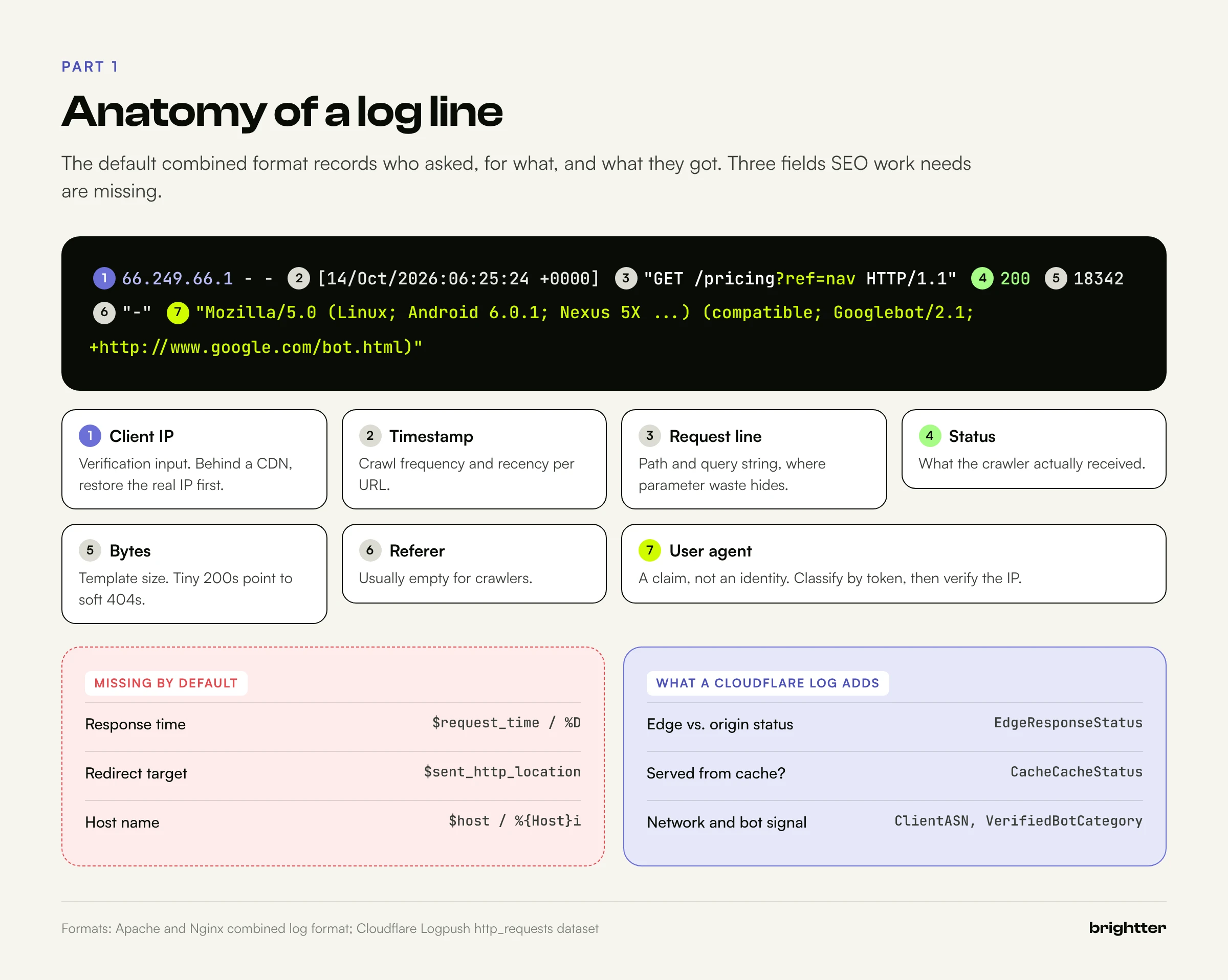
66.249.66.1 - - [14/Oct/2026:06:25:24 +0000] "GET /pricing?ref=nav HTTP/1.1" 200 18342 "-" "Mozilla/5.0 (Linux; Android 6.0.1; Nexus 5X Build/MMB29P) AppleWebKit/537.36 (KHTML, like Gecko) Chrome/141.0.7390.122 Mobile Safari/537.36 (compatible; Googlebot/2.1; +http://www.google.com/bot.html)"
| Field | Example | SEO use | Caveat |
|---|---|---|---|
| Client IP | 66.249.66.1 | Bot verification | Behind a CDN this is the proxy's IP unless you restore the real one |
| Timestamp | [14/Oct/2026:06:25:24 +0000] | Crawl frequency, time series | Normalize time zones across servers |
| Request line | GET /pricing?ref=nav HTTP/1.1 | URL and parameter analysis | The query string is where most crawl waste hides |
| Status | 200 | What the crawler received | A 200 can still be a soft 404 |
| Bytes | 18342 | Template size | A sudden drop can mean an empty template |
| User agent | ... Googlebot/2.1 ... | Classification | Trivially spoofed; must be verified |
The default format leaves out three fields that matter for SEO: response time, the redirect target (the Location header), and the host name. Without the redirect target you can count redirects but not reconstruct chains. Without response time you cannot connect slow templates to falling crawl rates.
Better formats for SEO
Nginx can write JSON lines directly, which avoids fragile regular expressions later:
# /etc/nginx/conf.d/seo-log.conf
log_format seo_json escape=json '{'
  '"ts":"$time_iso8601",'
  '"ip":"$remote_addr",'
  '"host":"$host",'
  '"method":"$request_method",'
  '"uri":"$request_uri",'
  '"status":$status,'
  '"bytes":$body_bytes_sent,'
  '"rt":$request_time,'
  '"ua":"$http_user_agent",'
  '"ref":"$http_referer",'
  '"loc":"$sent_http_location"'
'}';

access_log /var/log/nginx/seo.json.log seo_json;

# Behind Cloudflare: restore the client IP, trusting only Cloudflare's ranges
set_real_ip_from 173.245.48.0/20;
set_real_ip_from 103.21.244.0/22;
# ...one line per range listed at cloudflare.com/ips...
real_ip_header CF-Connecting-IP;
Apache's equivalent adds %D (time to serve the request in microseconds), the Location response header, and the host. With mod_remoteip, %a logs the real client IP:
RemoteIPHeader CF-Connecting-IP
RemoteIPTrustedProxy 173.245.48.0/20 103.21.244.0/22
LogFormat "%a %l %u %t \"%r\" %>s %b \"%{Referer}i\" \"%{User-Agent}i\" %D \"%{Location}o\" %{Host}i" seo_combined
CustomLog "logs/seo_access_log" seo_combined
Never trust CF-Connecting-IP or X-Forwarded-For from arbitrary clients. Anyone can send those headers, and a pipeline that believes them can be fed fake Googlebot IPs as easily as fake user agents.
What a CDN log adds
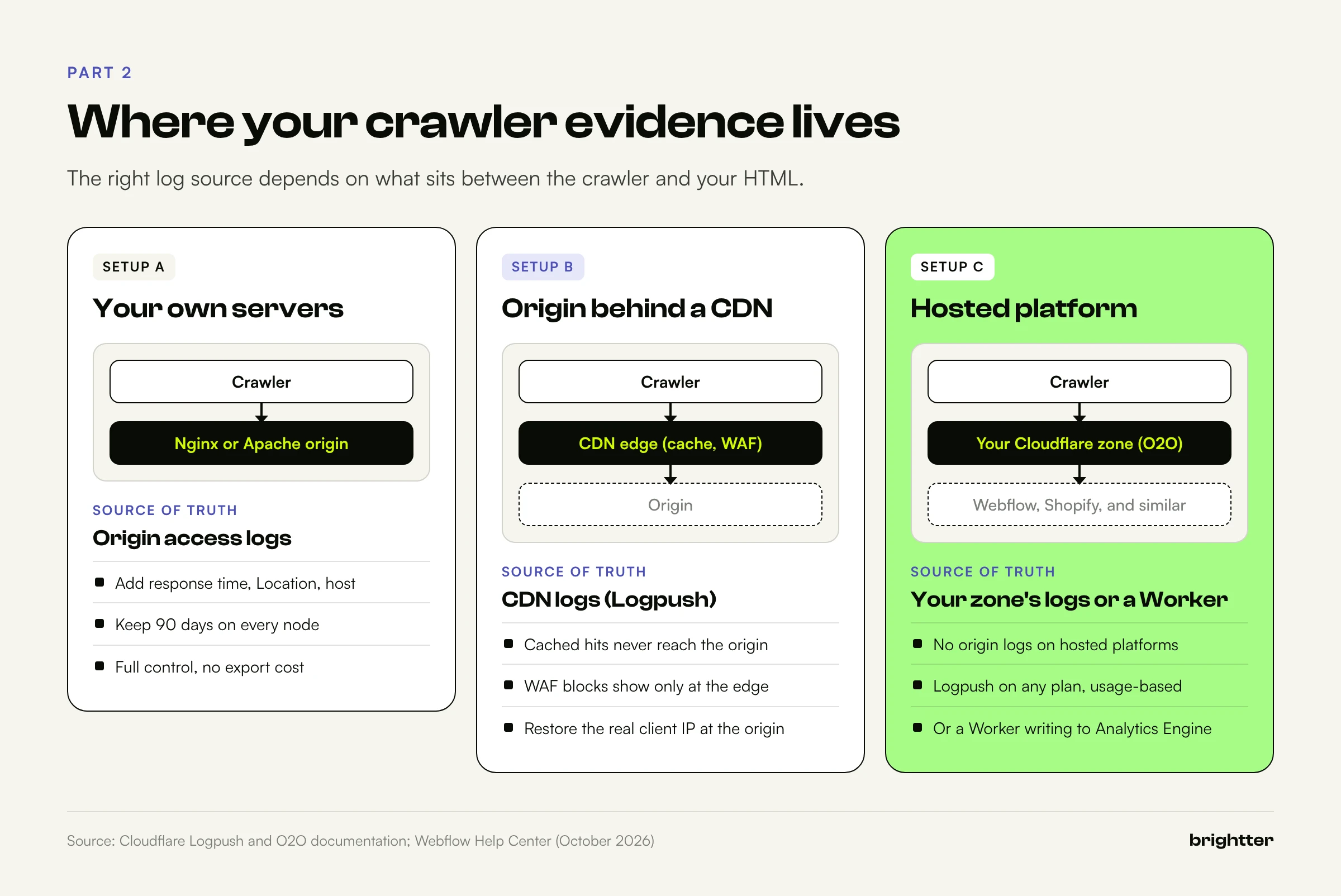
A CDN sees every request before your origin does, including those it answers from cache and those its firewall blocks. A crawler that receives a cached 200 from the edge never appears in your Nginx log. Cloudflare's http_requests dataset has well over a hundred fields; these matter most for crawl analysis:
| Cloudflare field | SEO use |
|---|---|
EdgeStartTimestamp | Time series |
ClientIP, ClientASN, ClientCountry | Verification; spotting impostors on hosting networks |
ClientRequestHost, ClientRequestURI, ClientRequestPath | URL counts (the URI includes the query string; the path does not) |
ClientRequestUserAgent | Classification |
EdgeResponseStatus | What the crawler actually received |
OriginResponseStatus | What your origin returned (0 means no origin response) |
CacheCacheStatus | Whether crawlers are served from cache |
VerifiedBotCategory | Cloudflare's own category for a verified bot |
SecurityAction | Crawlers your WAF challenged or blocked |
EdgeTimeToFirstByteMs | Slow templates and origin stress |
BotScore and BotDetectionTags exist too, but only for Bot Management customers. The pairing of EdgeResponseStatus with OriginResponseStatus is the most useful detail: a 403 at the edge with an origin status of 0 means your firewall stopped the request before your origin saw it. That is how sites discover that a bot protection setting has been challenging GPTBot for months.
Hosted platforms: when the CDN log is the only log
On Webflow, Shopify, Squarespace, Wix, and similar platforms, you never get an origin log, because the platform runs the servers. The only way to see crawler requests is a CDN you control in front of the platform.
Webflow documents the path. Its hosting now runs on Cloudflare (Webflow says sites created after April 21, 2025 are already on it), and Webflow and Cloudflare both document an Orange-to-Orange (O2O) setup: on a paid Webflow site plan, you proxy your custom domain through your own Cloudflare zone, on any Cloudflare plan including Free, with a proxied CNAME to cdn.webflow.com. Requests pass through your zone first, where your WAF rules, Workers, and logs apply. Follow the O2O instructions exactly; Webflow warns that simply proxying standard hosting can cause 525 handshake errors. Brightter's own site is a Webflow site behind Cloudflare, and on any setup like that, the Cloudflare zone is where the crawler evidence lives.
Part 2: Pulling the Logs
Where your logs come from depends on how the site is hosted, and many large sites combine two of these setups.
Nginx and Apache on your own servers
On a self-managed server, logs already exist. The work is keeping enough of them:
- Retention. Default
logrotatesettings often keep a week or two. Crawl analysis needs at least 30 days, and 90 days lines up with Search Console's Crawl Stats window. Logs compress extremely well, so compress rather than delete. - Every node. Behind a load balancer, each server writes its own file. Collect all of them, or log at the load balancer.
- Privacy. IP addresses in access logs can be personal data under laws such as the GDPR. A common practice is to keep full lines for crawler user agents and truncate IPs for everything else before logs leave the server.
# Merge current and rotated Nginx logs (plain and .gz) into one file
sudo sh -c 'zcat -f /var/log/nginx/seo.json.log* > /tmp/seo-90d.json.log'
Cloudflare: the current product lineup
Cloudflare has reorganized its logging products several times, and older tutorials often use outdated names. As of October 2026, its documentation describes:
| Product | What it does | Availability (per Cloudflare docs) |
|---|---|---|
| Logpush | Pushes raw datasets such as http_requests to R2, S3, Google Cloud Storage, BigQuery, and SIEM tools | All plans; usage-based pricing on Free, Pro, and Business with 25 GB per account per month included per destination type |
| Logs (under Observability) | Query stored log datasets in the dashboard, including with SQL | Varies by dataset and plan |
| Log Explorer (Legacy) | The earlier stored-log product, being merged into Observability Logs | Existing subscriptions keep working |
| Instant Logs | Live stream of HTTP requests, now a live mode inside Observability Logs | Business and Enterprise |
| AI Crawl Control (formerly AI Audit) | AI crawler dashboards, per-crawler allow or block, robots.txt compliance tracking | All plans |
| Workers Analytics Engine | Custom data points written from a Worker, queried with SQL | Data kept for three months |
Logpush has one trap: it cannot backfill. If a job is disabled or failing, logs from that period are permanently lost, so turn on Logpush health notifications. Creating a job that writes to R2 takes one API call (the token needs Logs Write):
curl "https://api.cloudflare.com/client/v4/zones/$ZONE_ID/logpush/jobs" \
  --request POST \
  --header "Authorization: Bearer $CLOUDFLARE_API_TOKEN" \
  --json '{
    "name": "www.example.com-crawl",
    "dataset": "http_requests",
    "destination_conf": "r2://crawl-logs/http/{DATE}?account-id='"$ACCOUNT_ID"'&access-key-id='"$R2_KEY_ID"'&secret-access-key='"$R2_SECRET"'",
    "output_options": {
      "field_names": ["EdgeStartTimestamp","ClientIP","ClientASN","ClientCountry",
        "ClientRequestHost","ClientRequestMethod","ClientRequestURI","ClientRequestUserAgent",
        "ClientRequestReferer","EdgeResponseStatus","OriginResponseStatus","EdgeResponseBytes",
        "CacheCacheStatus","VerifiedBotCategory","SecurityAction","EdgeTimeToFirstByteMs","RayID"],
      "timestamp_format": "rfc3339"
    },
    "enabled": true
  }'
Cloudflare recommends {DATE} in the path for daily folders and rfc3339 timestamps for BigQuery. Logpush supports filters, but do not filter on the user agent: "user agent contains bot" throws away the impostors and undeclared fetchers you want to find. If volume is a concern, exclude static asset paths instead.
A lightweight option: a Worker
For a small site on Cloudflare O2O that only needs crawler data, a Worker on the hostname can pass every request through unchanged and record bot requests in Workers Analytics Engine:
// worker.js: record crawler and AI fetcher requests in Workers Analytics Engine.
// wrangler.toml:
//   [[analytics_engine_datasets]]
//   binding = "CRAWL"
//   dataset = "crawl_log"
const BOT = /Googlebot|bingbot|GPTBot|OAI-SearchBot|ChatGPT-User|ClaudeBot|Claude-SearchBot|Claude-User|PerplexityBot|Perplexity-User|CCBot|Applebot|meta-externalagent|Bytespider|Amazonbot/i;

export default {
  async fetch(request, env) {
    const response = await fetch(request); // pass through to the origin (or Webflow)
    const ua = request.headers.get("user-agent") || "";
    const match = ua.match(BOT);
    if (match) {
      const url = new URL(request.url);
      env.CRAWL.writeDataPoint({
        blobs: [
          match[0],                                       // blob1: bot token
          url.pathname,                                   // blob2: path
          url.search.slice(0, 512),                       // blob3: query string
          String(response.status),                        // blob4: status
          request.headers.get("cf-connecting-ip") || "",  // blob5: client IP
          String(request.cf?.asn ?? ""),                  // blob6: ASN
          request.cf?.asOrganization ?? "",               // blob7: network owner
          response.headers.get("location") || "",         // blob8: redirect target
          ua.slice(0, 300),                               // blob9: full user agent
        ],
        doubles: [response.status],
        indexes: [match[0]],
      });
    }
    return response;
  },
};
Query it with the Analytics Engine SQL API (token permission: Account Analytics Read). Analytics Engine samples at high volume, so sum _sample_interval instead of counting rows:
curl "https://api.cloudflare.com/client/v4/accounts/$ACCOUNT_ID/analytics_engine/sql" \
  --header "Authorization: Bearer $CF_ANALYTICS_TOKEN" \
  --data "SELECT blob1 AS bot, blob4 AS status, SUM(_sample_interval) AS hits
          FROM crawl_log WHERE timestamp > NOW() - INTERVAL '7' DAY
          GROUP BY bot, status ORDER BY hits DESC"
A data point accepts up to twenty blobs, with a 16 KB total blob size, and the Worker counts toward your Workers request usage on every request it handles. For a large site, Logpush is cleaner. For a 300-page marketing site, this is often enough.
Part 3: Who Is Knocking: Classifying Crawlers by Purpose
Sort requests into groups that mean something for decisions. A crawler's purpose matters more than its brand, because purpose determines what blocking it costs you and which robots.txt rules it follows.

| Purpose | Crawlers (user agent token) | robots.txt behavior (per vendor docs) |
|---|---|---|
| Search engine crawling | Googlebot (plus Googlebot-Image, Googlebot-Video, Storebot-Google), Bingbot, Applebot | Followed |
| AI search indexing | OAI-SearchBot, Claude-SearchBot, PerplexityBot | Followed |
| AI training | GPTBot, ClaudeBot, CCBot, Meta-ExternalAgent, Bytespider | Followed |
| User-triggered fetching | ChatGPT-User, Claude-User, Perplexity-User, Google's user-triggered fetchers | OpenAI: rules "may not apply"; Perplexity: "generally ignores robots.txt"; Google: ignored; Anthropic: its bots honor robots.txt |
| Testing and ads | Google-InspectionTool, AdsBot-Google, OAI-AdsBot | Special rules; leave them out of crawl reports |
Details that are easy to miss:
- Google-Extended has no user agent. It is a robots.txt token controlling whether Google-crawled content may be used for Gemini training and grounding. It never appears in logs; Googlebot does the fetching.
- GoogleOther is real Google traffic but not Search. Google says it does not affect any specific product, so keep it out of Googlebot reports.
- OpenAI may use one crawl for two purposes. Its documentation says that if a site allows both GPTBot and OAI-SearchBot, results from one crawl may serve both. Low OAI-SearchBot counts next to high GPTBot counts are not necessarily a problem.
- robots.txt changes are not instant. OpenAI and Perplexity both cite about 24 hours, and Google generally caches robots.txt for up to 24 hours.
- Match tokens, not full strings. Google's documented user agents use
W.X.Y.Zas a placeholder for the Chrome version, and OpenAI's current strings show GPTBot/1.4 and OAI-SearchBot/1.4. Version numbers change.
Classification tells you what a client says it is. Verification tells you whether that is true.
Part 4: Verifying Bots and Spotting Fake Googlebots
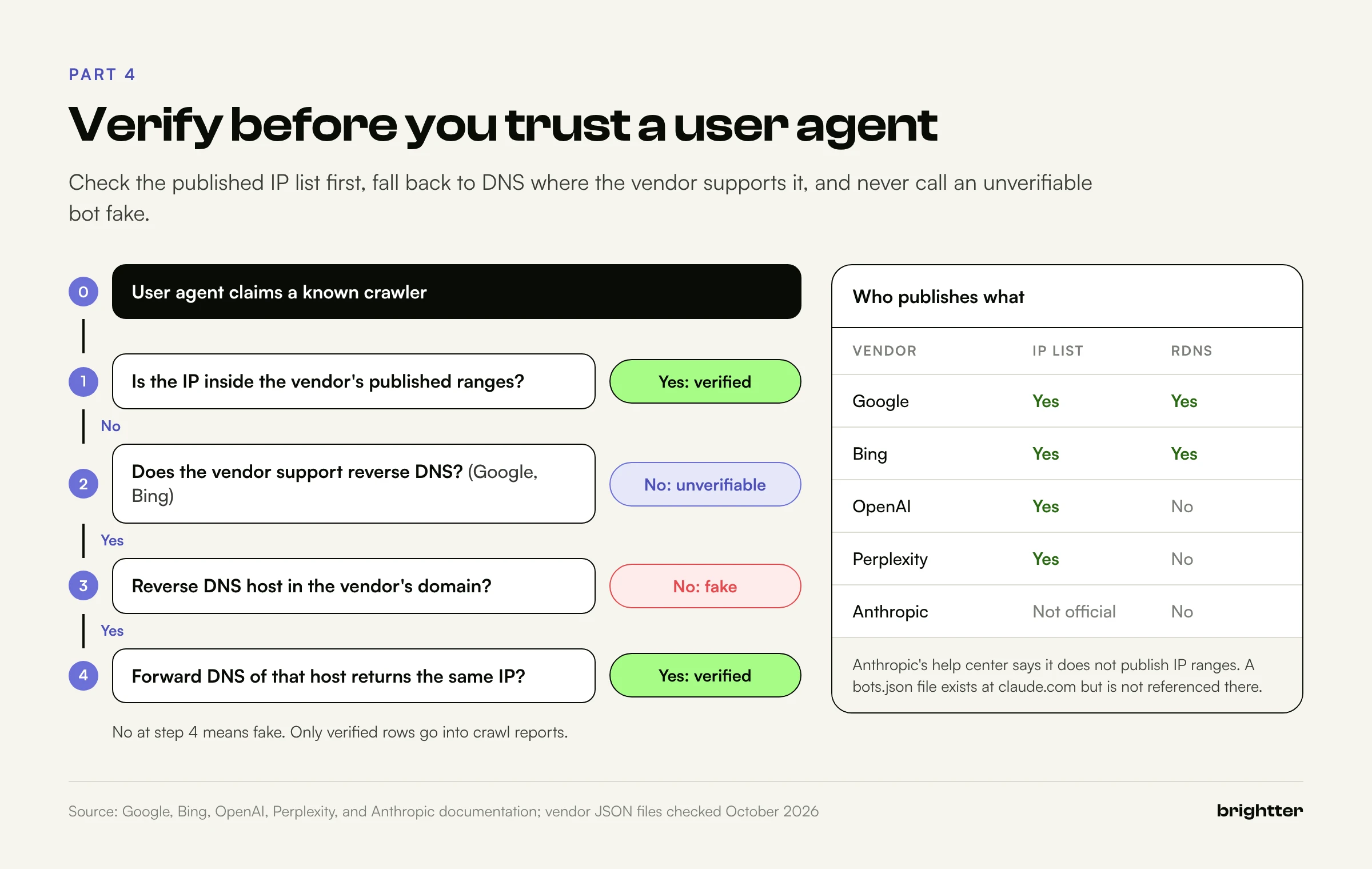
Anyone can send Googlebot/2.1 in a user agent. Scrapers do it to get past firewalls that wave Google through, and many SEO and security tools do it by default. Google's documentation says plainly that the user agent can be spoofed and should be verified. Crawl analysis built on unverified user agents measures a mix of real crawlers and impostors.
Method 1: Reverse DNS plus forward confirmation
This works for Google and Bing because only they control DNS for their domains. Google's steps: run a reverse DNS lookup on the IP from your log, check that the host is in googlebot.com, google.com, or googleusercontent.com, run a forward lookup on that host, and confirm it returns the original IP.
$ host 66.249.66.1
1.66.249.66.in-addr.arpa domain name pointer crawl-66-249-66-1.googlebot.com.

$ host crawl-66-249-66-1.googlebot.com
crawl-66-249-66-1.googlebot.com has address 66.249.66.1
The forward step is the one people skip, and the one that matters. Whoever controls the reverse zone for an IP block can make it say googlebot.com. They cannot make Google's forward DNS point back at their IP. Google's host names also reveal the client type: crawl-*.googlebot.com or geo-crawl-*.geo.googlebot.com for common crawlers such as Googlebot, rate-limited-proxy-*.google.com for special-case crawlers such as AdsBot, and *.gae.googleusercontent.com or google-proxy-*.google.com for user-triggered fetchers. For Bing, the host must end in search.msn.com, followed by the same forward check.
Method 2: Published IP range files
DNS lookups are slow at scale. The faster method is matching IPs against the CIDR ranges vendors publish as JSON, all in the same shape: a creationTime and a list of prefixes with ipv4Prefix or ipv6Prefix entries.
| Vendor | Published IP lists | Reverse DNS |
|---|---|---|
common-crawlers.json, special-crawlers.json, user-triggered-fetchers.json, user-triggered-fetchers-google.json, user-triggered-agents.json, all under developers.google.com/static/crawling/ipranges/ | Yes | |
| Microsoft (Bingbot) | www.bing.com/toolbox/bingbot.json | Yes |
| OpenAI | openai.com/gptbot.json, searchbot.json, chatgpt-user.json, adsbot.json | Not documented |
| Perplexity | www.perplexity.com/perplexitybot.json, perplexity-user.json | Not documented |
| Anthropic | Help center: does not currently publish IP ranges | Not documented |
Three practical notes:
- Google moved its files. The old
.../search/apis/ipranges/googlebot.jsonpath now redirects tocommon-crawlers.json, and Google addeduser-triggered-agents.json. Scripts that hard-code the old path without following redirects load nothing. - Check
creationTime. When we checked in October 2026, Google's files and OpenAI's ChatGPT-User file carried that day's date, Bing's showed January 2024, and Perplexity's crawler file February 2025. Keep reverse DNS as a fallback for Bing, and treat a Perplexity mismatch as "unverified" rather than "fake." - Handle IPv6. Google's lists are full of IPv6 prefixes. A parser that only understands dotted quads marks real Googlebot traffic as unverified.
The Anthropic case
Anthropic's help center lists ClaudeBot (training data), Claude-SearchBot (search quality), and Claude-User (fetches a person requests), says they honor robots.txt and the non-standard Crawl-delay extension, and states that Anthropic does "not currently publish IP ranges, as we use service provider public IPs," adding that this may change.
At the time of writing, a file also exists at claude.com/crawling/bots.json in the same format as the other vendors' lists, and some third-party tools use it. Because Anthropic's help center does not reference it, treat it as provisional: use it to raise confidence, and do not label ClaudeBot traffic fake purely because an IP falls outside it. The pipeline in Part 6 loads it as a separate, labeled source.
Signed requests
IP lists identify networks, not software. Cloudflare's Web Bot Auth adds a cryptographic layer using HTTP Message Signatures: a bot signs requests with an Ed25519 key and publishes its public key at /.well-known/http-message-signatures-directory. OpenAI documents that ChatGPT agent's cloud browser signs requests this way, with Signature, Signature-Input, and Signature-Agent headers. Signature checks belong at the edge, so for log analysis, log your CDN's verdict (such as VerifiedBotCategory) alongside your own.
How fake Googlebots show up
Once verification runs, impostors stand out:
- Both checks fail. The IP is outside every Google list, and reverse DNS returns a hosting provider's name or nothing.
- Third-party hosting networks. The ASN belongs to a VPS or cloud provider other than Google.
- Odd targets.
/wp-login.php,/xmlrpc.php,/.env, internal search, or product URLs in alphabetical order. - No robots.txt fetch, and bursts. Real crawlers fetch robots.txt regularly and back off when your server struggles.
For SEO the rule is simple: exclude unverified traffic from every crawl report. If a large share of your "Googlebot" hits are fake, every number built on them is wrong. Blocking is a security decision; if you block, block on failed verification, never on user agent alone, and confirm with URL Inspection's live test afterward.
Watch for undeclared crawling too. In August 2025, Cloudflare accused Perplexity of crawling with a generic Chrome-on-macOS user agent and rotating IPs when its declared crawler was blocked; Perplexity publicly disputed the findings. The lesson for log analysis holds either way: after blocking a declared crawler, watch for new, unexplained traffic to the same URLs. A URL-level report shows it; a user agent report never will.
Part 5: Crawl Budget, According to Google's Own Documentation
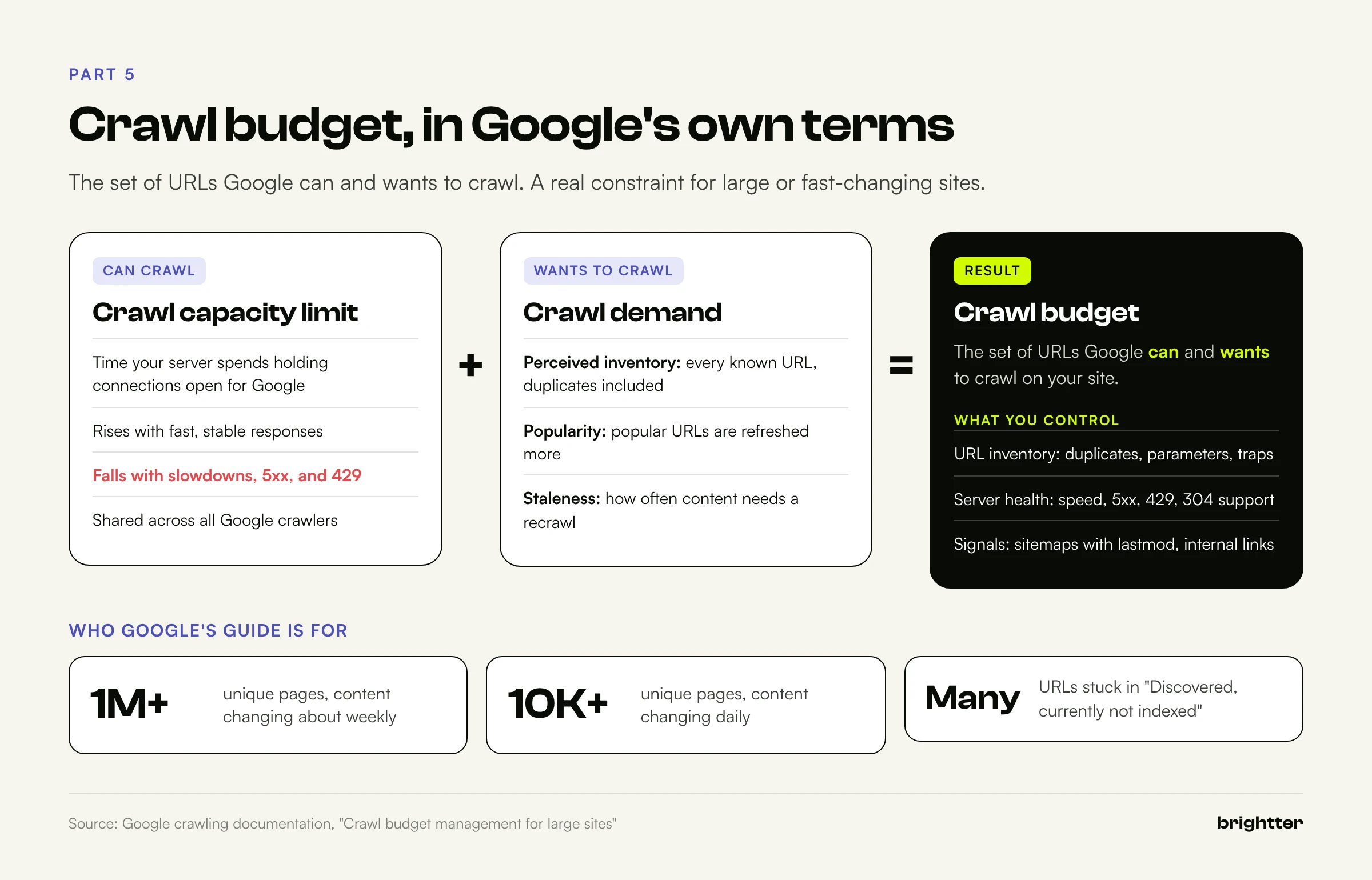
Few SEO terms are used as loosely as "crawl budget." It gets blamed for slow indexing on 200-page sites and ignored on million-page catalogs where it really is the constraint. Google's crawl budget guide, now part of its crawling documentation, is specific about both definition and audience.
Who it applies to
Google says the guide is aimed mainly at:
- Large sites (1 million or more unique pages) with content that changes moderately often (about weekly)
- Medium or larger sites (10,000 or more unique pages) with very rapidly changing content (daily)
- Sites with a large portion of URLs classified in Search Console as "Discovered, currently not indexed"
Google calls these numbers a rough estimate, and says that if your pages seem to be crawled the same day they are published, you don't need to read the guide. Take that seriously. A 500-page B2B site with slow indexing almost never has a crawl budget problem. It has a discovery, quality, or duplication problem.
Capacity and demand
Google defines crawl budget as the set of URLs that Google can and wants to crawl.
Crawl capacity limit (also called host load) is what your server can take. In Google's wording, it limits the total time your server spends holding connections open for Google, based on the number of parallel connections and their duration. It rises when the site responds quickly and consistently, and falls with slowdowns, 5xx errors, or 429 responses. Google's own resources limit it too.
Crawl demand is how much Google wants to crawl, driven by perceived inventory (every URL Google knows about, including duplicates, which is the factor you control most), popularity, and staleness. Events such as site moves raise demand temporarily.
One detail changes how you read logs: the capacity limit is shared across all of Google's crawlers. Heavy image or ads crawling uses host load that page crawling would otherwise get.
Google's recommendations, mapped to logs
| Google recommendation | What to look for in logs |
|---|---|
| Manage URL inventory; consolidate duplicates; block unimportant URLs in robots.txt | Share of verified Googlebot hits on parameter, filter, and session URLs |
Don't use noindex to save budget (Google still requests the page, then drops it) | Hits on noindex templates |
| Don't use robots.txt to temporarily reallocate budget | Robots.txt changes followed by crawl shifts |
| Return 404 or 410 for permanently removed pages; eliminate soft 404s | Removed URLs returning 200; tiny 200 responses |
Keep sitemaps current with lastmod | Delay between a page change and the next Googlebot fetch |
| Avoid long redirect chains | 3xx responses whose Location is another redirect |
Make pages efficient; support 304 Not Modified; add capacity if URL Inspection shows "Hostload exceeded" | Response time per template; share of 304s |
The 304 row is underrated. Google's crawlers support ETag/If-None-Match and Last-Modified/If-Modified-Since, and Google recommends ETag when both exist. A server that never returns 304 pays for a full response on every recrawl of unchanged content.
Turning crawling down safely
During an incident or migration, Google's documentation says to return 500, 503, or 429 instead of 200 for a short period (a couple of hours, or one to two days), optionally with Retry-After. Crawling slows across the whole hostname and recovers as errors stop. Google warns against doing this longer than one to two days, because URLs that keep returning these codes may be dropped from the index. Search Console also has a special request form to lower the crawl rate (never to raise it).
Robots.txt has its own rules. If it returns a 5xx, Google stops crawling the site for the first 12 hours while retrying, then uses the last good version for up to 30 days. If it returns a 4xx other than 429, Google treats it as if no robots.txt exists, meaning no restrictions at all. A deploy that makes robots.txt return 404 opens every disallowed URL to crawling.
Crawl health for everyone else
Below Google's thresholds, run the same reports as crawl health checks: are important pages crawled at all, and how soon after they change? What share of verified Googlebot requests gets a 200? Are AI crawlers reaching the pages you want cited, or hitting redirects, 404s, and challenges? Only logs answer these precisely.
Part 6: A Working Pipeline: Parse, Classify, Verify, Aggregate
The script below turns raw logs into one clean table. It reads the combined format, the extended Apache format and Nginx JSON format from Part 1, and Cloudflare Logpush files, plain or gzipped, and writes a CSV with one row per request, including bot name, purpose, and verification result. It uses only the Python standard library.
#!/usr/bin/env python3
"""botlogs.py: parse, classify, verify, and aggregate crawler traffic from access logs.
Reads combined format (optionally + %D "%{Location}o" %{Host}i), the seo_json Nginx
format, and Cloudflare Logpush http_requests NDJSON, plain or .gz. Writes one CSV.
Usage: python3 botlogs.py access.log.gz [more files] -o hits.csv [--all] [--no-dns]
"""
import argparse, csv, gzip, ipaddress, json, re, socket, sys, urllib.request
from collections import Counter
from concurrent.futures import ThreadPoolExecutor
from datetime import datetime
from urllib.parse import urlsplit

# 1. PARSE ---------------------------------------------------------------
COMBINED = re.compile(
    r'(?P<ip>\S+) \S+ \S+ \[(?P<ts>[^\]]+)\] '
    r'"(?P<method>[A-Z]+) (?P<uri>\S+)(?: [^"]*)?" '
    r'(?P<status>\d{3}) (?P<bytes>\d+|-) '
    r'"(?P<ref>[^"]*)" "(?P<ua>[^"]*)"'
    r'(?: (?P<rt_us>\d+) "(?P<loc>[^"]*)" (?P<host>\S+))?')

def parse_line(line):
    line = line.strip()
    if not line:
        return None
    if line.startswith("{"):
        d = json.loads(line)
        if "ClientRequestURI" in d:  # Cloudflare Logpush http_requests
            return dict(ts=d.get("EdgeStartTimestamp"), ip=d.get("ClientIP"),
                        host=d.get("ClientRequestHost"), method=d.get("ClientRequestMethod"),
                        uri=d.get("ClientRequestURI"), status=d.get("EdgeResponseStatus"),
                        bytes=d.get("EdgeResponseBytes"), ref=d.get("ClientRequestReferer"),
                        ua=d.get("ClientRequestUserAgent", ""),
                        cache=d.get("CacheCacheStatus"), cf_bot=d.get("VerifiedBotCategory"))
        return dict(ts=d.get("ts"), ip=d.get("ip"), host=d.get("host"), method=d.get("method"),
                    uri=d.get("uri"), status=d.get("status"), bytes=d.get("bytes"),
                    ref=d.get("ref"), ua=d.get("ua", ""), rt=d.get("rt"), loc=d.get("loc"))
    m = COMBINED.match(line)
    if not m:
        return None
    r = m.groupdict()
    r["ts"] = datetime.strptime(r["ts"], "%d/%b/%Y:%H:%M:%S %z").isoformat()
    r["bytes"] = 0 if r["bytes"] == "-" else int(r["bytes"])
    r["rt"] = int(r.pop("rt_us")) / 1e6 if r.get("rt_us") else None
    return r

# 2. CLASSIFY ------------------------------------------------------------
# (bot, user-agent regex, operator, purpose). Order matters: specific tokens first.
BOTS = [
    ("Google-InspectionTool", r"Google-InspectionTool", "google", "testing"),
    ("Googlebot-Image",       r"Googlebot-Image",       "google", "search"),
    ("GoogleOther",           r"GoogleOther",           "google", "other"),
    ("AdsBot-Google",         r"AdsBot-Google",         "google", "ads"),
    ("Googlebot",             r"Googlebot",             "google", "search"),
    ("Bingbot",               r"bingbot",               "bing",   "search"),
    ("OAI-SearchBot",         r"OAI-SearchBot",         "openai", "ai_search"),
    ("ChatGPT-User",          r"ChatGPT-User",          "openai", "ai_user"),
    ("GPTBot",                r"GPTBot",                "openai", "ai_training"),
    ("Claude-SearchBot",      r"Claude-SearchBot",      "anthropic", "ai_search"),
    ("Claude-User",           r"Claude-User",           "anthropic", "ai_user"),
    ("ClaudeBot",             r"ClaudeBot",             "anthropic", "ai_training"),
    ("Perplexity-User",       r"Perplexity-User",       "perplexity", "ai_user"),
    ("PerplexityBot",         r"PerplexityBot",         "perplexity", "ai_search"),
    ("CCBot",                 r"CCBot",                 "commoncrawl", "ai_training"),
    ("Applebot",              r"Applebot",              "apple", "search"),
    ("Meta-ExternalAgent",    r"meta-externalagent",    "meta", "ai_training"),
    ("Bytespider",            r"Bytespider",            "bytedance", "ai_training"),
]
BOT_RES = [(b, re.compile(p, re.I), o, pu) for b, p, o, pu in BOTS]
GENERIC = re.compile(r"bot|crawl|spider|slurp|fetch|python-requests|curl|wget|httpx|scrapy|headless", re.I)

def classify(ua):
    for bot, rx, op, purpose in BOT_RES:
        if rx.search(ua or ""):
            return bot, op, purpose
    if GENERIC.search(ua or ""):
        return "other-bot", "unknown", "unknown"
    return None, None, None

# 3. VERIFY --------------------------------------------------------------
G = "https://developers.google.com/static/crawling/ipranges/"
RANGES = {
    "google": [G + f for f in ("common-crawlers.json", "special-crawlers.json",
                               "user-triggered-fetchers.json",
                               "user-triggered-fetchers-google.json",
                               "user-triggered-agents.json")],
    "bing": ["https://www.bing.com/toolbox/bingbot.json"],
    "openai": ["https://openai.com/gptbot.json", "https://openai.com/searchbot.json",
               "https://openai.com/chatgpt-user.json"],
    "perplexity": ["https://www.perplexity.com/perplexitybot.json",
                   "https://www.perplexity.com/perplexity-user.json"],
    # Not referenced in Anthropic's help center at the time of writing; see the article.
    "anthropic": ["https://claude.com/crawling/bots.json"],
}
RDNS = {"google": (".googlebot.com", ".google.com", ".googleusercontent.com"),
        "bing": (".search.msn.com",)}

def load_ranges():
    nets = {}
    for op, urls in RANGES.items():
        nets[op] = []
        for url in urls:
            try:
                req = urllib.request.Request(url, headers={"User-Agent": "botlogs/1.0"})
                data = json.load(urllib.request.urlopen(req, timeout=20))
            except Exception as e:
                print(f"warn: could not load {url}: {e}", file=sys.stderr)
                continue
            for p in data.get("prefixes", []):
                cidr = p.get("ipv4Prefix") or p.get("ipv6Prefix")
                if cidr:
                    nets[op].append(ipaddress.ip_network(cidr))
    return nets

def in_ranges(ip, nets):
    try:
        addr = ipaddress.ip_address(ip)
    except ValueError:
        return False
    return any(addr.version == n.version and addr in n for n in nets)

def dns_verify(ip, suffixes):
    """Reverse DNS, check the domain, then forward-confirm it resolves back to the IP."""
    try:
        host = socket.gethostbyaddr(ip)[0].rstrip(".").lower()
        if not host.endswith(suffixes):
            return False
        return ip in {ai[4][0] for ai in socket.getaddrinfo(host, None)}
    except (socket.herror, socket.gaierror, OSError):
        return False

def verify_all(pairs, nets, use_dns=True):
    """pairs: set of (ip, operator). Returns {(ip, op): (verified, method)}."""
    out, todo = {}, []
    for ip, op in pairs:
        if op in nets and nets[op] and in_ranges(ip, nets[op]):
            out[(ip, op)] = (True, "ip_list")
        elif use_dns and op in RDNS:
            todo.append((ip, op))
        else:
            out[(ip, op)] = (False if op in nets else None,
                             "ip_list" if op in nets else "unverifiable")
    with ThreadPoolExecutor(max_workers=32) as pool:
        for (ip, op), ok in zip(todo, pool.map(lambda t: dns_verify(t[0], RDNS[t[1]]), todo)):
            out[(ip, op)] = (ok, "rdns")
    return out

# 4. AGGREGATE (normalize to CSV; heavy lifting happens in SQL) -------------
FIELDS = ["ts", "ip", "host", "method", "path", "query", "status", "bytes", "rt", "loc",
          "ref", "ua", "bot", "operator", "purpose", "verified", "verify_method",
          "cache", "cf_bot"]

def open_any(path):
    return gzip.open(path, "rt", errors="replace") if path.endswith(".gz") \
        else open(path, errors="replace")

def main():
    ap = argparse.ArgumentParser()
    ap.add_argument("logs", nargs="+")
    ap.add_argument("-o", "--out", default="hits.csv")
    ap.add_argument("--all", action="store_true", help="keep non-bot rows too")
    ap.add_argument("--no-dns", action="store_true", help="skip reverse DNS fallback")
    a = ap.parse_args()

    rows, bad = [], 0
    for path in a.logs:
        with open_any(path) as fh:
            for line in fh:
                try:
                    r = parse_line(line)
                except (ValueError, json.JSONDecodeError):
                    r = None
                if r is None:
                    bad += 1
                    continue
                r["bot"], r["operator"], r["purpose"] = classify(r.get("ua"))
                if r["bot"] is None and not a.all:
                    continue
                u = urlsplit(r.pop("uri") or "/")
                r["path"], r["query"] = u.path or "/", u.query
                rows.append(r)

    nets = load_ranges()
    pairs = {(r["ip"], r["operator"]) for r in rows if r["operator"] not in (None, "unknown")}
    results = verify_all(pairs, nets, use_dns=not a.no_dns)
    for r in rows:
        r["verified"], r["verify_method"] = results.get((r["ip"], r["operator"]), (None, None))

    with open(a.out, "w", newline="") as fh:
        w = csv.DictWriter(fh, fieldnames=FIELDS, extrasaction="ignore")
        w.writeheader()
        w.writerows(rows)

    # Quick console summary: hits per claimed bot, split by verification result
    tally = Counter((r["bot"] or "human", r["verified"]) for r in rows)
    for (bot, ok), n in sorted(tally.items(), key=lambda kv: -kv[1]):
        print(f"{bot:24} verified={str(ok):5} hits={n}")
    print(f"{len(rows)} rows written to {a.out}; {bad} unparsed lines", file=sys.stderr)

if __name__ == "__main__":
    main()
What each stage does:
- Parse. Each line is detected as JSON (Nginx or Cloudflare) or matched against the combined format regex, and the URI is split into path and query.
- Classify. User agents are matched against an ordered token list, most specific first, so
Googlebot-Imageis not counted asGooglebotandClaude-Useris not counted asClaudeBot. Other automated-looking clients becomeother-bot. - Verify. The script loads the vendors' current IP lists, checks each unique IP and operator pair once, and falls back to reverse plus forward DNS for Google and Bing. Operators without a verification method are left empty (unverifiable), not marked fake.
- Aggregate. The CSV is the aggregation layer; the reports run in SQL.
python3 botlogs.py /var/log/nginx/seo.json.log* -o hits.csv
python3 botlogs.py logpush/2026101*/*.log.gz -o hits.csv   # Cloudflare files synced from R2
The console summary is your first sanity check. A share of "Googlebot" rows failing verification is normal. Verified Googlebot traffic with a 5xx share above a few percent is not, and neither is an allowed crawler that never appears. For large logs, run parsing per file in parallel and cache verification results by IP for a day or two.
Part 7: The Reports That Matter, in SQL
DuckDB queries a CSV of millions of rows on a laptop with no server or schema setup, in SQL close to BigQuery's. Load the pipeline output once:
-- reports.sql: run with  duckdb crawl.duckdb < reports.sql  (DuckDB 1.x)
CREATE OR REPLACE TABLE hits AS
SELECT * REPLACE (CAST(ts AS TIMESTAMPTZ) AS ts),
       path || CASE WHEN coalesce(query, '') = '' THEN '' ELSE '?' || query END AS url
FROM read_csv('hits.csv', header = true, auto_detect = true,
              types = {'query': 'VARCHAR', 'loc': 'VARCHAR', 'verified': 'BOOLEAN'});

-- Verified crawler traffic only
CREATE OR REPLACE VIEW vbot AS SELECT * FROM hits WHERE verified;
Most reports use the vbot view, which contains verified crawler traffic only.
Report 1: Who crawls, and how much of it is real
-- R1. Who crawls, how much, and how much of it is real
SELECT bot, purpose,
       count(*)                                         AS hits,
       count(*) FILTER (WHERE verified)                 AS verified_hits,
       count(*) FILTER (WHERE verified = false)         AS failed_verification,
       round(100.0 * count(*) FILTER (WHERE verified) / count(*), 1) AS pct_verified
FROM hits WHERE bot IS NOT NULL
GROUP BY ALL ORDER BY hits DESC;
Show this one to stakeholders first. On any site with a public profile, the share of fake "Googlebot" traffic is rarely small, and it changes how every later number is read.
Report 2: What each crawler actually receives
-- R2. Status code mix per verified bot (percent of that bot's hits)
SELECT bot,
       round(100.0 * count(*) FILTER (WHERE status BETWEEN 200 AND 299) / count(*), 1) AS pct_2xx,
       round(100.0 * count(*) FILTER (WHERE status = 304) / count(*), 1)              AS pct_304,
       round(100.0 * count(*) FILTER (WHERE status IN (301, 302, 307, 308)) / count(*), 1) AS pct_redirect,
       round(100.0 * count(*) FILTER (WHERE status IN (404, 410)) / count(*), 1)      AS pct_404_410,
       round(100.0 * count(*) FILTER (WHERE status >= 500 OR status = 429) / count(*), 1) AS pct_5xx_429
FROM vbot GROUP BY bot ORDER BY count(*) DESC;
If verified Googlebot gets 95 percent 200s and GPTBot gets 60 percent, something treats them differently: a WAF rule, bot protection, a rate limit, or a CDN setting. On Cloudflare data, compare EdgeResponseStatus with OriginResponseStatus to see which layer is responsible.
Report 3: Fake Googlebot traffic
-- R3. Fake Googlebot: claims Google in the user agent, fails both IP list and DNS checks
SELECT ip, count(*) AS hits, min(ts) AS first_seen, max(ts) AS last_seen,
       count(DISTINCT path) AS distinct_paths, any_value(ua) AS sample_ua
FROM hits
WHERE operator = 'google' AND verified = false
GROUP BY ip ORDER BY hits DESC LIMIT 25;
With Cloudflare data, add ClientASN. Impostors cluster on a handful of hosting networks.
Report 4: Crawl frequency against page value
This report turns log analysis into prioritization. It needs pages.csv, one row per URL you care about with a value measure. Search Console clicks over 90 days are a good default; revenue, leads, or a manual tier also work.
url,template,clicks_90d,in_sitemap
/,home,9120,true
/pricing,commercial,3410,true
/articles/log-file-analysis,article,180,true
-- R4. Crawl frequency against page value. pages.csv: url,template,clicks_90d,in_sitemap
CREATE OR REPLACE TABLE pages AS SELECT * FROM read_csv('pages.csv', header = true);
WITH g AS (
  SELECT url, count(*) AS googlebot_hits_30d, max(ts) AS last_crawl
  FROM vbot
  WHERE bot = 'Googlebot' AND ts >= now() - INTERVAL 30 DAY AND status = 200
  GROUP BY url
)
SELECT p.template,
       count(*)                                              AS pages,
       sum(p.clicks_90d)                                     AS clicks_90d,
       sum(coalesce(g.googlebot_hits_30d, 0))                AS googlebot_hits_30d,
       count(*) FILTER (WHERE g.url IS NULL)                 AS never_crawled_30d,
       round(median(date_diff('day', g.last_crawl, now())), 1) AS median_days_since_crawl
FROM pages p LEFT JOIN g USING (url)
GROUP BY p.template ORDER BY clicks_90d DESC;
At the URL level, read the result as a quadrant:
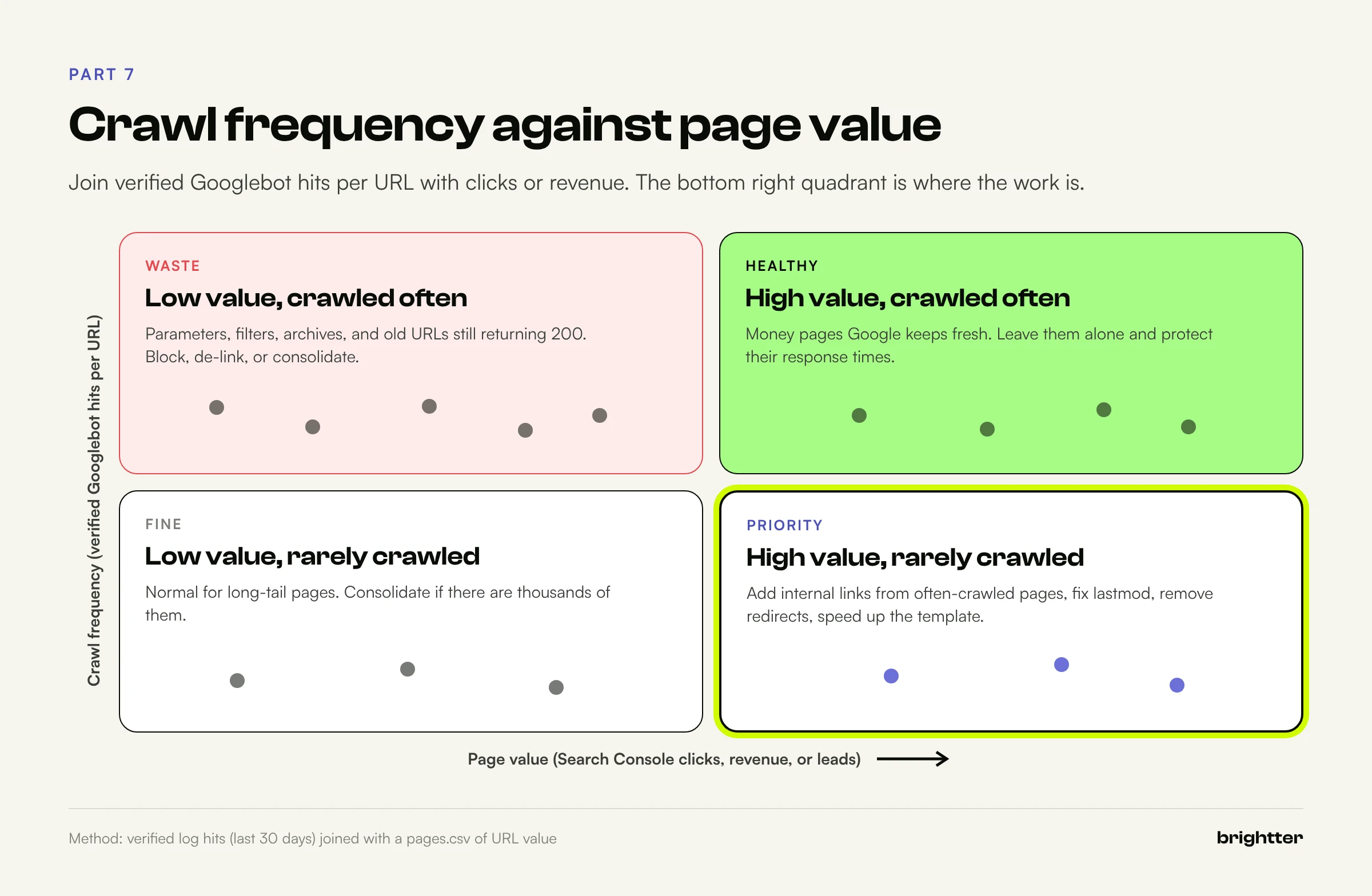
The priority quadrant is high value, rarely crawled: improve internal links from frequently crawled pages, keep the URL in the sitemap with an accurate lastmod, and make sure it returns a fast, clean 200. Low value, crawled often is waste when there is a lot of it, usually parameters, archives, or old URLs still returning 200. A good executive metric is crawl share on valuable URLs: verified Googlebot 200s on URLs in pages.csv divided by all verified Googlebot requests, tracked monthly.
Report 5: Parameter waste
-- R5. Parameter waste: which query keys absorb verified Googlebot requests
WITH q AS (
  SELECT split_part(unnest(string_split(query, '&')), '=', 1) AS param
  FROM vbot WHERE bot = 'Googlebot' AND query <> ''
)
SELECT param, count(*) AS hits,
       round(100.0 * count(*) / (SELECT count(*) FROM vbot WHERE bot = 'Googlebot'), 1)
         AS pct_of_all_googlebot_hits
FROM q GROUP BY param ORDER BY hits DESC LIMIT 20;
Parameters that absorb a large share of Googlebot requests without producing pages you want indexed are candidates for robots.txt rules or removal from internal links. Tracking parameters (utm_*, gclid), session IDs, sort orders, and view modes are the usual suspects.
Report 6: Crawl trap candidates
-- R6. Crawl trap candidates: deep paths, repeated segments, far-future dates
WITH p AS (
  SELECT path, string_split(trim(path, '/'), '/') AS segs, count(*) AS hits,
         list_filter(string_split(trim(path, '/'), '/'), lambda s: len(s) > 2) AS words
  FROM vbot GROUP BY path
)
SELECT path, hits, len(segs) AS depth,
       len(list_distinct(words)) < len(words) AS repeated_segment,
       regexp_matches(path, '/20[3-9][0-9]/') AS far_future_year
FROM p
WHERE len(segs) > 6 OR len(list_distinct(words)) < len(words)
   OR regexp_matches(path, '/20[3-9][0-9]/')
ORDER BY hits DESC LIMIT 50;
The list_filter call ignores short segments such as 01 so ordinary date paths are not flagged as repeats. Tune the depth threshold to your site's hierarchy.
Report 7: Redirects and chains
-- R7. Redirects and chains (needs the Location field from the custom log formats)
WITH r AS (
  SELECT DISTINCT url, status, loc FROM vbot WHERE status IN (301, 302, 307, 308) AND loc <> ''
)
SELECT a.url AS start_url, a.loc AS hop1, b.loc AS hop2,
       CASE WHEN b.url IS NULL THEN 'single hop' ELSE 'chain' END AS kind,
       (SELECT count(*) FROM vbot v WHERE v.url = a.url) AS crawler_hits
FROM r a LEFT JOIN r b ON b.url = a.loc
ORDER BY crawler_hits DESC LIMIT 50;
This needs the Location header, which is why the custom log formats in Part 1 include it.
Report 8: Error patterns
-- R8. Error patterns by first directory and day
SELECT date_trunc('day', ts) AS day,
       '/' || split_part(trim(path, '/'), '/', 1) AS section,
       count(*) FILTER (WHERE status IN (404, 410)) AS not_found,
       count(*) FILTER (WHERE status >= 500 OR status = 429) AS server_errors
FROM vbot GROUP BY ALL
HAVING server_errors > 0 OR not_found > 0
ORDER BY day, server_errors DESC;
A steady trickle of 404s in one section usually means broken internal links or a stale sitemap. A spike of 5xx or 429 on specific days usually means deploys, traffic peaks, or rate limits, and often lines up with a drop in Search Console's crawl requests chart shortly after: the capacity limit reacting.
Report 9: AI crawlers over time
-- R9. AI crawlers and user-triggered fetchers, week by week
SELECT date_trunc('week', ts) AS week, bot, purpose,
       count(*) AS hits, count(DISTINCT url) AS distinct_urls
FROM vbot WHERE purpose LIKE 'ai_%'
GROUP BY ALL ORDER BY week, hits DESC;
Report 10: What people ask assistants about
-- R10. What people ask assistants about: top URLs fetched by user-triggered agents
SELECT url, count(*) AS user_fetches,
       count(*) FILTER (WHERE bot = 'ChatGPT-User')    AS chatgpt,
       count(*) FILTER (WHERE bot = 'Claude-User')     AS claude,
       count(*) FILTER (WHERE bot = 'Perplexity-User') AS perplexity,
       count(*) FILTER (WHERE status <> 200)           AS non_200
FROM hits WHERE purpose = 'ai_user' AND verified IS NOT FALSE
GROUP BY url ORDER BY user_fetches DESC LIMIT 25;
This one includes fetchers without a verification method (such as Claude-User) but excludes failed verification, so treat it as directional. The URLs user-triggered fetchers request are pages people are asking ChatGPT, Claude, and Perplexity about, a demand signal you cannot get anywhere else. A non-200 on any of them is a priority fix.
The same reports in BigQuery
If Logpush writes directly to BigQuery, the reports translate almost one to one. Two examples, assuming my-project.cloudflare_logs.http_requests with EdgeStartTimestamp as a TIMESTAMP:
-- Weekly AI crawler and fetcher activity, last 90 days (BigQuery)
SELECT
  TIMESTAMP_TRUNC(EdgeStartTimestamp, WEEK(MONDAY)) AS week,
  REGEXP_EXTRACT(ClientRequestUserAgent,
    r'(GPTBot|OAI-SearchBot|ChatGPT-User|ClaudeBot|Claude-SearchBot|Claude-User|PerplexityBot|Perplexity-User)') AS bot,
  COUNT(*) AS hits,
  COUNT(DISTINCT ClientRequestPath) AS distinct_paths,
  COUNTIF(EdgeResponseStatus >= 400) AS errors,
  COUNTIF(EdgeResponseStatus = 403 AND OriginResponseStatus = 0) AS blocked_at_edge
FROM `my-project.cloudflare_logs.http_requests`
WHERE EdgeStartTimestamp >= TIMESTAMP_SUB(CURRENT_TIMESTAMP(), INTERVAL 90 DAY)
  AND REGEXP_CONTAINS(ClientRequestUserAgent,
    r'GPTBot|OAI-SearchBot|ChatGPT-User|ClaudeBot|Claude-SearchBot|Claude-User|PerplexityBot|Perplexity-User')
GROUP BY week, bot
ORDER BY week, hits DESC;
For IP verification, load the vendors' prefixes into a small table (operator STRING, cidr STRING) and match with the NET functions:
-- Verify claimed crawlers against published IP ranges (BigQuery)
WITH ranges AS (
  SELECT operator,
         NET.IP_FROM_STRING(SPLIT(cidr, '/')[OFFSET(0)]) AS net,
         CAST(SPLIT(cidr, '/')[OFFSET(1)] AS INT64) AS bits
  FROM `my-project.seo.bot_ranges`
),
claims AS (
  SELECT ClientIP, NET.SAFE_IP_FROM_STRING(ClientIP) AS ip_bytes,
         CASE
           WHEN REGEXP_CONTAINS(ClientRequestUserAgent, r'Googlebot') THEN 'google'
           WHEN REGEXP_CONTAINS(ClientRequestUserAgent, r'GPTBot|OAI-SearchBot|ChatGPT-User') THEN 'openai'
           WHEN REGEXP_CONTAINS(ClientRequestUserAgent, r'PerplexityBot|Perplexity-User') THEN 'perplexity'
         END AS operator,
         COUNT(*) AS hits
  FROM `my-project.cloudflare_logs.http_requests`
  WHERE EdgeStartTimestamp >= TIMESTAMP_SUB(CURRENT_TIMESTAMP(), INTERVAL 30 DAY)
  GROUP BY 1, 2, 3
)
SELECT c.operator, c.ClientIP, c.hits,
       LOGICAL_OR(r.net IS NOT NULL) AS verified
FROM claims c
LEFT JOIN ranges r
  ON r.operator = c.operator
 AND BYTE_LENGTH(r.net) = BYTE_LENGTH(c.ip_bytes)
 AND SAFE.NET.IP_TRUNC(c.ip_bytes, r.bits) = r.net
WHERE c.operator IS NOT NULL
GROUP BY c.operator, c.ClientIP, c.hits
ORDER BY c.hits DESC;
Part 8: Crawl Waste Patterns and How They Look in Logs
Faceted navigation and parameters
Google's faceted navigation documentation describes the problem: crawlers can't know whether a filter URL is useful without fetching it, so they typically access a very large number of them, and time spent on useless URLs is time not spent on new, useful ones. In logs: a high share of verified Googlebot requests on query string URLs (Report 5) that earn almost no clicks (Report 4).
Google's guidance: if filtered URLs don't need indexing, block them in robots.txt or use URL fragments, which Google generally ignores for crawling. If they must be crawlable, use the standard & separator, keep filter order consistent, avoid duplicate filters, and return 404 when a combination has no results.
# robots.txt: keep crawlers out of sort orders, view modes, and session URLs
User-agent: *
Disallow: /*?*sort=
Disallow: /*?*view=
Disallow: /*?*sessionid=
Robots.txt blocks crawling, not indexing. For parameters that already have indexed URLs, consolidate with canonicals and remove internal links first, then block.
Crawl traps
A crawl trap generates an effectively infinite URL set: calendars that link to the next month forever (/events/2031/07/), relative link bugs that stack segments (/blog/tag/seo/tag/seo/), linked internal search results, session IDs appended to links, and unlimited facet combinations. In logs, a trap is a section whose distinct URL count keeps growing week over week while its clicks stay flat (Report 6).
Redirect chains
Google's crawlers follow up to 10 redirect hops by default, and every hop is a separate request; Search Console's Crawl Stats counts each request in a server-side chain separately. Point the first URL straight at the final destination and update internal links so crawlers stop requesting old URLs. AI crawlers are worth checking here: in the Vercel and MERJ study (December 2024) covered in the first article in this series, ChatGPT's crawlers spent 14.4 percent of their fetches on redirects.
404s and soft 404s
A 404 or 410 for a page that is really gone is correct. Google treats all 4xx codes except 429 the same way: the URL is treated as nonexistent, and its crawl frequency gradually decreases. Don't "fix" real 404s by redirecting everything to the homepage; that creates soft 404s, which Google's guide says keep getting crawled. Find them as 200 responses far smaller than their section's typical size:
-- Soft 404 candidates: 200 responses far smaller than the section's median size (DuckDB)
WITH t AS (
  SELECT url, '/' || split_part(trim(path, '/'), '/', 1) AS section, bytes
  FROM vbot WHERE bot = 'Googlebot' AND status = 200
),
m AS (SELECT section, median(bytes) AS median_bytes FROM t GROUP BY section)
SELECT t.url, t.section, t.bytes, m.median_bytes
FROM t JOIN m USING (section)
WHERE t.bytes < 0.25 * m.median_bytes
GROUP BY ALL ORDER BY t.bytes LIMIT 100;
5xx and 429 bursts
Server errors are the one crawl problem that reduces crawling everywhere at once. Google treats 429 like 5xx: a signal of overload that slows crawling across the hostname. A rate limiter tuned for scrapers that also throttles verified Googlebot is a crawl budget problem by definition. Check Report 2 for 429s on verified search crawlers, and exclude verified bots you want from rate limiting rules.
Part 9: Tracking AI Crawlers and User-Triggered Fetchers Over Time
AI crawler traffic is volatile. Vendors launch agents and change crawl rates, and your own changes (a firewall rule, a robots.txt edit, a CDN default) can cut a crawler off overnight without anyone noticing. A weekly series by purpose (Report 9) is the simplest defense. For each agent, track:
- Hits and distinct URLs. One crawler hammering a few URLs inflates hits; distinct URLs show coverage.
- Status mix. A crawler that suddenly gets mostly 403s is almost always a firewall or bot setting.
- Top sections. Where each crawler spends time compared with where you want it. A crawler that never reaches your service pages has a linking or access problem.
- robots.txt fetches. A declared crawler that keeps requesting disallowed paths is worth reporting to its vendor.
- New user agents. The
other-botbucket is where new AI agents usually appear first.
| Purpose | Agents | Question it answers |
|---|---|---|
| AI training | GPTBot, ClaudeBot, CCBot | Is our content available to future models (if we allow it)? |
| AI search indexing | OAI-SearchBot, Claude-SearchBot, PerplexityBot | Can AI search features find and cite our pages? |
| User-triggered fetching | ChatGPT-User, Claude-User, Perplexity-User | What are people asking assistants about, and can the assistant read the answer? |
User-triggered fetches deserve special attention. A ChatGPT-User request means a person, at that moment, asked something that led ChatGPT to your URL. If it gets a 403 from bot protection, a cookie wall, or a redirect to a country selector, the assistant answers without you. Treat a non-200 on a user-triggered fetch as an incident. And because most AI fetchers do not execute JavaScript, a 200 that delivers an empty application shell is still a failed fetch; run the first article's raw HTML word count test on the pages in Report 10.
Connect crawling to visibility
Crawling is a precondition for AI visibility, not a measure of it. Retrieval is only the first gate in the pipeline described in How AI Engines Decide What to Cite. Pair the weekly crawl series with prompt-based measurement, such as the method in our guide on how to measure AI search visibility, and look for changes in one that precede changes in the other. A drop in OAI-SearchBot coverage followed by fewer ChatGPT citations is a pattern only the combination reveals.
On Cloudflare, AI Crawl Control is a useful cross-check: activity by crawler, per-crawler allow or block policies, and robots.txt compliance tracking. It does not replace URL-level analysis, because you cannot join it with page value.
Part 10: Search Console's Crawl Stats Report as a Complement
The Crawl Stats report (under Settings) is Google's own summary of how it crawls your site. It shows total crawl requests, download size, and average response time, broken down by response, file type, purpose, and Googlebot type, plus host status for robots.txt fetching, DNS resolution, and server connectivity over the past 90 days. Purpose splits into discovery (a URL never crawled before) and refresh (a recrawl of a known page).
Its limits, per Google's help documentation: it is available only for root-level properties; counts are for the actual URLs requested, not canonicals; each request in a server-side redirect chain counts separately; example URLs are a representative sample; and Google notes that it "currently reports most crawl requests, but some requests might not be counted."
Compare its daily totals with verified Googlebot per day from Report 1:
| What you see | Likely explanation |
|---|---|
| Logs show far more Googlebot than Crawl Stats | Fake Googlebots counted as real, or several properties in one log |
| Crawl Stats shows far more than logs | Edge-cached responses missing from origin logs, missing server files, or other hosts in the property |
| Crawl Stats response time rising while logs look fast | Time spent outside your server (DNS, TLS, CDN) or on other hosts |
| Host status problems with no matching log errors | DNS or connectivity failures never reach your server |
That last row is why you need both. Logs record requests that arrived. Search Console also records the ones that failed to arrive.
Part 11: Common Mistakes in Log Analysis
Trusting the user agent. Every report built on unverified user agents mixes real crawlers with impostors. Verify first.
Reading origin logs behind a CDN. Cached responses never reach the origin, so origin logs undercount crawlers. Without the real client IP restored, every request looks like the CDN and verification fails for all of it.
Too short a window. Seven days can miss low-frequency crawling and make a normal weekly cycle look like a problem. Use at least 30 days, 90 when you can.
Treating every site as a crawl budget site. On a 400-page site, "Googlebot only crawled 30 percent of our pages this week" is usually normal. Focus small sites on errors, redirects, and discovery of new pages.
Counting hits instead of URLs. One URL fetched 2,000 times and 2,000 URLs fetched once look identical in a hit count.
Ignoring edge status codes. A WAF challenge never reaches your origin. In origin logs, a blocked crawler simply seems to have stopped visiting.
Blocking AI crawlers by accident. Firewall presets and CDN defaults can block AI crawlers without anyone deciding to; Cloudflare began blocking known AI crawlers by default for newly onboarded domains in July 2025. Decide per agent and purpose, then confirm in the logs.
Using stale IP lists. Google moved and expanded its files, OpenAI publishes four, and update schedules vary widely. Load lists fresh, follow redirects, include IPv6, and keep DNS verification as a fallback.
Using robots.txt to fix indexing. Robots.txt stops crawling, not indexing, and Google cannot see a noindex on a page it may not fetch.
No retention plan. Logpush cannot backfill, and log rotation deletes old files on schedule. Without retention, the first month of any analysis is spent waiting for data.
Part 12: A Prioritized Plan
This sequence front-loads the steps that make later numbers trustworthy.
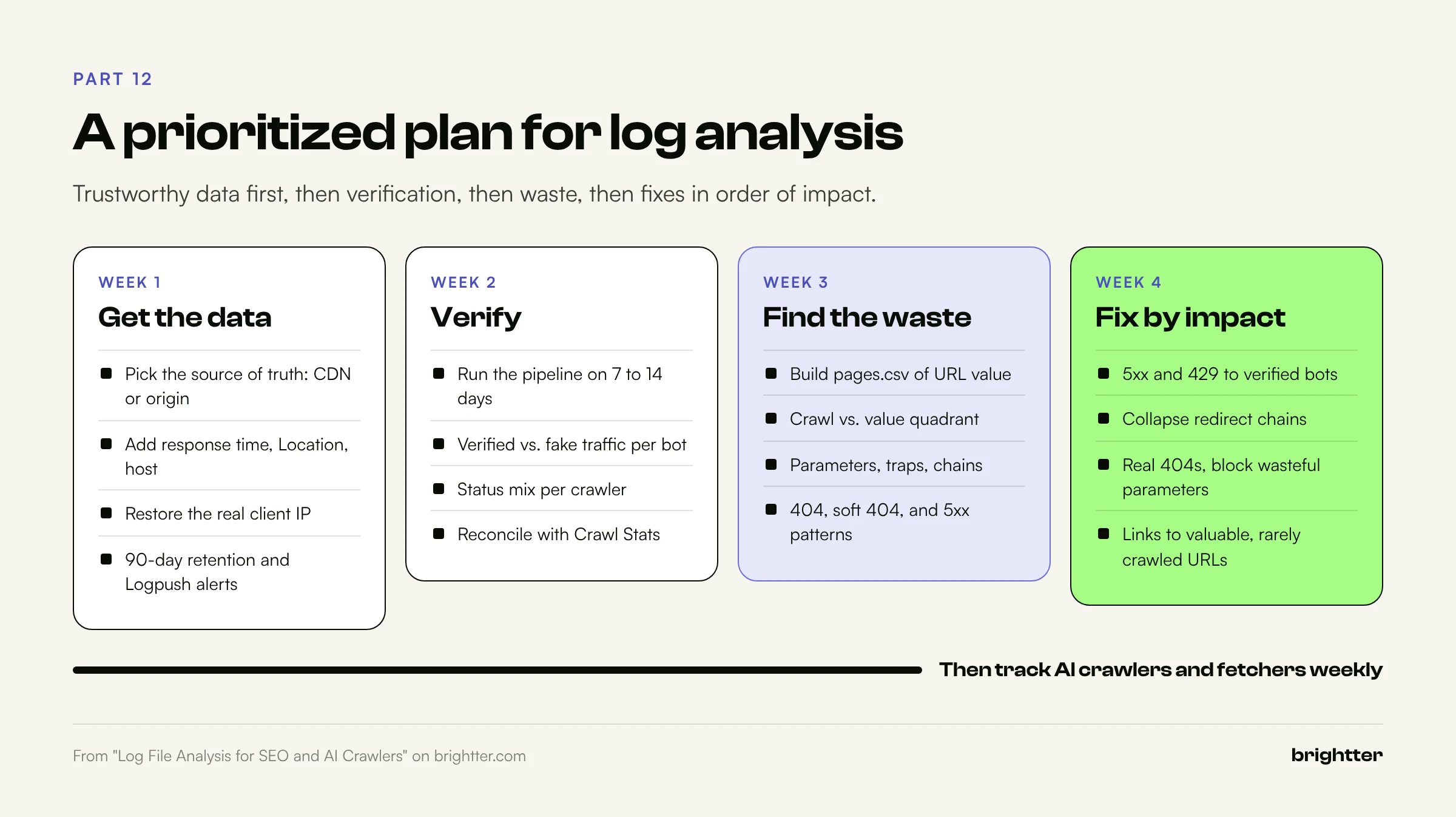
Week 1: Get complete, trustworthy data.
- Choose the source of truth: CDN logs if a CDN serves your HTML, origin logs otherwise. On Webflow or similar platforms, set up Cloudflare O2O with Logpush or the Worker from Part 2.
- Add response time,
Location, and host to origin log formats, and restore the real client IP behind any proxy. - Set retention to at least 90 days and turn on Logpush health alerts.
- Check WAF, bot protection, and robots.txt for unintended blocks of crawlers you want.
Week 2: Verify and baseline.
- Run the pipeline on the first 7 to 14 days of data.
- Produce Reports 1 and 2, and compare verified Googlebot per day with Crawl Stats.
- Agree with your security team on how to handle impostor traffic.
Week 3: Find the waste.
- Build
pages.csvfrom Search Console clicks, your sitemap, and template rules. - Run Reports 4 through 8.
- List the top five sources of wasted Googlebot requests and the top 20 valuable URLs that are rarely crawled.
Week 4: Fix in order of impact.
- Fix 5xx and 429 responses served to verified crawlers, because they reduce crawling everywhere.
- Collapse redirect chains and update internal links that point at redirects.
- Return real 404s or 410s for removed content and fix soft 404 templates.
- Block or de-link wasteful parameters and close crawl traps.
- Strengthen internal links and sitemap
lastmodfor valuable, rarely crawled URLs. - Make sure the pages user-triggered AI fetchers request most return clean 200s with complete server-rendered HTML.
Ongoing. Weekly: Reports 9 and 10 and any new automated user agents. Monthly: crawl share on valuable URLs, Crawl Stats reconciliation, and an IP list refresh. After every deploy or CDN change: status mix per verified crawler for 48 hours.
Conclusion: Measure the Machines Directly
For most of SEO's history, crawling was inferred from indexing reports, ranking changes, and the occasional URL Inspection result. Logs replace inference with evidence: which pages each crawler requests, what it receives, how often it returns, and whether it is who it claims to be.
That evidence matters more now that a growing share of the machines reading your site belong to AI companies that offer no reporting at all. Your logs are the only place where GPTBot, ClaudeBot, PerplexityBot, and the fetchers acting for real people leave a complete trail. Start with one week of CDN or server logs and Report 1. The share of traffic that fails verification, and the status codes your most important crawlers receive, will tell you how urgent the rest of this plan is.
Need help reading your logs? Brightter, Inc. runs technical SEO and GEO audits that include log file analysis across origin and CDN data, crawler verification, crawl versus value mapping, and AI crawler access reviews, delivered as a prioritized fix list your developers can act on. As a Webflow Certified Partner that also works with WordPress, Cloudflare, and custom stacks, we set up the logging as well as the analysis. Talk to our team about an audit.