.avif)

Design Tokens from Figma to Webflow: Building a Brand System That Survives Scale
Key Takeaways
- A design token is a named design decision stored as data: one value, one name, one owner. Brand systems break at scale because the same decision gets copied into Figma, Webflow, product code, and slide templates, and the copies drift apart.
- Use three tiers. Primitives hold raw values (
color.indigo.700), semantic tokens hold intent (color.text.brand), and component tokens hold local decisions (button.primary.background). Pages and components should almost never touch primitives directly. - The format question is settled. The W3C Design Tokens Community Group published its first stable specification, version 2025.10, on October 28, 2025, with a Color module and a Resolver module alongside the Format module. Figma, Style Dictionary, Tokens Studio, and Terrazzo all work with it.
- Modes do the heavy lifting. Figma Variables and Webflow Variables both support modes, so light, dark, and multi-brand values live on the same token names. Figma caps modes per collection by plan (10 on Professional, 20 on Organization), and extended collections for multi-brand systems are Enterprise only.
- Getting tokens out of Figma is now easier: Figma rolled out native DTCG JSON import and export in December 2025. The Variables REST API still requires an Enterprise plan, so most teams automate from exported files or a plugin.
- Style Dictionary 5 (5.7.0 at the time of writing) reads DTCG 2025.10 color objects natively and turns one token set into CSS custom properties, Webflow variables, and JSON for other tools. This guide includes a working build config, a Figma exporter, and a Webflow sync script.
- Put accessibility in the pipeline, not in a review meeting. A short script that checks every foreground and background token pair against WCAG 2.2 contrast minimums, in every brand and every mode, catches regressions before anyone ships them.
Introduction: Why Brand Systems Break at Scale
Most brand systems don't fail all at once. They erode.
A designer darkens the primary blue in Figma. A developer hardcodes #4C50B8 because the variable was hard to find. A sales deck is built from last year's template. A Webflow page gets a one-off gray class. Six months later the company has four primary blues, eleven grays, and three type scales, and nobody can say which is correct.
Nobody did anything unreasonable. The problem is structural: the brand's design decisions exist as copies, and copies drift. Design tokens fix the structure. You store each decision once, give it a name that describes its purpose, and generate every tool's version from that source. Change it once, and the change reaches every surface through a pipeline you control.
That idea isn't new (the term came out of the team behind Salesforce's Lightning Design System in the mid 2010s), but three recent changes make it practical for teams of almost any size:
- The format stabilized. The Design Tokens Community Group (DTCG) published its first stable specification in October 2025.
- Figma caught up. Figma Variables support collections, modes, scoping, aliasing, and native DTCG import and export.
- Webflow added real variables. Webflow Variables support collections, theme and responsive modes, aliases, and
clamp().
This guide covers token tiers and naming, each token category (including fluid type), modes, the Figma architecture, the mapping to Webflow Variables and Client-First, a working Style Dictionary pipeline, automated WCAG 2.2 contrast checks, governance, templates, failure patterns, and a prioritized plan. If you're still defining the brand itself, start with our guide on how to build a scalable brand system. This article is about making that system hold up in production.
Part 1: What Design Tokens Are (and What They Are Not)
A design token is a name paired with a value, plus metadata. The name describes a decision (color.text.secondary), the value is what it currently resolves to (#5C5F59), and the metadata says what kind of value it is and, optionally, what it's for. Three properties make something a token rather than just a variable:
- It is platform-neutral. It's stored as JSON, and each platform gets a generated representation.
- It has a stable name. Names are the contract between design and engineering. Values change freely; names change rarely.
- It can reference other tokens.
color.text.brandpoints atbrand.color.700, which points atcolor.indigo.700. That chain lets a brand switch or a dark mode change hundreds of usages at once.
Tokens aren't a component library or a brand book. They're the layer underneath both: the single place where "primary indigo" is defined as a value.
The DTCG format in 2026
Before 2025, every token tool had its own JSON dialect. On October 28, 2025, the Design Tokens Community Group announced the first stable version of the specification, 2025.10. It's published as a set of Community Group Final Reports: the Format module (the file structure, types, and aliases), the Color module (modern color spaces), and the Resolver module (how to combine token sets into themes and modes). Style Dictionary, Tokens Studio, and Terrazzo are named as reference implementations, and the announcement lists Figma, Penpot, Sketch, Framer, Supernova, Knapsack, and zeroheight as supporting or implementing it.
One nuance: a Community Group report is not a W3C Recommendation and isn't on the standards track. The tools have converged on it anyway, but don't call it a W3C standard.
The essentials of the format:
- A token is any JSON object with a
$value. Optional properties are$type,$description,$extensions(vendor metadata), and$deprecated(trueor a string explaining what to use instead). - Groups are plain objects; a
$typeon a group is inherited by the tokens inside it. - Aliases use curly braces:
"{color.indigo.700}"resolves to that token's$value. The spec also requires tools to support JSON Pointer references via$reffor reaching into sub-values. - Dimensions are objects, not strings:
{"value": 16, "unit": "px"}. The only allowed units arepxandrem. Durations work the same way withmsors. - Colors are objects with a
colorSpace,components, optionalalpha, and an optionalhexfallback. Display P3, OKLCH, and the other CSS Color Module 4 spaces are supported. - The recommended file extension is
.tokens.jsonand the media type isapplication/design-tokens+json.
Here is a short primitive file in the 2025.10 format:
{
  "color": {
    "$type": "color",
    "indigo": {
      "700": {
        "$value": {
          "colorSpace": "srgb",
          "components": [0.298, 0.3137, 0.7216],
          "alpha": 1,
          "hex": "#4c50b8"
        },
        "$description": "Primary brand indigo. Passes 4.5:1 with white text."
      }
    }
  },
  "space": {
    "$type": "dimension",
    "4": { "$value": { "value": 16, "unit": "px" } }
  },
  "duration": {
    "$type": "duration",
    "fast": { "$value": { "value": 120, "unit": "ms" } }
  }
}
If you've used older Style Dictionary files with "value": "#4c50b8" strings, note the difference. Developers testing Figma's native importer have reported that it rejects plain hex strings for colors and expects the object form, so update older files before importing them.
Why brand systems break without tokens
Drift has predictable sources:
- Untraceable values. A hex code says nothing about why it's there, and search-and-replace misses near matches (
#4C50B8versus#4D51B9). - Names that describe appearance.
blue-darkbreaks when the brand moves to green or dark mode needs a light value in that slot.text-brandsurvives both. - Parallel definitions. Figma, the Webflow style guide, and the product theme each define "primary."
- No owner, so new grays appear whenever someone needs one.
- No tests, so nothing fails when a color change breaks contrast.
Tokens address the first four by design. The fifth needs a pipeline, which Parts 7 and 8 build.
Part 2: Token Tiers: Primitive, Semantic, Component
Every mature token system separates what values exist from what they're used for. The common way to do that is three tiers.
| Tier | Answers | Example name | Example value | Who uses it |
|---|---|---|---|---|
| Primitive (also called base, global, or core) | What values does the brand have? | color.indigo.700 | #4c50b8 | Only other tokens |
| Semantic (also called alias or system) | What is this value for? | color.text.brand | {brand.color.700} | Pages, layouts, utility classes, most components |
| Component | What does this specific component use? | button.primary.background | {color.background.brand} | One component and its variants |
Each tier references the one below it. Pages and components consume semantic tokens. Primitives are an implementation detail.

Primitives: the palette, not the design
Primitives are every raw value the brand allows, named after what they are: color.neutral.600, space.4, radius.md, duration.fast.
- Keep ramps sparse. Unused steps invite drift. Add a step when a semantic token needs one.
- Use numeric steps for scales. They sort correctly and leave room to insert values. T-shirt sizes work for short lists like radius.
- Hide primitives from consumers. Hide the collection from publishing in Figma, and lint for primitive usage in code.
Semantic tokens: where the design lives
Semantic tokens describe intent. This tier changes between modes and brands while names stay the same. A convention that scales is category.property.role.state, with parts left out when they don't apply:
color.background.primary,color.background.secondary,color.background.inverse,color.background.brandcolor.text.primary,color.text.secondary,color.text.on-brand,color.text.dangercolor.border.subtle,color.border.strong,color.border.focusspace.inline.sm,space.stack.md,space.section.lg,space.guttermotion.duration.feedback,motion.easing.enter
Three rules matter more than the exact convention:
- Never put a color name in a semantic name. Finsweet's Client-First documentation makes the same point for Webflow.
- Pair foreground and background roles. Every background that can hold text gets a matching
on-token (color.background.brandandcolor.text.on-brand). Part 8 tests those pairs. - Keep the vocabulary small. Twenty to forty semantic color tokens cover most marketing sites.
Component tokens: optional, local, and disciplined
Component tokens (button.primary.background, card.padding) capture decisions that belong to one component and usually alias semantic tokens. They become a problem when every component gets a full set "just in case." Create one only when the value differs from its semantic default, or when a brand or mode must override it independently. For a Webflow marketing site, buttons, cards, form fields, and navigation are usually enough.
Part 3: The Token Categories
Color
Primitive ramps cover neutrals, each brand color, and success, warning, and danger. Build them in a perceptual space such as OKLCH, where equal lightness steps look equal; the 2025.10 Color module lets you keep oklch as the source with a hex fallback.
Semantic color work is choosing which ramp step each role points to in each mode, driven by contrast. In the example system, color.text.secondary points at neutral.600 in light mode (5.94:1 on the page background) and neutral.400 in dark mode (7.10:1). Put alpha in values, not names (color.background.scrim), and treat color.border.focus as first-class: it needs 3:1 non-text contrast (WCAG success criterion 1.4.11) on every background it can sit on.
Typography and fluid type with clamp()
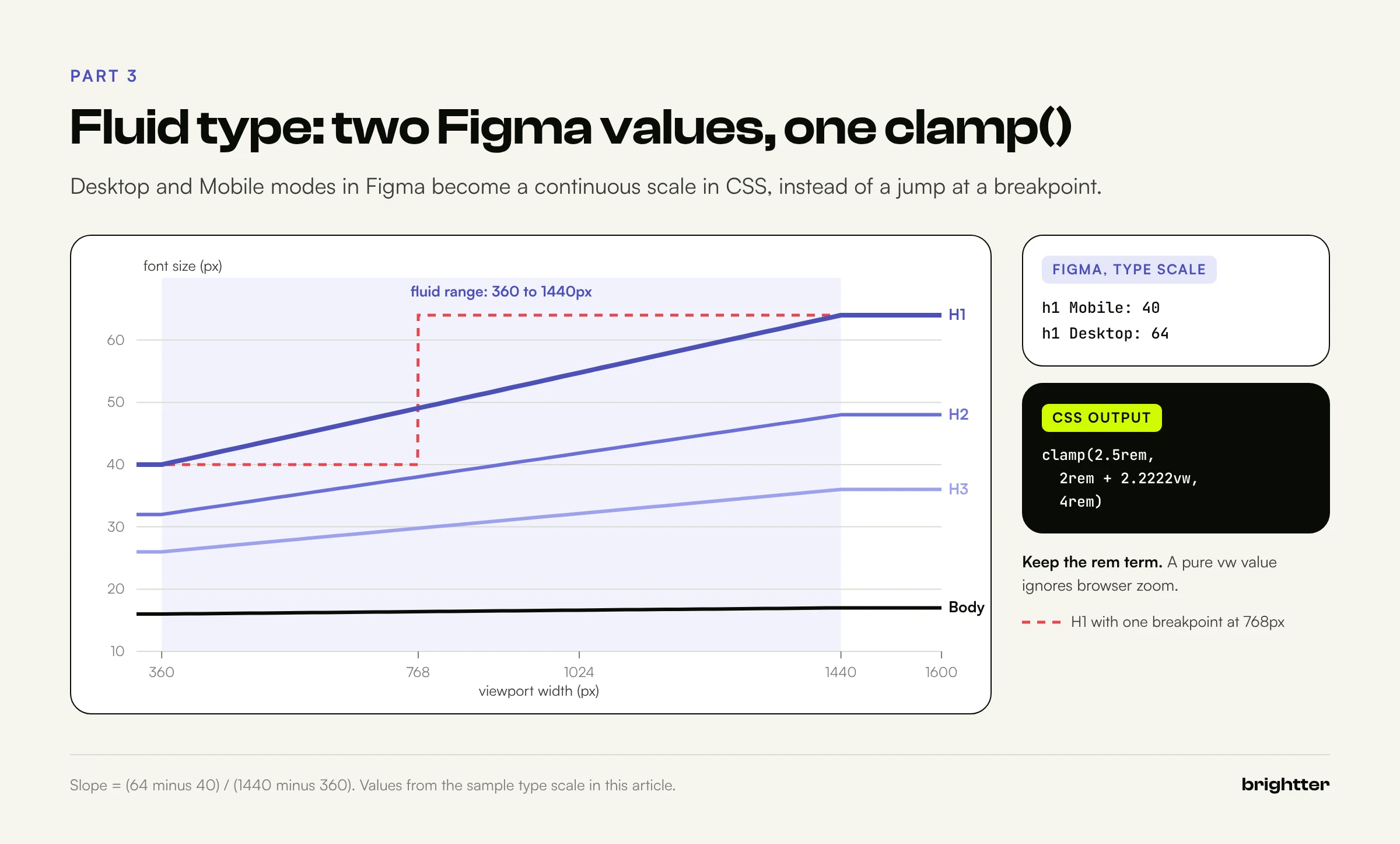
DTCG has types for families, weights, and sizes, plus a composite typography type. Sizes are where systems get stuck: one size per heading is wrong on mobile or desktop, and per-breakpoint sizes create jumps. The better answer is fluid type with CSS clamp():
--font-size-h1: clamp(2.5rem, 2rem + 2.2222vw, 4rem);
Never smaller than 40px, never larger than 64px, and linear in between. The middle term is a line through two points. For 40px at a 360px viewport and 64px at 1440px:
- Slope = (64 minus 40) divided by (1440 minus 360) = 0.02222. As a
vwvalue, that's 2.2222vw (because 1vw is 1 percent of the viewport). - Intercept = 40 minus (0.02222 times 360) = 32px = 2rem.
- Check at 1440px: 32 plus (0.02222 times 1440) = 64px. Correct.
Three details matter:
- Keep a
remterm in the preferred value. A purevwvalue doesn't respond to browser zoom, which can fail WCAG success criterion 1.4.4 (Resize Text). - Scale headings more than body text. H1 goes from 40px to 64px; body text only from 16px to 17px.
- Generate the math. Figma can't express
clamp(), so store the type scale in a collection with Desktop and Mobile modes and let the build in Part 7 turn each pair into a fluid token.
Spacing
Use a base-4 or base-8 primitive scale (space.1 = 4px through space.10 = 128px) and semantic roles for how space is used: inline (within a row), stack (within a column), section, and gutter. Output rem so spacing respects user font settings. Section spacing suits Webflow's responsive modes (Part 6).
Radius
Radius is small but brand-defining. Keep primitives short (none, sm, md, lg, xl, pill) and expose roles like brand.radius.control and brand.radius.surface, which multi-brand systems usually vary. Keep radius in px; corners shouldn't grow with font size.
Elevation
DTCG's composite shadow type has color, offsetX, offsetY, blur, spread, and an optional inset flag:
{
  "shadow": {
    "$type": "shadow",
    "raised": {
      "$value": {
        "color": { "colorSpace": "srgb", "components": [0.03, 0.05, 0.02], "alpha": 0.12 },
        "offsetX": { "value": 0, "unit": "px" },
        "offsetY": { "value": 2, "unit": "px" },
        "blur": { "value": 8, "unit": "px" },
        "spread": { "value": 0, "unit": "px" }
      }
    }
  }
}
Shadows need mode-specific values: 12 percent opacity disappears on near-black, so dark mode needs a stronger shadow or a lighter surface. Keep three or four levels, named by purpose (raised, overlay).
Motion
Motion is the most neglected category. DTCG covers it with duration and cubicBezier (four numbers, x coordinates between 0 and 1). A minimal system:
| Token | Value | Use |
|---|---|---|
motion.duration.feedback | 120ms | Hover, press, toggle |
motion.duration.transition | 200ms | Menus, tabs, accordions |
motion.duration.emphasis | 320ms | Modals, page-level transitions |
motion.easing.standard | cubic-bezier(0.2, 0, 0, 1) | Most movement |
motion.easing.enter | cubic-bezier(0, 0, 0.2, 1) | Elements appearing |
Tokens also give you one place to honor reduced-motion preferences:
@media (prefers-reduced-motion: reduce) {
  :root {
    --motion-duration-transition: 0s;
    --motion-duration-emphasis: 0s;
  }
}
That works only if no transition hardcodes 0.3s.
Part 4: Modes: Light, Dark, and Multi-Brand
A mode is an alternate set of values for the same token names: light and dark, brands, high-contrast variants, densities, or the Desktop and Mobile type scale. The key decision is which dimension each mode set varies along. Mixing brand and theme into one collection needs a mode per combination, and that grows multiplicatively: five brands, two themes, and a high-contrast variant is fifteen modes. Keep them orthogonal instead:
- A Brand collection, one mode per brand, mapping roles like
brand.color.700andbrand.radius.controlto primitives. - A Theme collection with Light and Dark modes, whose semantic tokens alias neutrals or brand tokens.
- Optionally, a Viewport or Density collection.
color.text.brand points at brand.color.700 in Light and brand.color.300 in Dark, and brand.color.700 resolves differently per brand, so every combination falls out automatically.

Multi-brand in Figma: extended collections
Figma's extended collections let you extend a parent collection into one collection per brand. Extensions stay linked, so parent changes flow through unless a brand has overridden the value. They're Enterprise only, and you can't add variables or modes in an extension; descriptions and scopes are edited on the parent. For colors, color and opacity count as one unit, so overriding opacity also detaches the color from parent updates. On other plans, the Brand collection pattern above does the same job.
Modes in CSS: the cascade trap
In CSS, light values sit on :root and dark values override them under [data-theme="dark"]. One trap catches most hand-built systems: a custom property that references another is resolved on the element where it's declared, and the computed value is what's inherited. Given:
:root {
  --color-background-brand: var(--brand-color-700);
  --button-primary-background: var(--color-background-brand);
}
[data-theme="dark"] {
  --color-background-brand: var(--brand-color-300);
}
a button inside a dark section still gets the light brand color, because --button-primary-background was resolved on :root. The fix is to re-declare every dependent token, including component tokens, inside each mode block. The build in Part 7 does this automatically.
Modes in Webflow
Webflow has two flavors. Theme modes are applied manually to an element (the Body, a section) through the Selector field dropdown in the Style panel. Responsive modes apply automatically at a breakpoint (tablet, mobile landscape, or mobile portrait). Webflow allows one mode per breakpoint within a collection, and unset values fall back to the Base mode. Its help center notes that some child elements don't inherit mode values (font color from the Body, for example); linking the child's style directly to the variable fixes it, which Client-First utility classes do anyway.
Part 5: Building the Variable Architecture in Figma
Figma Variables come in four types (color, number, string, and boolean), live in collections with modes, and can alias each other across collections. A layout that maps cleanly to the tiers:
| Figma collection | Modes | Contents | Published? |
|---|---|---|---|
| Primitive | Default | Color ramps, spacing scale, radius scale, font families, weights | Hidden from publishing |
| Brand | Core, Alt (one per brand) | brand/color/*, brand/font/*, brand/radius/* aliasing primitives | Hidden or published, depending on whether designers switch brands |
| Theme | Light, Dark | Semantic color, spacing, shadow and motion roles | Published |
| Type scale | Desktop, Mobile | font-size/h1 through font-size/small | Published |
| Component | Default | Button, card, input, navigation tokens | Published |
Names use slashes for grouping (color/text/primary), and the exporter turns each slash into a level of nesting.
Mode limits and inheritance
Figma's plan comparison lists up to 10 modes per collection on Professional and up to 20 on Organization, with extended collections on Enterprise. Ten is plenty for orthogonal collections. Objects default to Auto and take their parent's mode; with no ancestor mode set, they use the collection's default (left-most) mode. Set modes at the frame or page level and let components inherit.
Scoping: make the right variable the easy one
Scoping controls which property pickers show a variable. It's the most effective way to keep designers on semantic tokens, because the wrong variables aren't in the menu.
| Token group | Figma scope (API name) |
|---|---|
color/background/* | Frame fill, Shape fill (FRAME_FILL, SHAPE_FILL) |
color/text/* | Text fill (TEXT_FILL) |
color/border/* | Stroke (STROKE_COLOR) |
space/* | Gap, Width and height (GAP, WIDTH_HEIGHT) |
radius/* | Corner radius (CORNER_RADIUS) |
font-size/* | Font size (FONT_SIZE) |
font/weight/* | Font weight (FONT_WEIGHT) |
font/family/* | Font family (FONT_FAMILY) |
| Primitives | None (no scopes), so they only appear when aliasing |
Scopes also help the export: Figma number variables don't say whether a value is pixels or a font weight, so the exporter in Part 7 reads the scopes to choose a DTCG type.
Code syntax, descriptions, and text styles
Set each variable's Web code syntax to the generated custom property (var(--color-text-primary)) so Dev Mode shows developers the token, not a raw value. Use descriptions for usage guidance ("Captions and meta text. Not for brand backgrounds"). Then build text styles whose font properties are bound to the Type scale and Primitive variables, so switching a frame from Desktop to Mobile resizes every heading.
Part 6: Mapping Tokens to Webflow Variables and Client-First
As a Webflow Certified Partner, Brightter, Inc. builds Webflow sites on Finsweet's Client-First conventions with variable-based brand tokens, and the mapping below is the one we use. If you're migrating an existing Figma design into Webflow, our Figma to Webflow guide covers the broader build process.
What Webflow Variables support
Webflow supports five variable types: color, size, font family, number, and percentage. Size variables accept px, em, rem, ch, and viewport units. Variables can also hold custom values using calc(), clamp(), min(), max(), and color-mix(), with var() references inside, so a size variable can hold clamp(2.5rem, 2rem + 2.2222vw, 4rem) directly. Also relevant:
- Collections each have their own modes, but cross-collection aliases can only reach the other collection's base mode value. Aliases must match types.
- Variable modes launched January 14, 2025. Libraries share collections, including modes, across sites in a Workspace.
- Each variable has a CSS name: the Designer API's
getCSSName()returns--blue-500for a variable namedblue-500. Webflow warns that names for non-base collections are changing, so checkgetCSSName()before using one in custom code.
Client-First conventions that matter for tokens
Finsweet's Client-First (2.1 is the current public release, with a version 3 waitlist open) shapes the mapping in three ways:
- Utility classes use hyphens and no underscore (
padding-global,padding-section-medium,heading-style-h2,text-size-large,text-color-secondary). Custom classes use one underscore between component and element (pricing_card-header), and combo classes useis-(button is-secondary). For more on class strategy, see our technical guide to classes in Webflow. - Base colors versus semantic colors. Client-First separates primitives (a "Base Color" prefix) from semantic variables named by element, style, and identifier, and recommends against linking primitives to classes.
- Semantic variables become utility classes. Pages use classes, classes use semantic variables, and those alias primitives.
Client-First's variables guidance covers color only; its docs say size variables were left out because Webflow lacked breakpoint support. Responsive modes changed that: a spacing collection with a Mobile portrait mode can now drive padding-global and padding-section-* without media query code.
The mapping table
| Token (DTCG) | CSS custom property | Webflow variable | Client-First class |
|---|---|---|---|
color.text.primary | --color-text-primary | Color, color-text-primary | text-color-primary |
color.text.secondary | --color-text-secondary | Color, color-text-secondary | text-color-secondary |
color.background.primary | --color-background-primary | Color, color-background-primary | background-color-primary |
color.background.inverse | --color-background-inverse | Color, color-background-inverse | background-color-alternate |
font-size.h1 | --font-size-h1 | Size, custom clamp() | heading-style-h1 |
font-size.large | --font-size-large | Size, custom clamp() | text-size-large |
space.gutter | --space-gutter | Size, space-gutter (responsive mode) | padding-global |
space.section.md | --space-section-md | Size, space-section-md (responsive mode) | padding-section-medium |
button.primary.background | --button-primary-background | Color, alias of color-background-brand | button |
brand.radius.control | --brand-radius-control | Size, brand-radius-control | Used inside button, form classes |
Three decisions behind it:
- Use the same kebab-case names as the CSS output. In the default collection,
color-text-primaryproduces--color-text-primary, so custom code works across Webflow and the product. - Map tokens to classes, not classes to tokens.
background-color-alternateis a fine class, but the token should be the precisecolor.background.inverse. - Keep alias chains inside one collection when they span modes, because cross-collection aliases only reach the base mode.
Getting tokens into Webflow
Manual entry works for 30 to 50 variables. The Variable Importer Marketplace app converts pasted CSS custom properties into variables, which suits a first import. For ongoing sync that keeps aliases and writes mode values, use a Designer Extension. The build in Part 7 writes a manifest (dist/webflow/core.json) with each token's value or alias target and any Dark override; this sketch applies it with the Designer API:
// webflow-sync.js: runs inside a Webflow Designer Extension (Designer API).
// Creates or updates variables from dist/webflow/<brand>.json, keeps aliases as
// aliases, and writes Dark values into a "Dark" mode. Test on a staging site first.
const MANIFEST_URL = 'https://tokens.example.com/webflow/core.json';

function toSize(css) {
  const m = /^(-?[\d.]+)(px|rem|em|vw|vh|ch|%)?$/.exec(css);
  if (css === '0') return { unit: 'px', value: 0 };
  if (m && m[2] && m[2] !== '%') return { unit: m[2], value: parseFloat(m[1]) };
  return { type: 'custom', value: css }; // clamp(), calc(), min(), max()
}

async function sync() {
  const rows = await (await fetch(MANIFEST_URL)).json();
  const collection = await webflow.getDefaultVariableCollection();
  const dark = (await collection.getVariableModeByName('Dark')) ?? (await collection.createVariableMode('Dark'));
  const byName = new Map();

  const valueFor = (literal, ref, type) => {
    if (ref) {
      const target = byName.get(ref);
      if (!target) throw new Error(`Alias target ${ref} must be synced first`);
      return target;
    }
    return type === 'size' ? toSize(literal) : literal;
  };

  for (const row of rows) { // rows arrive primitives first, so alias targets exist
    const base = valueFor(row.value, row.ref, row.type);
    let v = await collection.getVariableByName(row.name);
    if (!v) {
      const create = { color: 'createColorVariable', size: 'createSizeVariable', font: 'createFontFamilyVariable' }[row.type];
      v = await collection[create](row.name, base);
    } else {
      await v.set(base);
    }
    if (row.dark) await v.set(valueFor(row.dark.value, row.dark.ref, row.type), { mode: dark });
    byName.set(row.name, v);
  }
  await webflow.notify({ type: 'Success', message: `Synced ${rows.length} variables` });
}
sync().catch((e) => webflow.notify({ type: 'Error', message: String(e.message ?? e) }));
Treat it as a starting point: run it on a staging site, check how font stacks land (they may need trimming to the family name), and add a dry-run mode before it writes to production.

Part 7: The Pipeline: Export, Transform, Build
The pipeline has three stages: get tokens out of Figma as DTCG JSON, store them in Git, and build every platform's output from them. The repository, not Figma and not Webflow, is the source of truth for released values.

Stage 1: Exporting from Figma
Native export. Figma announced DTCG import and export at Schema 2025 and rolled it out in December 2025. You can export one mode or all modes of a collection as JSON, and an import creates one mode per DTCG file. Early community reports noted that descriptions were missing from exports and that imports aliasing another collection need it to exist first.
The Variables REST API (Enterprise only). Reading (GET /v1/files/:file_key/variables/local) needs view access and the file_variables:read scope; writing needs a Full seat, edit access, and file_variables:write. Guests can't use it.
Plugins such as Tokens Studio work on any plan, at the cost of a dependency and a manual step.
On Enterprise, automate it. The API response has variableCollections and variables maps; each variable has a resolvedType (COLOR, FLOAT, STRING, or BOOLEAN), valuesByMode keyed by mode ID, scopes, and codeSyntax. Values are literals or {"type": "VARIABLE_ALIAS", "id": "..."}, and colors arrive as {r, g, b, a} from 0 to 1. This script writes one DTCG file per collection and mode:
// figma-to-dtcg.mjs: pull local variables from a Figma file (REST API) and write
// one DTCG 2025.10 token file per collection and mode: tokens/<collection>/<mode>.tokens.json
// Usage: FIGMA_TOKEN=... node figma-to-dtcg.mjs <fileKey>
//        node figma-to-dtcg.mjs --from response.json   (offline, from a saved API response)
// The GET endpoint requires an Enterprise plan and a token with the file_variables:read scope.
import fs from 'node:fs';
import path from 'node:path';

const slug = (s) => s.trim().toLowerCase().replace(/[^a-z0-9]+/g, '-').replace(/^-|-$/g, '');
const segs = (name) => name.split('/').map(slug).filter(Boolean); // "color/text/primary" -> [color, text, primary]

async function load() {
  const [arg, value] = process.argv.slice(2);
  if (arg === '--from') return JSON.parse(fs.readFileSync(value, 'utf8'));
  if (!arg || !process.env.FIGMA_TOKEN) throw new Error('Usage: FIGMA_TOKEN=... node figma-to-dtcg.mjs <fileKey>');
  const res = await fetch(`https://api.figma.com/v1/files/${arg}/variables/local`, {
    headers: { 'X-Figma-Token': process.env.FIGMA_TOKEN },
  });
  if (!res.ok) throw new Error(`Figma API ${res.status}: ${await res.text()}`);
  return res.json();
}

const hex2 = (n) => Math.round(n * 255).toString(16).padStart(2, '0');

// Figma colors are { r, g, b, a } in 0..1; DTCG 2025.10 uses a color object.
function color({ r, g, b, a }) {
  const comp = [r, g, b].map((n) => +n.toFixed(4));
  return { colorSpace: 'srgb', components: comp, alpha: +a.toFixed(4), hex: `#${hex2(r)}${hex2(g)}${hex2(b)}` };
}

// Decide the DTCG type from Figma's resolvedType plus the variable's scopes.
const PX_SCOPES = ['CORNER_RADIUS', 'GAP', 'WIDTH_HEIGHT', 'FONT_SIZE', 'STROKE_FLOAT', 'EFFECT_FLOAT', 'LETTER_SPACING', 'PARAGRAPH_SPACING'];
function dtcgType(v) {
  const s = v.scopes ?? [];
  if (v.resolvedType === 'COLOR') return 'color';
  if (v.resolvedType === 'STRING') return s.includes('FONT_FAMILY') ? 'fontFamily' : 'string';
  if (v.resolvedType === 'FLOAT') {
    if (s.includes('FONT_WEIGHT')) return 'fontWeight';
    if (s.some((x) => PX_SCOPES.includes(x))) return 'dimension';
    return 'number';
  }
  return 'boolean';
}

function literal(type, value) {
  if (type === 'color') return color(value);
  if (type === 'dimension') return { value, unit: 'px' };
  return value;
}

function setPath(root, keys, leaf) {
  let node = root;
  for (const k of keys.slice(0, -1)) node = node[k] ??= {};
  node[keys.at(-1)] = leaf;
}

const { meta } = await load();
const vars = meta.variables;
const collections = meta.variableCollections;
let warnings = 0;

for (const col of Object.values(collections)) {
  if (col.remote) continue; // library collections are exported from their own file
  for (const mode of col.modes) {
    const out = {};
    for (const id of col.variableIds) {
      const v = vars[id];
      if (!v || v.remote) continue;
      const type = dtcgType(v);
      if (type === 'boolean' || type === 'string') continue; // not design tokens for CSS in this pipeline
      const raw = v.valuesByMode[mode.modeId];
      let $value;
      if (raw && typeof raw === 'object' && raw.type === 'VARIABLE_ALIAS') {
        const target = vars[raw.id];
        if (!target) { console.warn(`! ${v.name}: alias to a variable outside this file (${raw.id})`); warnings++; continue; }
        $value = `{${segs(target.name).join('.')}}`;
      } else {
        $value = literal(type, raw);
      }
      const token = { $type: type, $value };
      if (v.description) token.$description = v.description;
      token.$extensions = { 'com.figma': { id: v.id, scopes: v.scopes, codeSyntax: v.codeSyntax, hidden: v.hiddenFromPublishing } };
      setPath(out, segs(v.name), token);
    }
    const file = path.join('tokens', slug(col.name), `${slug(mode.name)}.tokens.json`);
    fs.mkdirSync(path.dirname(file), { recursive: true });
    fs.writeFileSync(file, JSON.stringify(out, null, 2) + '\n');
    console.log(`wrote ${file}`);
  }
}
process.exit(warnings ? 2 : 0);
The layout matches Figma's collections and modes one to one, the same one-file-per-mode structure the native export uses. Commit the files to Git; each pull request diff becomes your design review record.
Stage 2: The repository layout
brand-tokens/
  tokens/
    primitive/default.tokens.json     # ramps, scales, families, durations
    brand/core.tokens.json            # Brand collection, Core mode
    brand/alt.tokens.json             # Brand collection, Alt mode
    theme/light.tokens.json           # Theme collection, Light mode
    theme/dark.tokens.json            # Theme collection, Dark mode
    type-scale/desktop.tokens.json    # Type scale collection, Desktop mode
    type-scale/mobile.tokens.json     # Type scale collection, Mobile mode
    component/default.tokens.json     # button, card, input
  contrast.pairs.json                 # pairs the contrast check must pass
  build.mjs                           # Style Dictionary build
  contrast-check.mjs
  deprecations.mjs
  figma-to-dtcg.mjs
  CHANGELOG.md
  package.json
Stage 3: Transforming with Style Dictionary
Style Dictionary 5.x (5.7.0 was released on October 16, 2026) reads DTCG natively, including 2025.10 color objects. It resolves aliases, applies transforms, and writes files through formats. The build below:
- Merges the Desktop and Mobile type scales into fluid tokens, storing the Mobile value in
$extensions. - Converts dimensions from the source pixels to
remfor spacing and type, while keeping radius inpx. - Generates
clamp()for fluid type from the two values. - Builds each brand and theme combination, writing light values on
:rootand dark overrides under[data-theme="dark"], with references preserved asvar()calls. - Writes two JSON outputs: resolved hex values for the contrast checker and a manifest for the Webflow sync.
// build.mjs: DTCG tokens -> CSS custom properties, one file per brand,
// with light values on :root and dark values under [data-theme="dark"].
// Run: node build.mjs   (requires: npm i -D style-dictionary@5)
import fs from 'node:fs';
import StyleDictionary from 'style-dictionary';
import { usesReferences, getReferences } from 'style-dictionary/utils';

const BRANDS = ['core', 'alt'];
const THEMES = ['light', 'dark'];
const BASE_PX = 16;
const VIEWPORT = { min: 360, max: 1440 }; // px range where type scales fluidly

// 1. Merge the Desktop and Mobile type-scale modes into one file of fluid tokens.
//    Desktop is the $value; Mobile is stored as the fluid minimum.
function mergeTypeScale() {
  const desk = JSON.parse(fs.readFileSync('tokens/type-scale/desktop.tokens.json', 'utf8'));
  const mob = JSON.parse(fs.readFileSync('tokens/type-scale/mobile.tokens.json', 'utf8'));
  for (const [name, token] of Object.entries(desk['font-size'])) {
    if (name.startsWith('$')) continue;
    const min = mob['font-size'][name]?.$value;
    if (!min) throw new Error(`type-scale: "${name}" is missing in the Mobile mode`);
    token.$extensions = { 'com.brightter.fluid': { min, minViewport: VIEWPORT.min, maxViewport: VIEWPORT.max } };
  }
  fs.mkdirSync('build', { recursive: true });
  fs.writeFileSync('build/type-scale.tokens.json', JSON.stringify(desk, null, 2));
}

const rem = (px) => `${+(px / BASE_PX).toFixed(4)}rem`;

// 2. Dimensions: px in the source, rem in CSS, except radius (stays px).
StyleDictionary.registerTransform({
  name: 'dimension/brand-units',
  type: 'value',
  transitive: true,
  filter: (t) => t.$type === 'dimension' && typeof t.$value === 'object' && t.$value !== null,
  transform: (t) => {
    const { value, unit } = t.$value;
    if (unit !== 'px') return `${value}${unit}`;
    if (value === 0) return '0';
    return t.path.includes('radius') ? `${value}px` : rem(value);
  },
});

// 3. Fluid type: clamp(min, intercept + slope*vw, max), rem-based so it respects zoom.
StyleDictionary.registerTransform({
  name: 'dimension/fluid-clamp',
  type: 'value',
  filter: (t) => Boolean(t.$extensions?.['com.brightter.fluid']),
  transform: (t) => {
    const { min, minViewport, maxViewport } = t.$extensions['com.brightter.fluid'];
    const max = t.original.$value;
    const slope = (max.value - min.value) / (maxViewport - minViewport);
    const intercept = min.value - slope * minViewport;
    if (slope === 0) return rem(max.value);
    return `clamp(${rem(min.value)}, ${rem(intercept)} + ${+(slope * 100).toFixed(4)}vw, ${rem(max.value)})`;
  },
});

const cssTransforms = [
  'attribute/cti', 'name/kebab', 'time/seconds', 'color/css', 'fontFamily/css',
  'cubicBezier/css', 'dimension/brand-units', 'dimension/fluid-clamp', 'shadow/css/shorthand',
];

// Tokens that belong in every mode block (anything that can change per theme).
const themed = (t) => !t.filePath.includes('/primitive/') && !t.filePath.includes('/brand/') && !t.filePath.includes('type-scale');

// A small JSON format the contrast checker reads: { "color.text.primary": "#080c06", ... }
StyleDictionary.registerFormat({
  name: 'json/resolved-flat',
  format: ({ dictionary }) =>
    JSON.stringify(Object.fromEntries(dictionary.allTokens.map((t) => [t.path.join('.'), t.$value])), null, 2) + '\n',
});

// Webflow manifest: each token's CSS value, or the token it aliases, so a Designer
// Extension can recreate the alias chain as Webflow variables.
const WEBFLOW_TYPES = { color: 'color', dimension: 'size', fontFamily: 'font' };
StyleDictionary.registerFormat({
  name: 'json/webflow',
  format: ({ dictionary }) => {
    const rows = dictionary.allTokens.filter((t) => WEBFLOW_TYPES[t.$type]).map((t) => {
      const orig = t.original.$value;
      const ref = usesReferences(orig) ? getReferences(orig, dictionary.tokens)[0]?.name : null;
      return { name: t.name, type: WEBFLOW_TYPES[t.$type], value: t.$value, ref: ref ?? null };
    });
    return JSON.stringify(rows, null, 2) + '\n';
  },
});

async function buildOne(brand, theme) {
  const isBase = theme === 'light';
  const sd = new StyleDictionary({
    source: [
      'tokens/primitive/**/*.tokens.json',
      `tokens/brand/${brand}.tokens.json`,
      `tokens/theme/${theme}.tokens.json`,
      'build/type-scale.tokens.json',
      'tokens/component/**/*.tokens.json',
    ],
    log: { verbosity: 'default', warnings: 'warn' },
    platforms: {
      css: {
        transforms: cssTransforms,
        buildPath: `dist/css/${brand}/`,
        files: [{
          destination: `${theme}.css`,
          format: 'css/variables',
          // Base file carries everything; the dark file only overrides themed tokens.
          filter: isBase ? undefined : themed,
          options: {
            selector: isBase ? ':root' : '[data-theme="dark"]',
            outputReferences: true,
          },
        }],
      },
      webflow: {
        transforms: cssTransforms,
        buildPath: 'build/webflow/',
        files: [{ destination: `${brand}.${theme}.json`, format: 'json/webflow' }],
      },
      json: {
        transforms: ['attribute/cti', 'name/kebab', 'color/hex'],
        buildPath: 'dist/json/',
        files: [{ destination: `${brand}.${theme}.json`, format: 'json/resolved-flat', filter: (t) => t.$type === 'color' }],
      },
    },
  });
  await sd.buildAllPlatforms();
}

mergeTypeScale();
for (const brand of BRANDS) {
  for (const theme of THEMES) await buildOne(brand, theme);
  // Concatenate into one stylesheet per brand: light first, dark overrides second.
  const css = THEMES.map((t) => fs.readFileSync(`dist/css/${brand}/${t}.css`, 'utf8')).join('\n');
  fs.writeFileSync(`dist/css/${brand}.css`, css);
  // One Webflow manifest per brand: base (light) values plus Dark mode overrides.
  const [light, dark] = THEMES.map((t) => JSON.parse(fs.readFileSync(`build/webflow/${brand}.${t}.json`, 'utf8')));
  const darkBy = new Map(dark.map((r) => [r.name, r]));
  const rows = light.map((r) => {
    const d = darkBy.get(r.name);
    // An alias to the same token follows the mode on its own; only record real overrides.
    const changed = d && (r.ref || d.ref ? d.ref !== r.ref : d.value !== r.value);
    return { ...r, dark: changed ? { value: d.value, ref: d.ref } : undefined };
  });
  fs.mkdirSync('dist/webflow', { recursive: true });
  fs.writeFileSync(`dist/webflow/${brand}.json`, JSON.stringify(rows, null, 2) + '\n');
}
console.log('Built:', BRANDS.map((b) => `dist/css/${b}.css`).join(', '));
Install and run it:
npm install --save-dev style-dictionary@5
node build.mjs
An excerpt of the generated dist/css/core.css:
:root {
  --color-neutral-50: #f6f5ef;
  --color-neutral-950: #080c06;
  --space-4: 1rem;
  --radius-md: 8px;
  --duration-fast: 0.12s;
  --easing-standard: cubic-bezier(0.2, 0, 0, 1);
  --shadow-raised: 0px 2px 8px 0px rgb(3% 5% 2% / 0.12);
  --font-size-h1: clamp(2.5rem, 2rem + 2.2222vw, 4rem);
  --font-size-regular: clamp(1rem, 0.9792rem + 0.0926vw, 1.0625rem);
  --color-text-primary: var(--color-neutral-950);
  --color-background-brand: var(--brand-color-700);
  --button-primary-background: var(--color-background-brand);
}

[data-theme="dark"] {
  --shadow-raised: 0px 2px 8px 0px rgb(3% 5% 2% / 0.5);
  --color-text-primary: var(--color-neutral-50);
  --color-background-brand: var(--brand-color-300);
  --button-primary-background: var(--color-background-brand);
}
--button-primary-background appears in both blocks: that's the cascade fix from Part 4. Style Dictionary warns that "filtered out token references were found" for each dark file. That's expected, because the referenced primitives are declared on :root in the same stylesheet. If you ever load light and dark files independently, the warning becomes a real bug, so don't silence it.
Running it in CI
Run the chain on every pull request that touches tokens:
# .github/workflows/tokens.yml
name: tokens
on:
  pull_request:
    paths: ["tokens/**", "contrast.pairs.json", "build.mjs"]
  push:
    tags: ["v*"]
jobs:
  check:
    runs-on: ubuntu-latest
    steps:
      - uses: actions/checkout@v4
      - uses: actions/setup-node@v4
        with:
          node-version: 22
      - run: npm ci
      - run: node build.mjs
      - run: node contrast-check.mjs
      - run: node deprecations.mjs
      - uses: actions/upload-artifact@v4
        with:
          name: tokens-dist
          path: dist/
Part 8: Accessibility Checks in the Pipeline
If every text color and background is a token, the combinations the brand allows are a finite list, and you can test all of them on every change.
The WCAG 2.2 requirements that apply to tokens
- Success criterion 1.4.3, Contrast (Minimum), Level AA: text needs a contrast ratio of at least 4.5:1 against its background. Large text needs at least 3:1. Large means at least 18 point, or 14 point bold, which W3C's Understanding document puts at roughly 24px and 18.5px.
- Success criterion 1.4.11, Non-text Contrast, Level AA: user interface components (input borders, focus indicators, icons that convey meaning) need at least 3:1 against adjacent colors.
- Success criterion 1.4.6, Contrast (Enhanced), Level AAA: 7:1 for normal text and 4.5:1 for large text, if you're targeting AAA.
W3C's guidance adds two details: ratios are not rounded (4.499:1 fails 4.5:1), and relative luminance uses a 0.04045 threshold (replacing 0.03928, with no practical effect). The script implements both.
Declaring the pairs
Keep the list of tokens used together in the repository:
{
  "pairs": [
    { "fg": "color.text.primary",     "bg": "color.background.primary",   "min": 4.5, "use": "Body text" },
    { "fg": "color.text.secondary",   "bg": "color.background.primary",   "min": 4.5, "use": "Captions, meta text" },
    { "fg": "color.text.secondary",   "bg": "color.background.secondary", "min": 4.5, "use": "Meta text on cards" },
    { "fg": "color.text.brand",       "bg": "color.background.primary",   "min": 4.5, "use": "Inline links" },
    { "fg": "color.text.on-brand",    "bg": "color.background.brand",     "min": 4.5, "use": "Primary button label" },
    { "fg": "color.text.on-accent",   "bg": "color.background.accent",    "min": 4.5, "use": "Accent badge label" },
    { "fg": "color.text.danger",      "bg": "color.background.primary",   "min": 4.5, "use": "Error messages" },
    { "fg": "color.text.inverse",     "bg": "color.background.inverse",   "min": 4.5, "use": "Inverse sections" },
    { "fg": "color.border.strong",    "bg": "color.background.primary",   "min": 3,   "use": "Input borders (SC 1.4.11)" },
    { "fg": "color.border.focus",     "bg": "color.background.primary",   "min": 3,   "use": "Focus ring (SC 1.4.11)" }
  ]
}
Use 4.5 for any pair that could ever carry body-size text.
The contrast-check script
// contrast-check.mjs: fail the build when a token pair misses its WCAG 2.2 contrast minimum.
// Usage: node contrast-check.mjs [dist/json] [contrast.pairs.json]
import fs from 'node:fs';
import path from 'node:path';

const dir = process.argv[2] ?? 'dist/json';
const { pairs } = JSON.parse(fs.readFileSync(process.argv[3] ?? 'contrast.pairs.json', 'utf8'));

// Parse #rgb, #rrggbb, or #rrggbbaa into [r, g, b, a] with r, g, b in 0..255 and a in 0..1.
function parseHex(hex) {
  let h = hex.replace('#', '');
  if (h.length === 3) h = [...h].map((c) => c + c).join('');
  if (!/^[0-9a-f]{6}([0-9a-f]{2})?$/i.test(h)) throw new Error(`Not a hex color: ${hex}`);
  const n = (i) => parseInt(h.slice(i, i + 2), 16);
  return [n(0), n(2), n(4), h.length === 8 ? n(6) / 255 : 1];
}

// Composite a translucent foreground over an opaque background (simple alpha blending).
const over = ([r, g, b, a], [R, G, B]) => [r * a + R * (1 - a), g * a + G * (1 - a), b * a + B * (1 - a)];

// WCAG 2.2 relative luminance (sRGB, 0.04045 threshold).
function luminance([r, g, b]) {
  const lin = (c) => { c /= 255; return c <= 0.04045 ? c / 12.92 : ((c + 0.055) / 1.055) ** 2.4; };
  return 0.2126 * lin(r) + 0.7152 * lin(g) + 0.0722 * lin(b);
}

function ratio(fgHex, bgHex) {
  const bg = parseHex(bgHex);
  if (bg[3] < 1) throw new Error(`Background ${bgHex} is translucent; check it against the surface beneath it instead`);
  const fg = over(parseHex(fgHex), bg);
  const [hi, lo] = [luminance(fg), luminance(bg)].sort((a, b) => b - a);
  return (hi + 0.05) / (lo + 0.05);
}

let failures = 0;
const files = fs.readdirSync(dir).filter((f) => f.endsWith('.json')).sort();
for (const file of files) {
  const tokens = JSON.parse(fs.readFileSync(path.join(dir, file), 'utf8'));
  console.log(`\n${file}`);
  for (const { fg, bg, min, use } of pairs) {
    if (!(fg in tokens) || !(bg in tokens)) {
      console.log(`  MISSING  ${fg} on ${bg}`);
      failures++;
      continue;
    }
    const r = ratio(tokens[fg], tokens[bg]);
    // WCAG does not round: 4.499:1 fails a 4.5:1 requirement, so compare the raw value.
    const ok = r >= min;
    if (!ok) failures++;
    console.log(`  ${ok ? 'pass' : 'FAIL'}  ${r.toFixed(2).padStart(5)}:1 (min ${min})  ${fg} on ${bg}  [${use}]`);
  }
}
console.log(failures ? `\n${failures} contrast check(s) failed` : '\nAll contrast checks passed');
process.exit(failures ? 1 : 0);
It tests resolved values in every brand and theme combination, which manual reviews rarely do. To see it catch a regression, change color.background.brand and color.text.brand in the Light theme from {brand.color.700} to the lighter {brand.color.500} and rebuild. The check fails, and the failures differ by brand:
$ node build.mjs && node contrast-check.mjs
alt.light.json
  FAIL   3.04:1 (min 4.5)  color.text.brand on color.background.primary  [Inline links]
  FAIL   3.32:1 (min 4.5)  color.text.on-brand on color.background.brand  [Primary button label]
core.light.json
  FAIL   3.94:1 (min 4.5)  color.text.brand on color.background.primary  [Inline links]
  FAIL   4.30:1 (min 4.5)  color.text.on-brand on color.background.brand  [Primary button label]

4 contrast check(s) failed
Core's button label fails narrowly at 4.30:1, a near miss that looks fine in review. Alt fails badly, and nobody would catch that from Core's mockups.

What the script can't check
A green build isn't an accessibility audit:
- Text over images and gradients and
color-mix()values need rendered-page testing. - Undeclared pairs aren't tested. Generate pairs from component definitions where you can.
- APCA isn't a WCAG 2.2 requirement; report conformance against WCAG 2.2.
- Focus visibility is more than color. WCAG 2.2's success criterion 2.4.11, Focus Not Obscured (Minimum), is about layout, not tokens.
Part 9: Governance: Versioning, Changelogs, Deprecation, Ownership
Without governance, a token system turns back into copies. You need four mechanisms, not a committee.
Version tokens like a public API
Token names are an interface. Use semantic versioning with token-specific rules:
| Change | Version bump | Example |
|---|---|---|
| Value change within the same intent | Patch (2.4.0 to 2.4.1) | neutral.600 adjusted slightly for contrast |
| New token, new mode, new brand | Minor (2.4.0 to 2.5.0) | Adding color.background.scrim |
| Token marked deprecated | Minor | color.text.muted deprecated in favor of color.text.secondary |
| Token renamed or removed, alias target changed in a way that changes meaning | Major (2.x to 3.0.0) | Removing color.text.muted |
A patch can still be visually significant, so pair versions with a changelog and visual review.
Write the changelog for people
Each release gets Added, Changed, and Deprecated or Removed sections, with old and new values and planned removal versions. Generate a draft from the Git diff, but have a person write the summary: "Primary button is darker for contrast" means more to a marketer than hex codes.
Deprecate before you delete
DTCG has a property for the transition: $deprecated, either true or a string naming the replacement.
{
  "color": {
    "text": {
      "muted": {
        "$type": "color",
        "$value": "{color.neutral.400}",
        "$deprecated": "Use color.text.secondary. Fails 4.5:1 on background.primary. Removal in 3.0.0."
      }
    }
  }
}
Deprecate in a minor release, keep the token for at least one more minor, and remove it only in a major. The repository's deprecations.mjs check walks the token files, lists every $deprecated token and whatever still references it, and fails CI while references remain. Outside the repository, search for the generated CSS name before the removal release:
# Find remaining uses of a deprecated token in a product codebase
grep -rn -- "--color-text-muted" src/ | grep -v "dist/"
In Webflow, replace a variable's usages before deleting it.
Assign ownership
- Primitives: brand or design lead. New ramps or scale steps are rare and deliberate.
- Semantic tokens: design system owner (one designer and one developer, together). This is where most changes land.
- Component tokens: the team that owns the component.
- Contrast pairs and accessibility thresholds: whoever is accountable for accessibility, with veto power.
Encode it in CODEOWNERS so reviews are requested automatically:
# CODEOWNERS
tokens/primitive/    @brand-lead
tokens/brand/        @brand-lead @design-system
tokens/theme/        @design-system
tokens/component/    @design-system @web-team
contrast.pairs.json  @accessibility-lead
Part 10: Keeping the Marketing Site, Product UI, and Templates in Sync
The test of a brand system is whether the website, the product, and the sales deck look like the same company. Each surface consumes tokens differently.
Product UI
Publish the build output as a versioned package (@yourco/brand-tokens), so upgrades are a dependency bump with a changelog, and lint for raw hex values and pixel literals outside it.
Marketing site in Webflow
- Run the Designer Extension sync on every minor and major release, on staging first.
- Use Webflow Libraries to share one collection across several sites.
- Keep a style guide page rendering every semantic variable and Client-First utility class as a visual check after each sync.
- Never edit values directly in Webflow without a matching repository change.
Slide and document templates
Templates drift worst, because they're copied and edited outside any system. Tokens can still define them:
- Map semantic tokens to theme slots. PowerPoint and Google Slides themes have dark and light text and background colors, six accents, and a hyperlink color. Decide which token fills each slot (Dark 1 is
color.text.primary, Accent 1 isbrand.color.700), and generate the table from the build with a small custom Style Dictionary format, so it updates with every release. - Map
brand.font.headingandbrand.font.bodyto theme fonts, with a documented fallback for laptops without the brand font. - Add template pairs (Accent 1 on Light 1) to
contrast.pairs.json. - Version templates with the tokens and retire old files on each major release.
Part 11: Failure Patterns
These are the patterns that most often turn a token system back into a set of copies. Check your own system for each one.
The primitive leak. Pages and components reference color.indigo.700 directly instead of color.background.brand. Everything looks fine until dark mode or a second brand arrives, and then hundreds of usages need manual changes. Fix: hide primitives from publishing in Figma, don't bind primitives to Webflow classes, and lint for primitive references outside the token files.
The color-named semantic token. color.text.blue or a Webflow variable called "Light Gray Background." It works until the brand changes or dark mode needs a dark value in that slot. Fix: rename to intent (color.text.brand, color.background.secondary) with a deprecation period.
The mode multiplication. One collection holds every brand and theme combination as separate modes. The mode count grows multiplicatively, it hits plan limits, and nobody can find the right column. Fix: split into orthogonal Brand and Theme collections.
The cascade bug in dark sections. Component tokens are declared only on :root, so components inside a [data-theme="dark"] section keep their light values. Fix: re-declare dependent tokens in every mode block, as the build in Part 7 does.
The Figma-only source of truth. Values are edited in Figma, but nobody exports them, or they're exported irregularly by hand. Code and Webflow drift behind design. Fix: treat the Git repository as the released source of truth, export on every design system change, and review token diffs in pull requests.
The Webflow hand edit. Someone tweaks a variable in the Webflow panel to fix a page. The next sync reverts it, or worse, nobody syncs and the tweak becomes permanent and undocumented. Fix: all changes go through the token repository; the Webflow panel is a deployment target.
The viewport-only fluid type. font-size: 4vw scales beautifully on resize and ignores browser zoom. Fix: always include a rem term in the preferred value of clamp().
The untested brand. Contrast is checked for the main brand in light mode. The secondary brand ships a button label at 3.3:1. Fix: run contrast checks across the full brand and theme matrix in CI, as shown in Part 8.
The token explosion. Every component gets a dozen tokens "for flexibility." The system has 1,400 tokens and nobody knows which ones matter. Fix: create component tokens only when a value differs from its semantic default or must vary by brand or mode. Audit unused tokens each quarter.
The silent removal. A token is deleted in a cleanup, and a product screen or Webflow class that still used it falls back to an inherited or default value. Fix: deprecate first, check references, remove only in a major release.
The orphaned deck. Sales and marketing templates were built from the brand guide two years ago and never updated. Fix: generate the theme slot table from tokens, version templates with releases, and retire old templates.
Part 12: A Prioritized Plan
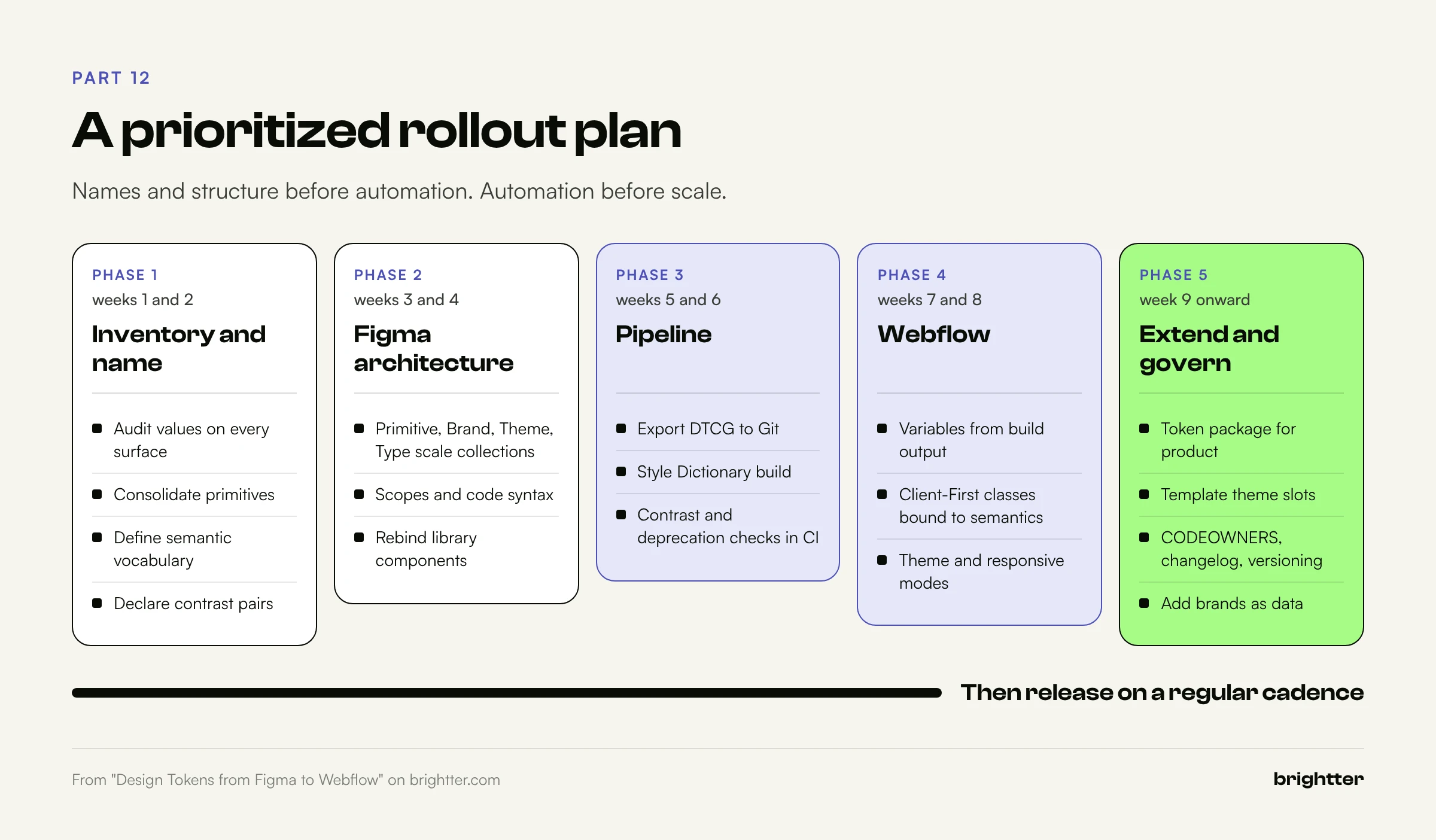
Here is a realistic sequence for a team moving an existing brand onto tokens without stopping other work. The order matters: names and structure before automation, automation before scale.
Phase 1 (weeks 1 and 2): Inventory and name.
- Audit current colors, type sizes, spacing values, radii, shadows, and durations across the website, product, and templates. Expect duplicates and near duplicates.
- Consolidate into primitive ramps and scales. Decide what's in and what's retired.
- Define the semantic vocabulary (20 to 40 color roles, spacing roles, type scale) and the naming convention. Write it down.
- Declare the foreground and background pairs and their required contrast.
Phase 2 (weeks 3 and 4): Build the Figma architecture.
- Create the Primitive, Brand, Theme, Type scale, and Component collections with their modes.
- Set scopes on every variable, hide primitives from publishing, and add code syntax and descriptions.
- Rebind the main Figma library components to semantic variables.
Phase 3 (weeks 5 and 6): Stand up the pipeline.
- Create the token repository. Export from Figma (native export, the REST API on Enterprise, or a plugin) and commit the DTCG files.
- Add the Style Dictionary build, the contrast check, and the deprecation check. Run them in CI on every pull request.
- Fix every contrast failure the first run finds. There will be some.
Phase 4 (weeks 7 and 8): Connect Webflow.
- Create Webflow variables from the build output (Variable Importer for a first import, then the Designer Extension for ongoing sync).
- Bind Client-First utility classes (
text-color-*,background-color-*,heading-style-*,text-size-*,padding-global,padding-section-*) to semantic variables. - Add theme modes for dark sections and responsive modes for spacing. Use
clamp()custom values for the type scale. - Replace one-off classes and hardcoded values page by page, starting with the templates that get the most traffic.
Phase 5 (week 9 onward): Extend and govern.
- Publish the token package for product teams and add lint rules against raw values.
- Generate the template theme slot table and rebuild slide and document masters.
- Add
CODEOWNERS, a changelog, and a deprecation policy. Release on a regular cadence. - Add a second brand or a high-contrast mode only after the first brand is stable. With orthogonal collections, it should be a data change, not a rebuild.
Conclusion: Build the System, Not the Copies
Brand systems survive scale when every design decision exists once, has a name that describes its purpose, and reaches every surface through a pipeline that tests it. That's all design tokens are. The tooling to do it properly is finally in place: a stable DTCG format, Figma Variables with modes and native DTCG export, Webflow Variables with modes and clamp(), and Style Dictionary 5 to connect them.
The hard part isn't the tooling. It's the naming, the tiers, and the discipline to route every change through one source. Start with an inventory and a semantic vocabulary this week. The pipeline can come next, and it's easier to build once you know exactly what it needs to carry.
Need help building a brand system that holds up across Figma, Webflow, and your product? Brightter, Inc. designs token architectures in Figma, builds Webflow sites on Client-First with variable-based brand tokens, and sets up the export, build, and accessibility checks that keep them in sync. As a Webflow Certified Partner, we handle the full path from design system to published site. Talk to our team about your brand system.