.avif)
Headless WordPress in 2026: WPGraphQL, Next.js, Previews, and a Caching Architecture That Holds Up
Key Takeaways
- Headless WordPress is an architecture decision, not an upgrade. It pays off with several frontends, a team that already ships React, or a private origin requirement. For a marketing site run by two editors, it usually costs more than it returns.
- The 2026 stack is stable. WPGraphQL 2.24 ships as a monorepo with Smart Cache, WPGraphQL for ACF, and the IDE, and is moving to canonical plugin status with Automattic's support. Next.js 16.4 recommends Cache Components for every app.
- Faust.js still works for the Pages Router, but its experimental App Router package is deprecated. For a new App Router build, plain
fetchagainst WPGraphQL is the simplest path. - Previews are the hardest part. WPGraphQL's
X-GraphQL-Previewheader replaces the deprecatedasPreviewargument. Pair it with a signed, expiring preview link, an Application Password for a preview user, and Next.js Draft Mode. - Make your cache tags mirror Smart Cache purge keys. WordPress then tells Next.js exactly which entries changed, and one small webhook keeps every page fresh.
- There are four cache layers: the WordPress object cache, GraphQL query caching, the Next.js cache, and the CDN. Most stale content bugs come from purging them in the wrong order, or forgetting one.
- SEO is now the frontend's job. Yoast and Rank Math data is available through GraphQL or REST, but canonicals, schema URLs, sitemaps, redirects, and real 404 status codes all need deliberate work.
Introduction: The Headless Question in 2026
Every few months a WordPress team asks whether it should go headless. The trigger is usually a slow theme, a page builder nobody trusts, a security review that flagged the public admin, or a second channel that needs the same content.
It's easier to answer in 2026 because the pieces have matured: WPGraphQL is the de facto GraphQL layer, Next.js has an explicit caching model with tag-based invalidation, and hosting has settled into a few clean choices.
What hasn't changed is the cost. A headless build is two applications, two deployments, and a contract between them that somebody must maintain. Plugins that inject markup stop working. Previews, redirects, sitemaps, and forms become your problem.
This guide covers when headless is worth it, how to build it so it holds up, and what goes wrong. The Next.js code was built and run against Next.js 16.4.2 with a mock WPGraphQL endpoint, and the PHP was syntax checked.
Part 1: When Headless Is Worth It, and When It Is Not
Headless means WordPress stops rendering public pages. Editors still work in wp-admin and the block editor, but a separate frontend fetches content through an API and produces the HTML. The theme layer, and everything that hooks into it, disappears from the public site. That single change creates every benefit and every cost.
What you gain. A frontend you fully control in React and TypeScript. One content source for a website, an app, and a docs portal, the argument that ages best. Fast pages by default, since cached HTML on a CDN doesn't care how many plugins run in WordPress. And a smaller attack surface, with the origin on a private hostname.
What you give up. Every plugin that outputs frontend markup, from page builders to the <head> output of SEO plugins. Previews that just work. Operational simplicity, since a WordPress schema change can break a frontend build. And layout freedom for editors used to visual builders.
Use the matrix below as a first pass. If most answers land in the right column, a well-built theme with a good host, an object cache, and a page cache will likely serve you better. Our guide to scaling WordPress for high-traffic corporate sites shows how far that path goes.
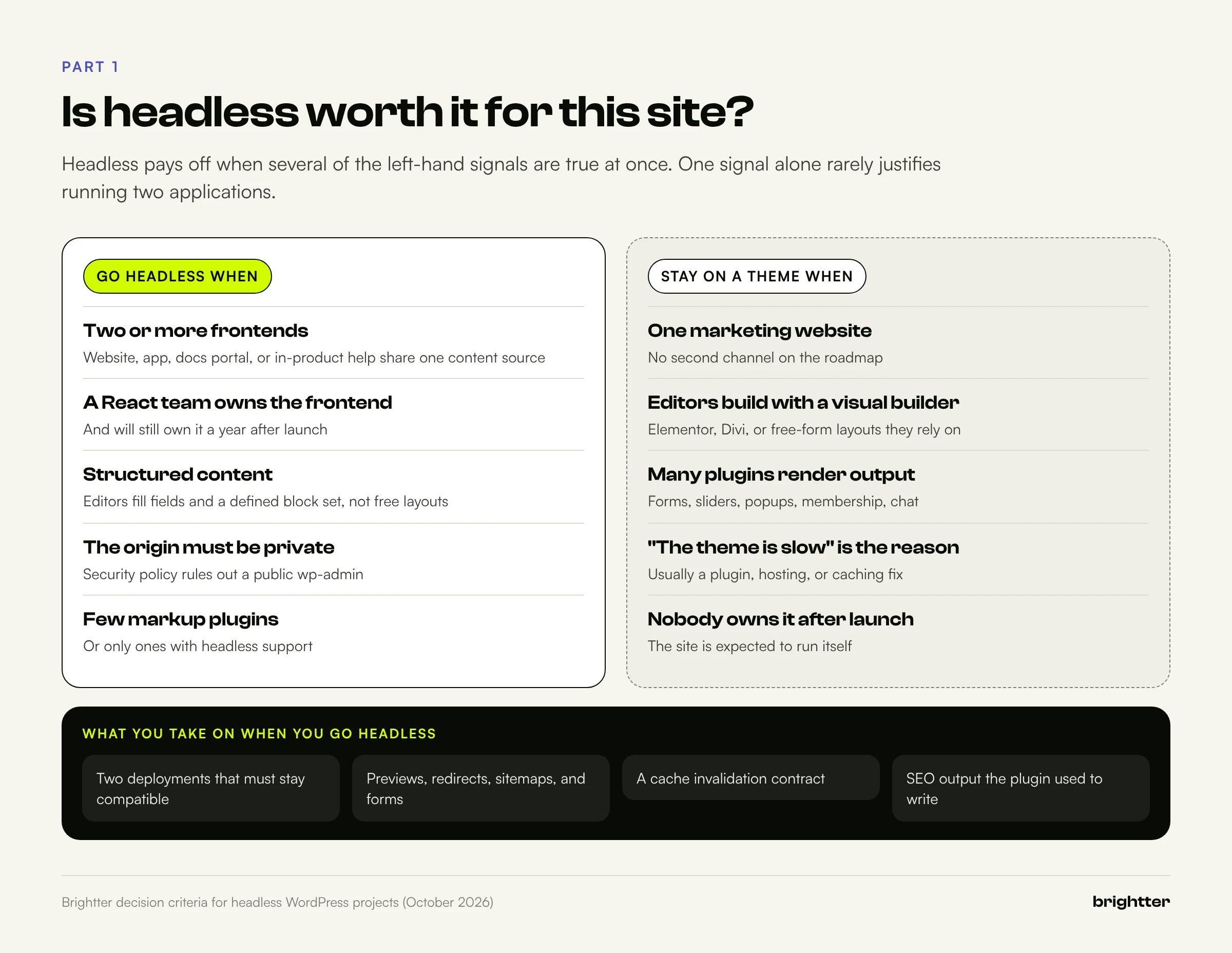
| Question | Points toward headless | Points toward a theme |
|---|---|---|
| How many frontends use the content? | Two or more | One website |
| Who builds the frontend? | A team that ships React or Next.js | A WordPress developer or agency |
| How do editors build pages? | Structured fields and a defined block set | A visual builder with free layout |
| How many plugins render frontend output? | Few, or ones with headless support | Many (forms, sliders, popups, membership) |
| Must the origin be private? | Yes | A hardened public WordPress is acceptable |
| Who owns the frontend after launch? | A named engineer or team | Nobody; the site should run itself |
"Our theme is slow" is rarely enough on its own; that's usually a plugin, hosting, or caching problem that costs far less to fix. If you're still choosing a platform altogether, our comparison of Webflow, headless, and custom builds is a useful companion.
Part 2: The State of the Stack in October 2026
| Component | Release (October 2026) | What it means for a new project |
|---|---|---|
| WordPress | 7.1.3 | REST API and Application Passwords unchanged; the block editor is the content source |
| WPGraphQL | 2.24.2 | Active; monorepo with Smart Cache, WPGraphQL for ACF, and the IDE |
| WPGraphQL Smart Cache | 2.3.3 | Fires graphql_purge events you can forward to the frontend |
| WPGraphQL for ACF | 3.0.0 | Options pages now need an explicit show_in_graphql opt-in |
| WPGraphQL Content Blocks | 4.8.x | WP Engine plugin, distributed on GitHub; blocks as typed data |
| WPGraphQL Yoast SEO Addon | 5.1.0 | Community plugin; Yoast fields, schema, and full head |
Faust.js (@faustwp/core) | 3.6.0 | Pages Router with Apollo; App Router package deprecated |
| Next.js | 16.4.2 | Cache Components recommended and on in new apps |
WPGraphQL. In October 2024, creator Jason Bahl announced he was joining Automattic and that WPGraphQL would become a canonical community plugin on WordPress.org. WP Engine had funded much of its earlier work. The project now ships core, Smart Cache, WPGraphQL for ACF, and the IDE from one monorepo. Releases 2.22 to 2.24 closed a series of authorization advisories in mutations and media handling, and 2.24.0 turned on query depth limiting (maximum 15) for new installs. Pin it, read the changelog, and update promptly.
Faust.js. WP Engine's toolkit is active: core and CLI shipped 3.6.0 in October 2026. But @faustwp/experimental-app-router is deprecated on npm, with a notice citing "the lack of Apollo support for React Server Components and Next's App Router." Faust remains a fair choice for Pages Router projects. For a new App Router build, Server Components can call WPGraphQL with fetch and let Next.js handle caching, which is the approach used here.
Next.js. Version 16 introduced Cache Components ('use cache', cacheLife, cacheTag), a two-argument revalidateTag, proxy.ts in place of middleware.ts, and async params and draftMode(), and requires Node.js 20.9 or later. Version 16.4 (October 6, 2026) recommends Cache Components "as the best choice for every Next.js app," enables them in create-next-app, says they become the default in Next.js 17, and adds ensureStatic to fail the build when a route that should be static picks up request-time rendering.
Hosting. WP Engine Headless Platform (formerly branded Atlas; its documentation URLs still use the name) runs WordPress and a Node.js frontend on one contract, with a CDN, preview environments, and Faust.js support. Vercel is the reference platform for Next.js. Netlify supports Next.js 16 through its OpenNext-based adapter, including revalidation by path or tag, though its docs don't yet list Cache Components explicitly, so test a branch deploy first.
Part 3: A Reference Architecture That Holds Up
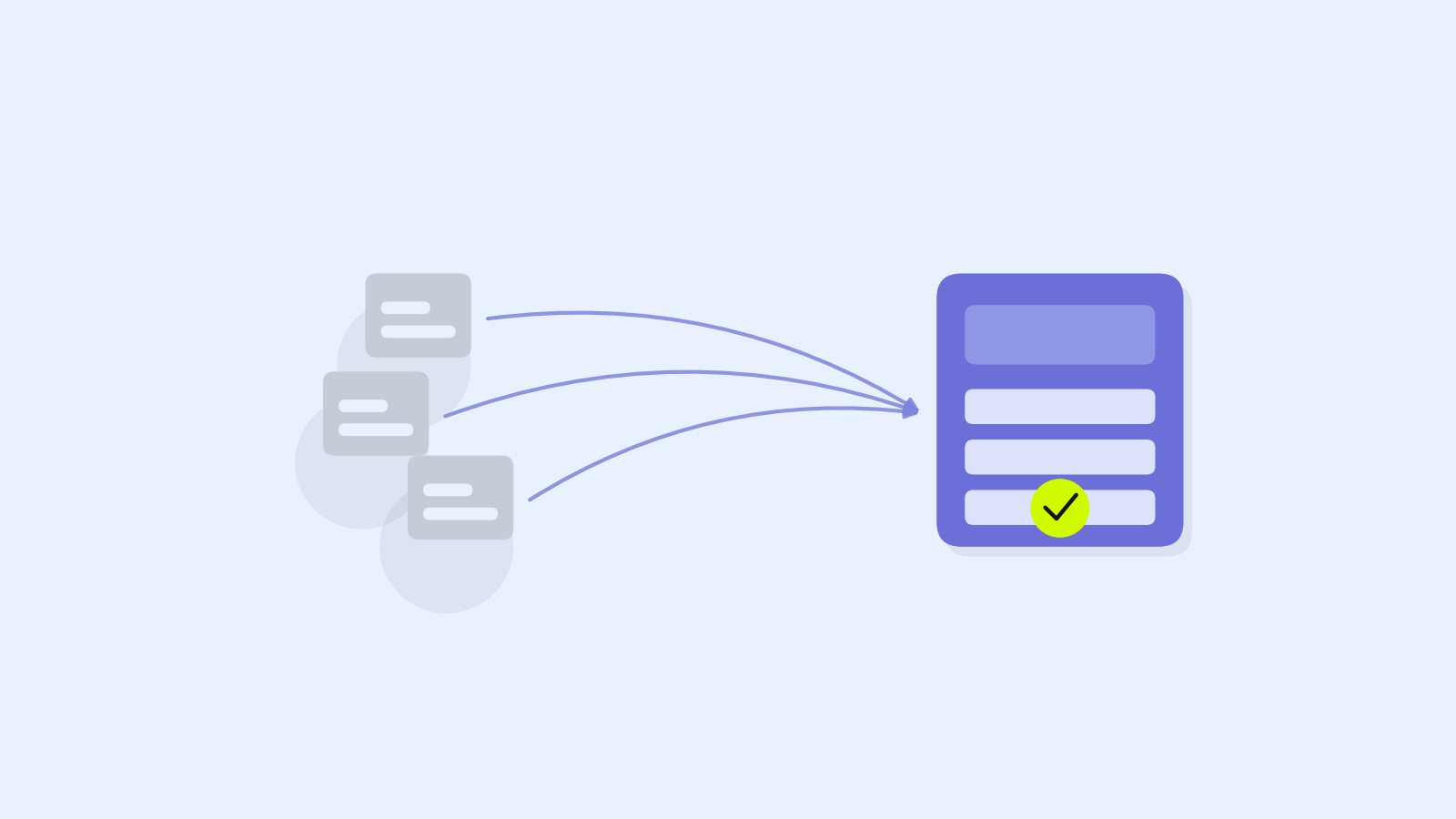
One rule matters more than any other: WordPress is never in the request path for an anonymous visitor. Every public page comes from a cache, and WordPress is asked for data only when an entry is missing or invalidated.
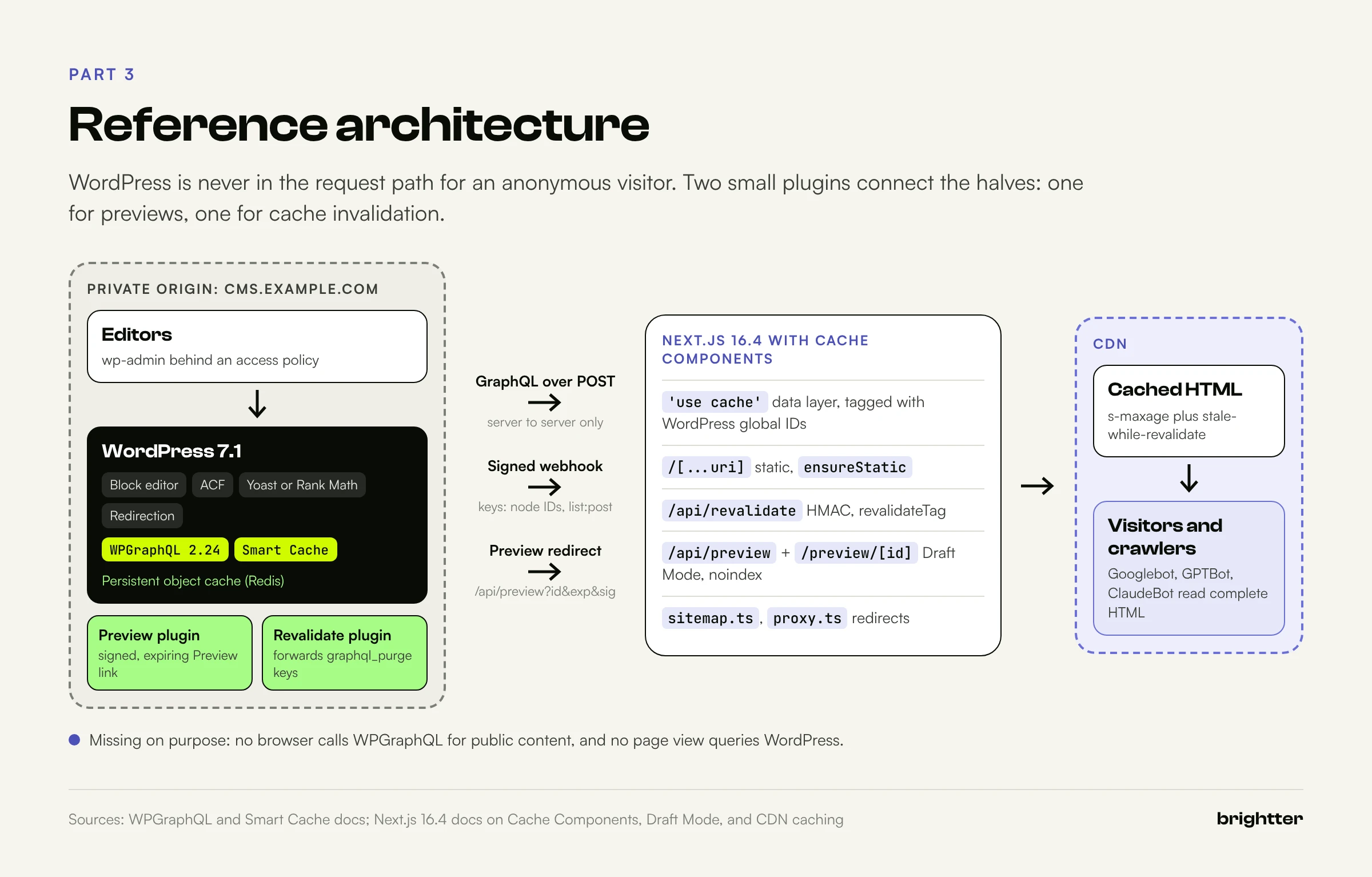
- Editors use
wp-adminon a private hostname such ascms.example.com, restricted by an identity-aware proxy, VPN, or IP allowlist. The block editor, ACF, Yoast or Rank Math, and Redirection run as normal. - WordPress exposes content through WPGraphQL. The REST API stays on because the block editor uses it. A persistent object cache keeps repeated queries cheap.
- Two must-use plugins connect the halves. One points the Preview button at a signed frontend URL. The other forwards Smart Cache purge keys to the frontend.
- Next.js fetches content in Server Components, caches it with
'use cache', and tags each entry with the WordPress IDs it contains. Public routes are static; the preview route is dynamic and authenticated. - The CDN serves almost every request. On Vercel or Netlify it's the platform's edge. Self-hosted, it's your CDN, and purging it is your job.
Browsers never call WPGraphQL for public content, and the frontend never queries WordPress per request.
Part 4: Content Modeling for a Headless Frontend
A theme tolerates loose content; a headless frontend can't, because every piece of content must map to a component it knows how to render.
Post types and fields
Give each kind of content its own post type. To appear in WPGraphQL, a post type needs show_in_graphql plus GraphQL names; keep show_in_rest on for the block editor.
<?php
/**
 * Plugin Name: Content Model
 */

add_action(
    'init',
    static function () {
        register_post_type(
            'case_study',
            array(
                'label'               => 'Case Studies',
                'public'              => true,
                'show_in_rest'        => true, // Required for the block editor.
                'supports'            => array( 'title', 'editor', 'excerpt', 'thumbnail', 'revisions', 'custom-fields' ),
                'rewrite'             => array( 'slug' => 'work' ),
                'show_in_graphql'     => true,
                'graphql_single_name' => 'caseStudy',
                'graphql_plural_name' => 'caseStudies',
            )
        );

        register_post_meta(
            'case_study',
            'client_industry',
            array(
                'type'              => 'string',
                'single'            => true,
                'show_in_rest'      => true,
                'revisions_enabled' => true, // WordPress 6.4+: lets previews show the draft value.
                'sanitize_callback' => 'sanitize_text_field',
            )
        );
    }
);

add_action(
    'graphql_register_types',
    static function () {
        register_graphql_field(
            'CaseStudy',
            'clientIndustry',
            array(
                'type'          => 'String',
                'isPreviewable' => true,
                'resolve'       => static function ( $post ) {
                    $value = get_post_meta( $post->databaseId, 'client_industry', true );
                    return '' === $value ? null : $value;
                },
            )
        );
    }
);
Three details matter later. Revision support plus revisions_enabled on the meta key (WordPress 6.4+) let previews show a field's draft value. isPreviewable tells WPGraphQL to resolve the field against the autosave during a preview. And the rewrite slug sets the uri the frontend routes on, so URL structure is decided here, not in Next.js.
ACF or native fields? ACF with WPGraphQL for ACF lets non-developers edit the model and gives you repeaters, flexible content, and options pages with a "Show in GraphQL" toggle. Store field groups as local JSON in version control. Its preview support covers the classic editor and ACF Forms, and the block editor with ACF PRO 6.8.1 or later and the Block Editor Datastore enabled. Native register_post_meta has no dependency but is code only. Either way, watch the WPGraphQL for ACF 3.0 change: options pages need an explicit opt-in, so an upgraded site can silently lose global settings from the schema.
Blocks: HTML or data
As rendered HTML, you query content and render it with dangerouslySetInnerHTML. It works with every core block and matches the editor exactly, provided you load the block library stylesheet from the same WordPress version. But you can't swap a block for a React component.
As structured data, WP Engine's WPGraphQL Content Blocks plugin adds an editorBlocks field with typed attributes per block and a renderedHtml fallback. With flat: true, it returns one list with clientId and parentClientId so you can rebuild nesting.
query PostBlocks($uri: String!) {
  nodeByUri(uri: $uri) {
    ... on NodeWithEditorBlocks {
      editorBlocks(flat: true) {
        __typename
        name
        clientId
        parentClientId
        renderedHtml
        ... on CoreHeading { attributes { content level } }
        ... on CoreImage { attributes { id url alt } }
      }
    }
  }
}
The practical pattern is a hybrid: map the few blocks that need components (images, embeds, custom blocks) and fall back to renderedHtml for the rest. Restrict the inserter with allowed_block_types_all, because a block the frontend can't render is a broken page.
Part 5: REST or GraphQL
| WordPress REST API | WPGraphQL | |
|---|---|---|
| Availability | Core | Plugin |
| Response shape | Fixed per endpoint; trim with _fields, expand with _embed | Exactly the fields requested |
| Related data | Several requests, or a heavy _embed | One query across posts, terms, media, SEO |
| Lookup by URL | You map paths to endpoints | nodeByUri resolves any public URL |
| Pagination | per_page up to 100, totals in X-WP-Total | Cursor connections, 100 per page by default |
| HTTP caching | Plain GET URLs cache anywhere | POST by default; GET and persisted queries with Smart Cache |
| Invalidation signals | None built in | Smart Cache purge events per node and list |
GraphQL wins on the two points this architecture depends on: nodeByUri lets one catch-all route resolve every WordPress URL, and Smart Cache says exactly what to invalidate. REST still has a role for what the bridges don't cover, such as Rank Math's head endpoint and form submissions. If you do use REST, always pass _fields, or list requests download the full content of every post:
curl -s "https://cms.example.com/wp-json/wp/v2/posts?slug=hello-world&_fields=id,link,title,modified,yoast_head_json"GraphQL makes it easy to over-fetch in a different way, with deep nested queries. Keep queries in the repository, review them like code, and keep depth limiting on.
Part 6: Rendering Strategy per Content Type
"SSG, ISR, or SSR?" has a different answer for each content type. With Cache Components, you decide per function and route what is cached, for how long, and what invalidates it.
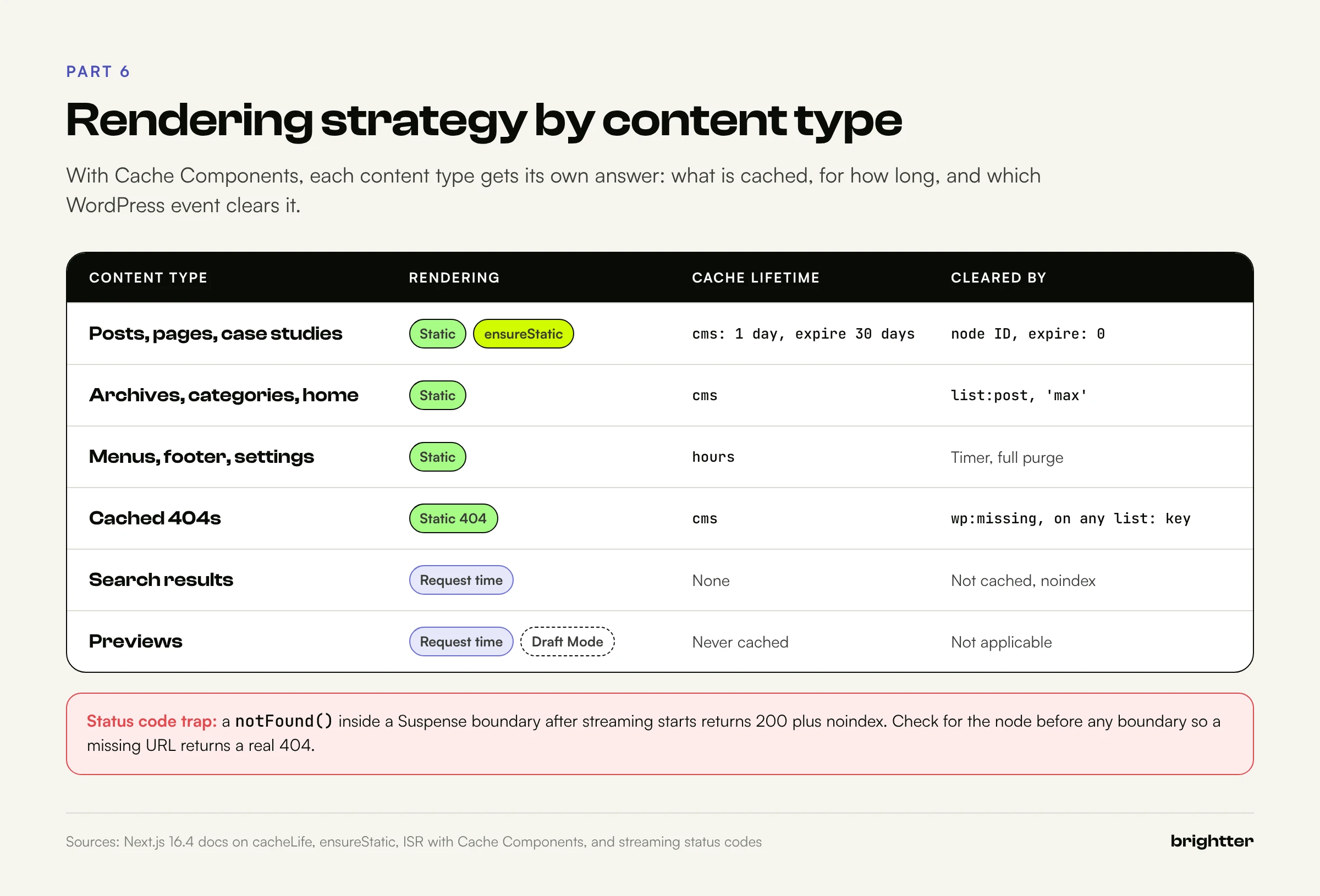
| Content type | Strategy | Invalidated by |
|---|---|---|
| Posts, pages, case studies | Static; prerender the newest, render the rest on first request; ensureStatic = 'navigation' | Node ID tag |
| Archives, category pages, home | Static | list:<type> tag plus node IDs on the page |
| Menus, footer, site settings | Static with cacheLife('hours') | Time, plus a full purge |
| Search results | Request time, noindex | Not cached |
| Previews | Request time, Draft Mode, authenticated | Never cached |
| Personalized fragments | Request time inside <Suspense>, never on content routes | Not cached |
The configuration turns on Cache Components and Partial Prefetching, as create-next-app now does. The custom cms profile is the key decision: webhooks keep content fresh, and a daily revalidation is the safety net.
import type { NextConfig } from 'next'

const wp = new URL(process.env.WP_URL ?? 'https://cms.example.com')

const nextConfig: NextConfig = {
  cacheComponents: true,
  partialPrefetching: true,
  // WordPress URIs end in a slash; match them so nothing redirects.
  trailingSlash: true,
  cacheLife: {
    // Webhooks keep content fresh; this daily timer is the safety net
    // for the one webhook that never arrives.
    cms: { stale: 300, revalidate: 60 * 60 * 24, expire: 60 * 60 * 24 * 30 },
  },
  images: {
    remotePatterns: [
      { protocol: 'https', hostname: wp.hostname, pathname: '/wp-content/uploads/**' },
    ],
  },
  async headers() {
    return [
      { source: '/preview/:path*', headers: [{ key: 'X-Robots-Tag', value: 'noindex, nofollow' }] },
    ]
  },
}

export default nextConfig
The data layer
Every WordPress request goes through one function. It sends credentials only when asked, times out instead of hanging a render, and throws on GraphQL errors, because a response with errors and partial data would otherwise be cached for weeks.
import 'server-only'

const ENDPOINT = `${process.env.WP_URL}/graphql`

type GraphQLResponse<T> = { data?: T; errors?: { message: string }[] }

type WpQueryOptions = {
  // Send the preview user's Application Password (server to server only).
  auth?: boolean
  // Ask WPGraphQL to overlay the newest autosave for this post ID.
  previewId?: number
}

export async function wpQuery<T>(
  query: string,
  variables: Record<string, unknown> = {},
  { auth = false, previewId }: WpQueryOptions = {},
): Promise<T> {
  const headers: Record<string, string> = { 'Content-Type': 'application/json' }

  if (auth) {
    const user = process.env.WP_PREVIEW_USER
    const pass = process.env.WP_PREVIEW_APP_PASSWORD
    if (!user || !pass) throw new Error('Preview credentials are not configured')
    headers.Authorization = `Basic ${Buffer.from(`${user}:${pass}`).toString('base64')}`
  }
  if (previewId) headers['X-GraphQL-Preview'] = `database_id=${previewId}`

  const res = await fetch(ENDPOINT, {
    method: 'POST',
    headers,
    body: JSON.stringify({ query, variables }),
    signal: AbortSignal.timeout(10_000),
  })

  if (!res.ok) throw new Error(`WPGraphQL responded ${res.status}`)
  const json = (await res.json()) as GraphQLResponse<T>
  // Throw instead of caching a half-empty result for a year.
  if (json.errors?.length) throw new Error(json.errors.map((e) => e.message).join('; '))
  if (!json.data) throw new Error('WPGraphQL returned no data')
  return json.data
}
The content functions use 'use cache' and tag each result with the WordPress global ID of every node it contains. Those are the same keys Smart Cache announces when something changes, which is why Part 8 is short.
import 'server-only'
import { cacheLife, cacheTag } from 'next/cache'
import { wpQuery } from './wp'

export type WpSeo = {
  title?: string | null
  metaDesc?: string | null
  canonical?: string | null
  metaRobotsNoindex?: string | null
  metaRobotsNofollow?: string | null
  opengraphImage?: { sourceUrl?: string | null } | null
  schema?: { raw?: string | null } | null
}

export type WpNode = {
  __typename: string
  id: string
  databaseId: number
  uri: string
  title?: string | null
  content?: string | null
  date?: string | null
  modified?: string | null
  isPreview?: boolean | null
  featuredImage?: {
    node: {
      sourceUrl: string
      altText?: string | null
      mediaDetails?: { width?: number | null; height?: number | null } | null
    }
  } | null
  seo?: WpSeo | null
}

const SEO_FIELDS = /* GraphQL */ `
  fragment SeoFields on PostTypeSEO {
    title
    metaDesc
    canonical
    metaRobotsNoindex
    metaRobotsNofollow
    opengraphImage { sourceUrl }
    schema { raw }
  }
`

const NODE_FIELDS = /* GraphQL */ `
  fragment NodeFields on ContentNode {
    __typename
    id
    databaseId
    uri
    date
    modified
    ... on NodeWithTitle { title }
    ... on NodeWithContentEditor { content }
    ... on NodeWithFeaturedImage {
      featuredImage { node { sourceUrl altText mediaDetails { width height } } }
    }
    ... on Post { seo { ...SeoFields } }
    ... on Page { seo { ...SeoFields } }
  }
`

const NODE_BY_URI = /* GraphQL */ `
  query NodeByUri($uri: String!) {
    nodeByUri(uri: $uri) { ... on ContentNode { ...NodeFields } }
  }
  ${NODE_FIELDS}
  ${SEO_FIELDS}
`

const PREVIEW_NODE = /* GraphQL */ `
  query PreviewNode($id: ID!) {
    contentNode(id: $id, idType: DATABASE_ID) { ...NodeFields isPreview }
  }
  ${NODE_FIELDS}
  ${SEO_FIELDS}
`

const RECENT_POSTS = /* GraphQL */ `
  query RecentPosts($first: Int!) {
    posts(first: $first, where: { orderby: { field: DATE, order: DESC } }) {
      nodes { id uri title date modified }
    }
  }
`

// Published content. Tags mirror WPGraphQL Smart Cache purge keys, so a
// purge event in WordPress maps one to one onto revalidateTag() here.
export async function getNodeByUri(uri: string): Promise<WpNode | null> {
  'use cache'
  cacheLife('cms')
  cacheTag('wp')

  const { nodeByUri } = await wpQuery<{ nodeByUri: WpNode | null }>(NODE_BY_URI, { uri })

  // A miss must be revalidated when new content is published,
  // because the purge event will carry an ID we have never seen.
  if (!nodeByUri?.id) {
    cacheTag('wp:missing')
    return null
  }
  cacheTag(nodeByUri.id)
  return nodeByUri
}

export async function getRecentPosts(first = 20) {
  'use cache'
  cacheLife('cms')

  const { posts } = await wpQuery<{
    posts: { nodes: Pick<WpNode, 'id' | 'uri' | 'title' | 'date' | 'modified'>[] }
  }>(RECENT_POSTS, { first })

  cacheTag('wp', 'list:post', ...posts.nodes.map((n) => n.id).slice(0, 126))
  return posts.nodes
}

// Drafts and autosaves. Never cached: it runs only behind Draft Mode,
// authenticated as a low-privilege preview user.
export async function getPreviewNode(databaseId: number): Promise<WpNode | null> {
  const { contentNode } = await wpQuery<{ contentNode: WpNode | null }>(
    PREVIEW_NODE,
    { id: String(databaseId) },
    { auth: true, previewId: databaseId },
  )
  return contentNode
}
Note the misses. A null for a URL that doesn't exist yet is tagged wp:missing. When someone later publishes there, Smart Cache announces an unknown node ID plus list:post, and the webhook uses the list: key to clear cached misses. Otherwise a URL requested once before publication can return a cached 404 for a month.
The catch-all content route
One route serves every WordPress URL. ensureStatic = 'navigation' fails the build if cookies, headers, or uncached fetches sneak in, and makes the first request for an unlisted URL wait for the complete page instead of streaming a shell.
import type { Metadata } from 'next'
import { notFound } from 'next/navigation'
import { getNodeByUri, getRecentPosts } from '@/lib/queries'
import { nodeMetadata } from '@/lib/seo'
import { NodeView } from '@/components/node-view'

// Every content URL must be complete static HTML: no request-time
// rendering can sneak in, and an unknown URL waits for the full page
// instead of streaming a shell (which would lock in a 200 status).
export const ensureStatic = 'navigation'

const toPath = (segments: string[]) => `/${segments.join('/')}/`

export async function generateStaticParams() {
  // Prerender the newest posts; everything else renders on first request.
  const posts = await getRecentPosts(50)
  return posts.map((p) => ({ uri: p.uri.split('/').filter(Boolean) }))
}

export async function generateMetadata({ params }: PageProps<'/[...uri]'>): Promise<Metadata> {
  const { uri } = await params
  const node = await getNodeByUri(toPath(uri))
  return node ? nodeMetadata(node) : {}
}

export default async function Page({ params }: PageProps<'/[...uri]'>) {
  const { uri } = await params
  const node = await getNodeByUri(toPath(uri))
  if (!node) notFound() // Before any Suspense boundary, so the status is a real 404.
  return <NodeView node={node} />
}
That waiting is an SEO decision. Next.js documentation is explicit that once a streamed response starts, the status is committed as 200. A notFound() inside a Suspense boundary after that point injects noindex but can't change the status, so some crawlers record a soft 404. Our guide to JavaScript SEO and AI crawler rendering explains how crawlers treat streamed HTML.
Two constraints: generateStaticParams must return at least one entry, and Cache Components require the Node.js runtime, so remove any runtime = 'edge' exports.
Part 7: Previews and Drafts
The goal: an editor clicks Preview and sees unsaved changes rendered by the real frontend, and nobody else can. It takes four pieces.
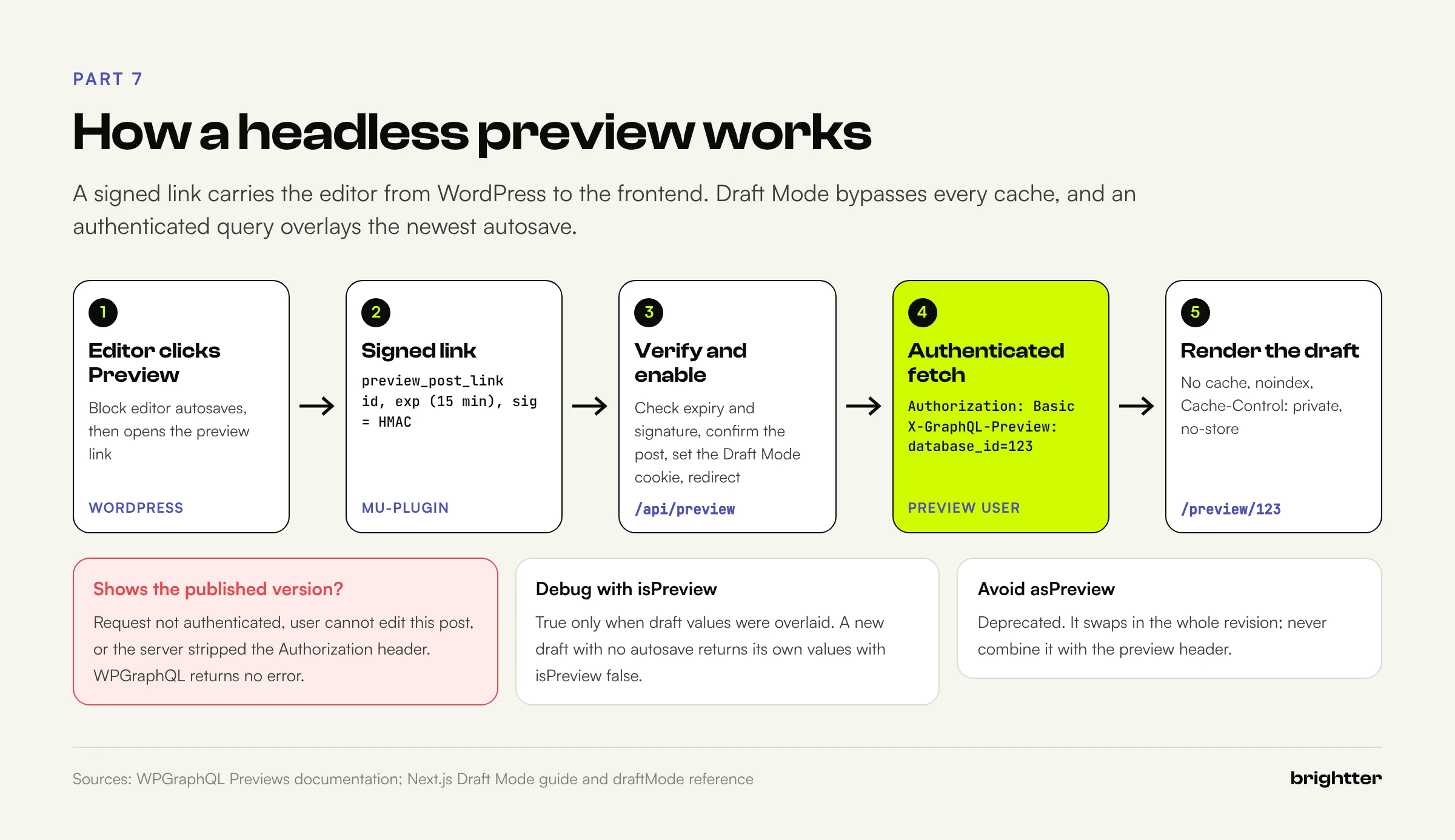
1. Point the Preview button at the frontend
WordPress builds the Preview URL through the preview_post_link filter, the same one Faust.js uses. Replace it with a frontend URL carrying the post ID, an expiry, and an HMAC signature, so the secret never appears in the URL and a leaked link dies after 15 minutes.
<?php
/**
 * Plugin Name: Headless Preview
 * Description: Sends the Preview button to the Next.js app with a signed, expiring link.
 *
 * wp-config.php:
 *   define( 'HEADLESS_FRONTEND_URL', 'https://www.example.com' );
 *   define( 'HEADLESS_PREVIEW_SECRET', '64 random hex characters' );
 */

if ( ! defined( 'HEADLESS_FRONTEND_URL' ) || ! defined( 'HEADLESS_PREVIEW_SECRET' ) ) {
    return;
}

add_filter(
    'preview_post_link',
    static function ( $link, $post ) {
        $id  = (int) $post->ID; // The published post ID, not the autosave ID.
        $exp = time() + 15 * MINUTE_IN_SECONDS;
        $sig = hash_hmac( 'sha256', $id . '.' . $exp, HEADLESS_PREVIEW_SECRET );
        return add_query_arg(
            array( 'id' => $id, 'exp' => $exp, 'sig' => $sig ),
            HEADLESS_FRONTEND_URL . '/api/preview'
        );
    },
    10,
    2
);

// Let Application Passwords authenticate GraphQL requests, not only REST.
// Runs early because mu-plugins load before regular plugins.
add_filter(
    'application_password_is_api_request',
    static function ( $is_api_request ) {
        $path = wp_parse_url( $_SERVER['REQUEST_URI'] ?? '', PHP_URL_PATH );
        return $is_api_request || ( is_string( $path ) && 0 === strpos( $path, '/graphql' ) );
    }
);
The second filter matters. WordPress accepts Application Passwords only for REST and XML-RPC requests unless application_password_is_api_request says otherwise. WPGraphQL sets this filter itself, but its documentation calls Application Password support limited, and timing problems have been reported. Setting it from a must-use plugin, which loads before regular plugins, removes the doubt.
2. Verify the link and enable Draft Mode
The handler checks expiry and signature, confirms the preview user can read the post, enables Draft Mode, and redirects to a path built from the validated integer ID, never from a query parameter, which closes the open redirect Next.js documentation warns about.
import 'server-only'
import { createHmac, timingSafeEqual } from 'node:crypto'

export function sign(payload: string, secret: string): string {
  return createHmac('sha256', secret).update(payload).digest('hex')
}

export function verify(payload: string, signature: string, secret: string): boolean {
  const expected = Buffer.from(sign(payload, secret), 'hex')
  const given = Buffer.from(signature, 'hex')
  return given.length === expected.length && timingSafeEqual(given, expected)
}
import { draftMode } from 'next/headers'
import { redirect } from 'next/navigation'
import { verify } from '@/lib/signature'
import { getPreviewNode } from '@/lib/queries'
// WordPress sends editors here from the Preview button:
// /api/preview?id=123&exp=1760000000&sig=<hmac of "123.1760000000">
export async function GET(request: Request) {
const { searchParams } = new URL(request.url)
const id = Number(searchParams.get('id'))
const exp = Number(searchParams.get('exp'))
const sig = searchParams.get('sig') ?? ''
const secret = process.env.PREVIEW_SECRET
if (!secret || !Number.isInteger(id) || id <= 0 || !Number.isInteger(exp)) {
return new Response('Invalid preview link', { status: 400 })
}
if (exp < Math.floor(Date.now() / 1000)) {
return new Response('Preview link expired. Click Preview in WordPress again.', { status: 401 })
}
if (!verify(`${id}.${exp}`, sig, secret)) {
return new Response('Invalid signature', { status: 401 })
}
// Confirm the preview user can actually read this post before
// handing out the bypass cookie.
const node = await getPreviewNode(id)
if (!node) return new Response('Not found', { status: 404 })
const draft = await draftMode()
draft.enable()
// Redirect to a path we build ourselves, never one from the query string.
redirect(`/preview/${id}`)
}
// Exit preview: <form method="post" action="/api/preview">
export async function POST() {
const draft = await draftMode()
draft.disable()
return new Response(null, { status: 303, headers: { Location: '/' } })
}draft.enable() sets the __prerender_bypass cookie, whose value changes with every build. While it's present, 'use cache' scopes re-execute without saving results, and responses carry Cache-Control: private, no-cache, no-store.
3. Fetch the draft with the preview context
WPGraphQL now handles previews through a request-level preview context. The recommended form is the X-GraphQL-Preview header (database_id=123), which overlays the newest autosave onto the published node while keeping its published id. The older asPreview: true argument is deprecated and swaps in the whole revision, so never combine the two. WPGraphQL's documentation shows the header with post queries; test contentNode with each post type you preview.
The overlay only applies if the request is authenticated as a user who can edit that post. Otherwise WPGraphQL silently returns the published version, the most common "preview shows old content" bug. Query isPreview while debugging; it's true only when draft values were overlaid. A brand new draft with no autosave returns its saved values with isPreview false.
4. Render the preview route
Previews get their own dynamic route, so ensureStatic stays strict on content routes. The route refuses to render without Draft Mode and is noindex twice: in metadata and through the X-Robots-Tag header in the config.
import { Suspense } from 'react'
import type { Metadata } from 'next'
import { draftMode } from 'next/headers'
import { notFound } from 'next/navigation'
import { getPreviewNode } from '@/lib/queries'
import { NodeView } from '@/components/node-view'

export const metadata: Metadata = { robots: { index: false, follow: false } }

export default function PreviewPage({ params }: PageProps<'/preview/[id]'>) {
  return (
    <Suspense fallback={<p>Loading preview</p>}>
      <Preview params={params} />
    </Suspense>
  )
}

async function Preview({ params }: { params: Promise<{ id: string }> }) {
  const { isEnabled } = await draftMode()
  if (!isEnabled) notFound()

  const { id } = await params
  const databaseId = Number(id)
  if (!Number.isInteger(databaseId) || databaseId <= 0) notFound()

  const node = await getPreviewNode(databaseId)
  if (!node) notFound()
  return <NodeView node={node} preview />
}
Create a dedicated preview user with an Application Password stored only in the frontend's server environment. Because WPGraphQL checks edit rights on each post, the user needs to edit other people's drafts; a custom role with edit capabilities but no publish or delete rights is tighter than Editor. Previews also need HTTPS on both domains, since the Draft Mode cookie is SameSite=None; Secure. And as WPGraphQL's documentation notes, a reviewer without a WordPress account can't be given a preview by link in this model; build a separate short-lived share link if you need one.
Part 8: On-Demand Revalidation With Webhooks
Timers alone force a bad trade: short ones hammer WordPress, long ones leave editors waiting. On-demand revalidation fixes that if you know what changed, and a post update touches the post, the home page, archives, and the sitemap. Hand-written invalidation maps break the first time someone adds a template.
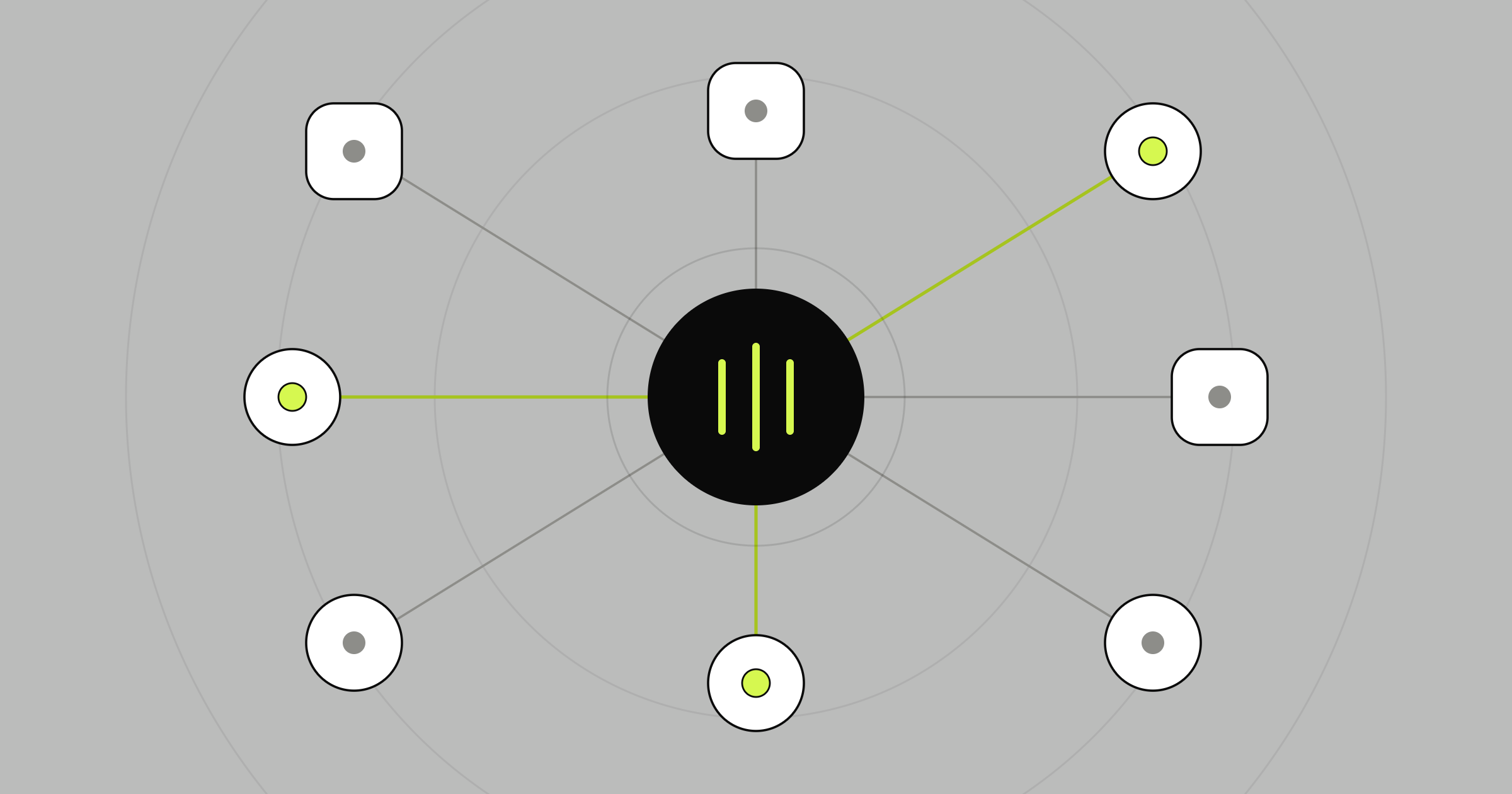
WPGraphQL Smart Cache solves this. Since version 2.2 it fires do_action( 'graphql_purge', $key, $event, $hostname ) for every key an event invalidates:
- Node IDs: base64 global IDs, such as
cG9zdDoxMjM=forpost:123. Terms and users work the same way. list:<type>: lists of a content type, fired when content of that type is published or removed.skipped:<type>: for caches whose key header was truncated. Explicit tags don't need it.graphql:Query: a full purge, such as Purge Cache Now.
Because the data layer tags entries with the same IDs, forwarding the keys is the whole integration.
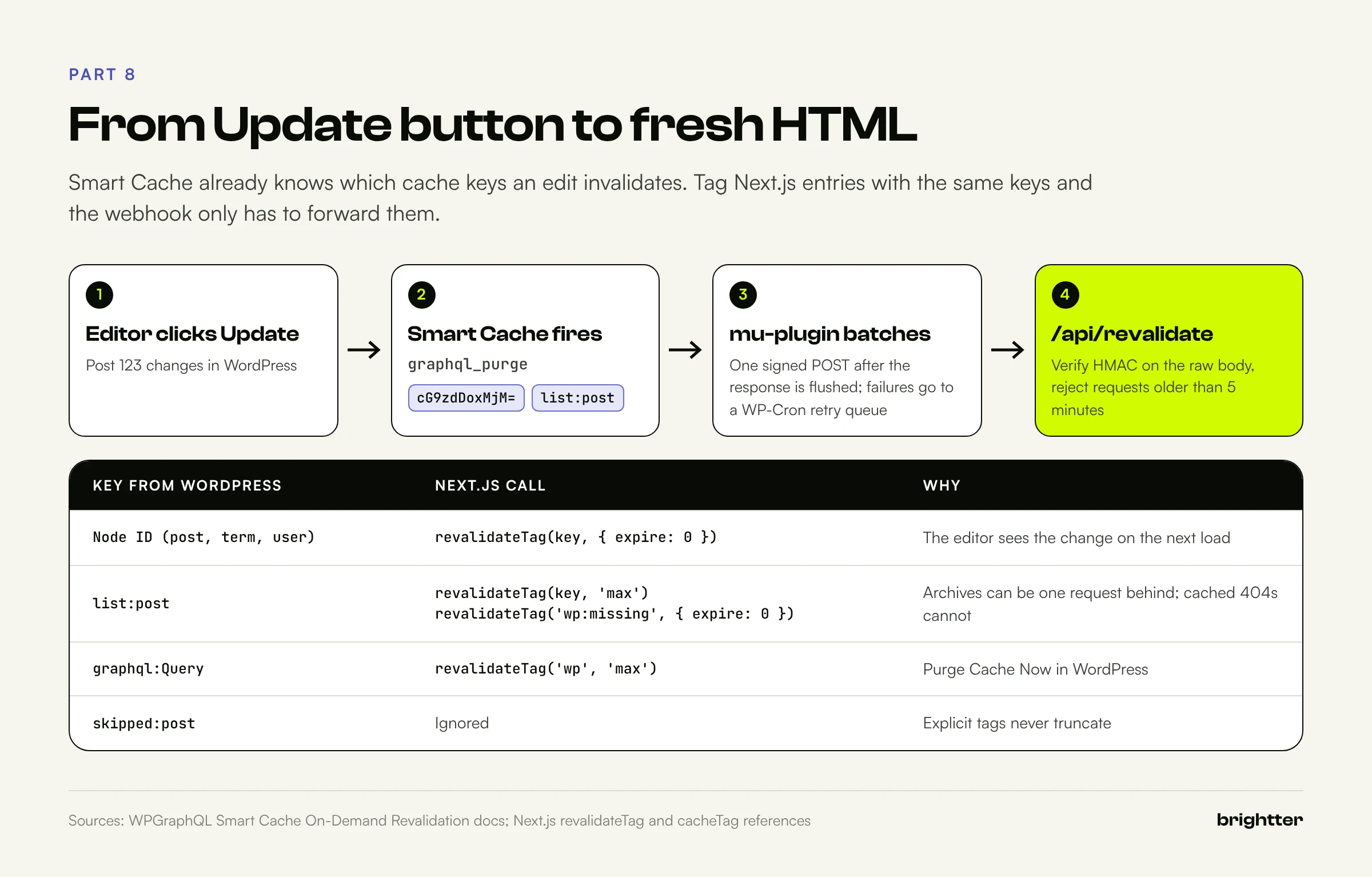
The WordPress side
This must-use plugin collects every key fired during a request and sends them in one signed POST after the editor's response is flushed. Smart Cache's own documentation warns that a non-blocking wp_remote_post() is fire-and-forget and silently loses invalidations when the frontend is down, so this version blocks with a five second timeout (after fastcgi_finish_request(), so editors don't wait) and queues failures for a retry.
<?php
/**
 * Plugin Name: Headless Revalidate
 * Description: Forwards WPGraphQL Smart Cache purge keys to the Next.js revalidation webhook.
 *
 * wp-config.php:
 *   define( 'HEADLESS_REVALIDATE_URL', 'https://www.example.com/api/revalidate' );
 *   define( 'HEADLESS_REVALIDATE_SECRET', '64 random hex characters' );
 */

if ( ! defined( 'HEADLESS_REVALIDATE_URL' ) || ! defined( 'HEADLESS_REVALIDATE_SECRET' ) ) {
    return;
}

// Smart Cache fires this for every cache key an edit invalidates.
add_action(
    'graphql_purge',
    static function ( $key, $event = '', $hostname = '' ) {
        static $hooked = false;
        $GLOBALS['headless_purge_keys'][ (string) $key ] = true;
        if ( ! $hooked ) {
            add_action( 'shutdown', 'headless_revalidate_flush', 99 );
            $hooked = true;
        }
    },
    10,
    3
);

function headless_revalidate_send( array $keys ): bool {
    $body = wp_json_encode( array( 'keys' => array_values( $keys ), 'ts' => time() ) );
    $res  = wp_remote_post(
        HEADLESS_REVALIDATE_URL,
        array(
            'timeout' => 5,
            'headers' => array(
                'Content-Type'   => 'application/json',
                'X-WP-Signature' => hash_hmac( 'sha256', $body, HEADLESS_REVALIDATE_SECRET ),
            ),
            'body'    => $body,
        )
    );
    return ! is_wp_error( $res ) && 200 === wp_remote_retrieve_response_code( $res );
}

// One request per page load, sent after the editor's response is flushed.
function headless_revalidate_flush() {
    $keys = array_keys( $GLOBALS['headless_purge_keys'] ?? array() );
    $GLOBALS['headless_purge_keys'] = array();
    if ( ! $keys ) {
        return;
    }
    if ( function_exists( 'fastcgi_finish_request' ) ) {
        fastcgi_finish_request();
    }
    if ( ! headless_revalidate_send( $keys ) ) {
        headless_revalidate_queue( $keys );
    }
}

// A failed webhook is retried by WP-Cron instead of being lost.
function headless_revalidate_queue( array $keys ) {
    $queued = get_option( 'headless_revalidate_retry', array() );
    $merged = array_slice( array_values( array_unique( array_merge( $queued, $keys ) ) ), 0, 500 );
    update_option( 'headless_revalidate_retry', $merged, false );
    if ( ! wp_next_scheduled( 'headless_revalidate_retry' ) ) {
        wp_schedule_single_event( time() + 60, 'headless_revalidate_retry' );
    }
}

add_action(
    'headless_revalidate_retry',
    static function () {
        $keys = get_option( 'headless_revalidate_retry', array() );
        delete_option( 'headless_revalidate_retry' );
        if ( $keys && ! headless_revalidate_send( $keys ) ) {
            headless_revalidate_queue( $keys );
        }
    }
);
WP-Cron runs only when something requests the site. On a quiet private origin, trigger it from system cron (wp cron event run --due-now every minute) so retries fire.
The Next.js side
The handler verifies the HMAC over the raw body before parsing, rejects requests older than five minutes, caps the key count, and maps keys to tags.
import { revalidateTag } from 'next/cache'
import { verify } from '@/lib/signature'

type Payload = { keys: string[]; ts: number }

const MAX_SKEW_SECONDS = 300

export async function POST(request: Request) {
  const secret = process.env.REVALIDATE_SECRET
  if (!secret) return Response.json({ error: 'Not configured' }, { status: 500 })

  // Verify the signature against the raw body, before parsing it.
  const raw = await request.text()
  const signature = request.headers.get('x-wp-signature') ?? ''
  if (!verify(raw, signature, secret)) {
    return Response.json({ error: 'Invalid signature' }, { status: 401 })
  }

  let payload: Payload
  try {
    payload = JSON.parse(raw) as Payload
  } catch {
    return Response.json({ error: 'Invalid JSON' }, { status: 400 })
  }

  // Reject replays of an old, captured request.
  if (Math.abs(Date.now() / 1000 - payload.ts) > MAX_SKEW_SECONDS) {
    return Response.json({ error: 'Stale request' }, { status: 401 })
  }

  const keys = Array.isArray(payload.keys)
    ? payload.keys.filter((k) => typeof k === 'string' && k.length > 0 && k.length <= 256).slice(0, 500)
    : []

  const revalidated: string[] = []
  for (const key of keys) {
    if (key === 'graphql:Query') {
      // "Purge Cache Now" in WordPress: drop everything from the CMS.
      revalidateTag('wp', 'max')
      revalidated.push('wp')
    } else if (key.startsWith('list:')) {
      // New or removed content: archives can serve stale for one request,
      // but cached 404s must go now, since the new URL may be one of them.
      revalidateTag(key, 'max')
      revalidateTag('wp:missing', { expire: 0 })
      revalidated.push(key, 'wp:missing')
    } else if (!key.startsWith('skipped:')) {
      // A node ID (base64 of "post:123", "term:45", "user:2"). The editor
      // who just clicked Update expects to see the change on next load.
      revalidateTag(key, { expire: 0 })
      revalidated.push(key)
    }
  }

  return Response.json({ revalidated: [...new Set(revalidated)] })
}
The two profiles are deliberate. Next.js recommends revalidateTag(tag, 'max') for most cases: the next visitor gets the stale copy while a background revalidation runs. That's fine for archives. For the node just edited, it means the editor clicks Update, opens the page, sees the old version, and files a bug. updateTag() would fix that but only works in Server Actions, so Next.js documents { expire: 0 } for webhooks: the next request is a blocking miss. One slower request buys an editor's trust.
Revalidation is also lazy. It's triggered by the next request, not by the revalidateTag() call, so a bulk edit of 500 posts doesn't stampede WordPress.
Test it from the command line
SECRET="your REVALIDATE_SECRET"
BODY=$(printf '{"keys":["%s","list:post"],"ts":%s}' "$(printf 'post:123' | base64)" "$(date +%s)")
SIG=$(printf '%s' "$BODY" | openssl dgst -sha256 -hmac "$SECRET" | awk '{print $2}')

curl -s -X POST https://www.example.com/api/revalidate \
  -H "Content-Type: application/json" \
  -H "X-WP-Signature: $SIG" \
  --data-raw "$BODY"
# {"revalidated":["cG9zdDoxMjM=","list:post","wp:missing"]}
Request the page twice: only the first should reach WordPress.
Part 9: Caching Layers and How to Invalidate Them
At least four caches sit between an editor's change and a visitor's screen. Each is useful, and each can serve stale content if purged at the wrong time.
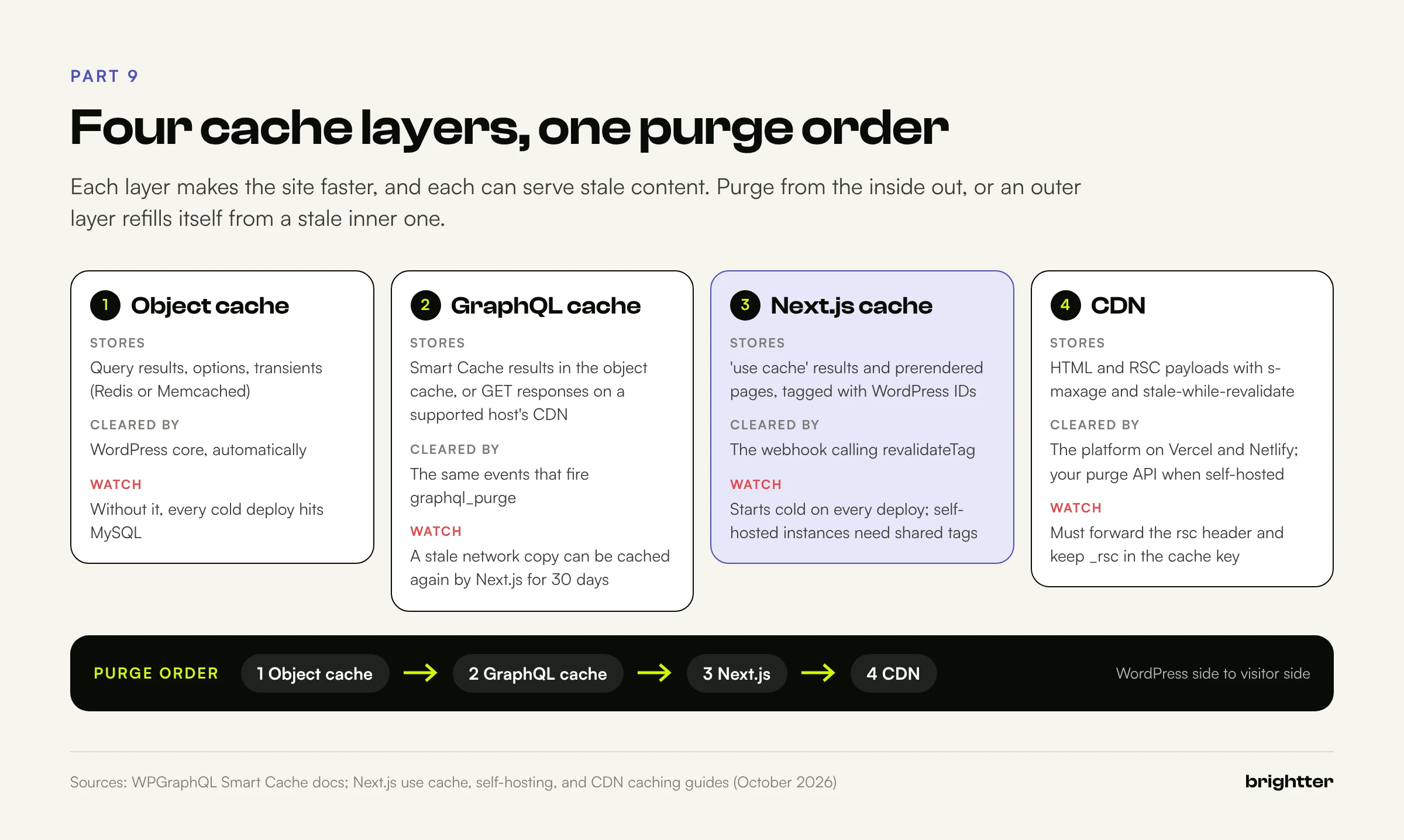
Layer 1: the WordPress object cache. Redis or Memcached (for example through the Redis Object Cache plugin) holds query results, options, and transients. WordPress invalidates its own entries, so this layer rarely causes staleness. Its job is to make misses cheap, because every expired Next.js entry and every cold deployment sends queries to WordPress.
Layer 2: GraphQL query caching. Smart Cache's object cache option stores query results in the persistent object cache. Its network cache lets a supported host's CDN cache GraphQL GET requests and purge them by key. Both are cleared by the same events that fire graphql_purge. Be careful with the network cache: if Next.js revalidates and its refetch hits a CDN copy that hasn't been purged yet, Next.js caches stale data again for up to 30 days. That's why the data layer uses POST, which CDNs don't cache, while WordPress still answers from the object cache.
Layer 3: the Next.js cache. 'use cache' results go through a cache handler, in memory by default. Three behaviors surprise teams: on serverless platforms, runtime entries typically don't persist between requests; every deployment starts cold, because the cache key includes the build ID; and with several self-hosted instances, revalidateTag() invalidates only the instance that received it unless a shared cache handler implements refreshTags(), as the self-hosting guide describes.
Layer 4: the CDN. Next.js sends s-maxage with stale-while-revalidate on static routes and private, no-store on dynamic ones. Vercel and Netlify wire on-demand revalidation into their own edge. Self-hosted, Next.js documentation is blunt: CDN caching alone doesn't support revalidateTag(), so you must purge the CDN alongside each revalidation, for both the HTML and the React Server Components variants. The CDN must also forward the rsc header and keep _rsc in the cache key, or client navigation breaks. If you run edge logic there, our guide to edge SEO with Cloudflare Workers covers keeping it cache-safe.
Purge from the inside out: object cache, then GraphQL network cache, then Next.js, then the CDN. Out of order, an outer layer refills itself from a stale inner one. In this architecture you manage only two of them (Next.js through the webhook, and the CDN, automatic on managed platforms), which is why it holds up.
Part 10: Authentication and Security
Headless shrinks the public attack surface but adds secrets, endpoints, and a GraphQL API that's public by default.
| Method | Best for | Watch out for |
|---|---|---|
| Application Passwords (core since 5.6) | Server to server calls: previews, builds | Requires HTTPS; some servers strip the Authorization header; GraphQL needs the filter from Part 7 |
| Cookie and nonce | Logged-in users on the same site | Without a nonce, WPGraphQL downgrades the request to a guest |
| Headless Login for WPGraphQL | Logged-in end users (members, customers) | Pre-1.0; replaces WPGraphQL JWT Authentication; you own token storage and revocation |
For most content sites the only authenticated traffic is previews and builds, so Application Passwords fit, with one user per purpose. If they return 401 on Apache with FastCGI, the server usually isn't passing the Authorization header to PHP; fix the server config, never move credentials into query strings. For end-user login, Headless Login (by AxeWP) supports passwords, OAuth 2.0 and OpenID Connect, and site tokens with refresh tokens. Keep tokens in HttpOnly cookies, not localStorage.
Hide and harden the origin
- Private hostname and access policy. Restrict
wp-adminandwp-login.php. The frontend's servers need/graphql; browsers don't. - No duplicate site. Send
X-Robots-Tag: noindexon origin responses and 301 theme requests to the frontend. A must-use plugin can do both: onesend_headershook and onetemplate_redirecthook that skips admin, cron, REST, and GraphQL requests. - Introspection off. WPGraphQL disables public introspection by default; confirm nobody turned it on for debugging.
- Query cost limits. Keep depth limiting on (2.24 defaults new installs to 15) and limit or disable batch queries you don't use.
- CORS. WPGraphQL sends
Access-Control-Allow-Origin: *without credentials. Harmless server to server, but if no browser should call the API, block cross-origin requests at the proxy. - Rate limits at the CDN or WAF on
/graphqland/wp-json/, on/api/revalidateand/api/preview, and on form routes. Signatures reject forgeries cheaply; rate limits stop the cost of checking them.
The stack is still WordPress, and plugins remain the usual way in. WPGraphQL's 2.22 to 2.24 releases fixed a series of authorization advisories, and Smart Cache 2.3.2 and 2.3.3 tightened persisted queries. Our guide to preventing WordPress plugin vulnerabilities covers the update process; add the GraphQL bridges to that list.
Part 11: SEO in a Headless Build
Crawlers need what they always did, but now the frontend, not the SEO plugin, writes the <head>.
Yoast offers the WPGraphQL Yoast SEO Addon, with an seo field on posts, pages, custom types, and terms (title, metaDesc, canonical, robots, Open Graph, breadcrumbs, schema { raw }, and fullHead), plus its REST API: yoast_head and yoast_head_json on core responses, and /wp-json/yoast/v1/get_head?url=. Rank Math has a "Headless CMS Support" setting (General Settings, Others) that enables /wp-json/rankmath/v1/getHead?url= with a full URL including the protocol. A community WPGraphQL for Rank Math extension also exists.
Map structured fields into generateMetadata rather than injecting a prebuilt head string, and use Yoast's prebuilt output, which Yoast recommends, as the reference you test against.
Rewrite every origin URL
SEO plugins build URLs from the WordPress site address, which is now the private origin. Unfixed, canonicals send search engines to cms.example.com and the schema graph's @id values describe a noindex site. The mapping rewrites them and leaves media alone:
import type { Metadata } from 'next'
import type { WpNode } from './queries'

const SITE = process.env.SITE_URL ?? 'https://www.example.com'
const WP = process.env.WP_URL ?? 'https://cms.example.com'

// Yoast builds URLs from the WordPress origin. Point them at the frontend,
// except media, which still lives on the origin (or its CDN).
export function toFrontendUrl(url?: string | null): string | undefined {
  if (!url) return undefined
  if (!url.startsWith(WP) || url.includes('/wp-content/')) return url
  return SITE + url.slice(WP.length)
}

export function nodeMetadata(node: WpNode): Metadata {
  const seo = node.seo ?? {}
  const canonical = toFrontendUrl(seo.canonical) ?? SITE + node.uri
  const image = seo.opengraphImage?.sourceUrl ?? node.featuredImage?.node.sourceUrl

  return {
    title: { absolute: seo.title || node.title || '' },
    description: seo.metaDesc || undefined,
    alternates: { canonical },
    robots: {
      index: seo.metaRobotsNoindex !== 'noindex',
      follow: seo.metaRobotsNofollow !== 'nofollow',
    },
    openGraph: {
      url: canonical,
      title: seo.title || node.title || undefined,
      description: seo.metaDesc || undefined,
      images: image ? [{ url: image }] : undefined,
      type: node.__typename === 'Post' ? 'article' : 'website',
    },
  }
}

// Yoast's schema graph also contains origin URLs in @id and url fields.
function rewriteUrls(value: unknown): unknown {
  if (typeof value === 'string') return toFrontendUrl(value)
  if (Array.isArray(value)) return value.map(rewriteUrls)
  if (value && typeof value === 'object') {
    return Object.fromEntries(Object.entries(value).map(([k, v]) => [k, rewriteUrls(v)]))
  }
  return value
}

export function nodeJsonLd(node: WpNode): string | null {
  const raw = node.seo?.schema?.raw
  if (!raw) return null
  try {
    // Escape "<" so a stray "</script>" in content cannot end the tag.
    return JSON.stringify(rewriteUrls(JSON.parse(raw))).replace(/</g, '\\u003c')
  } catch {
    return null
  }
}
Walking the parsed schema avoids two production bugs: Yoast escapes slashes in raw schema (https:\/\/), so plain string replacement misses URLs, and blanket replacement also rewrites image URLs to a host that doesn't serve them. Render the result as a JSON-LD script in the server HTML, where every crawler can read it.
Sitemaps, redirects, and status codes
- Sitemaps should come from Next.js (
app/sitemap.ts), built from the same data, so URLs,lastmod, andnoindexexclusions match what the frontend serves. Page throughcontentNodes100 at a time, tag the resultlist:postandlist:page, and split withgenerateSitemaps()past 50,000 URLs. - Redirects belong in the frontend, where requests arrive. Let editors keep using the Redirection plugin (including its option to add a redirect when a permalink changes), expose its rules as JSON from the origin, and enforce them in
proxy.tswith a short in-memory cache that keeps the last good copy if WordPress is down. For a fixed migration list,redirects()in the config is simpler. - 404s must be real. Call
notFound()before any Suspense boundary, and check unknown URLs withcurl -I. - Trailing slashes. WordPress URIs end in a slash and Next.js strips them by default with a 308. The config sets
trailingSlash: true, so canonicals, sitemaps, and links agree without a redirect hop. - Robots. Serve
robots.txtfrom the frontend. On the origin, rely onnoindexheaders instead of a blanketDisallow: a crawler that can't fetch a URL never sees itsnoindex, and blocking/wp-content/uploads/hides origin-hosted images from image search. - Links in content pasted from the admin may point at the origin. Rewrite them at render time and fix them at the source with a search-replace.
Part 12: Forms, Search, Comments, and Plugin Reality
Forms. Form plugins render through shortcodes or blocks in the theme, so headless, they render nowhere. Use the plugin's API (Gravity Forms has a REST API and a community WPGraphQL extension; Contact Form 7 accepts submissions over REST) with a React form, or post to a Next.js Server Action that validates, rate-limits, and forwards to your CRM. Either way, submissions go to your frontend's server, which holds any secret; the browser never calls WordPress with credentials.
Search. WPGraphQL's where: { search: "..." } uses WordPress's built-in LIKE search, which is weak on relevance and expensive under load. Larger sites should index into Algolia, ElasticPress, or WP Engine Smart Search. Keep search pages request time and noindex.
Comments. WPGraphQL reads comments and creates them with createComment (its 2.24 releases tightened these mutations). Cache comment lists as their own entry tagged with the post ID, or retire comments, which many teams do.
The rule for plugins is simple: plugins that change data keep working; plugins that change the rendered page stop working.
| Plugin category | Works headless? | Notes |
|---|---|---|
| ACF, custom post types and fields | Yes | Through WPGraphQL for ACF or register_graphql_field |
| Yoast SEO, Rank Math | Partly | Data via GraphQL or REST; the frontend renders tags |
| Redirection | Partly | Rules live in WordPress; the frontend enforces them |
| WPML, Polylang | Partly | Need WPGraphQL bridges; locale routing is your job |
| WooCommerce | Partly | WPGraphQL for WooCommerce or the Store API; checkout is a large project |
| Form plugins | Partly | Through their APIs only |
| Page builders (Elementor, Divi, WPBakery) | No | Output depends on the theme and their scripts |
| Page caching and minification | Not needed | Keep only the object cache |
| Login protection and 2FA | Yes | Protect wp-admin as before |
| Popups, sliders, cookie banners, chat | No | Rebuild in the frontend or load vendor scripts directly |
Sort every active plugin into this table before you scope the project; the "No" rows are where budgets go.
Part 13: Images
WordPress stores originals and resized copies in /wp-content/uploads/. Most teams render featured images with next/image for modern formats and layout stability, which brings a few rules:
- Allow only the uploads path. The
remotePatternsentry in the config keeps anyone from using your optimizer as a free image proxy. - Know the Next.js 16 defaults.
minimumCacheTTLrose from 60 seconds to 4 hours,qualitiesdefaults to[75](other values snap to it), local IP sources are blocked unlessdangerouslyAllowLocalIPis set, and redirects are capped at 3. A private network origin will hit the third rule in development. - Always pass dimensions from
mediaDetails { width height }to prevent layout shift. - Watch the bill. Vercel lists on-demand image optimization at $0.05 to $0.0812 per 1,000 transformations, plus cache reads and writes. Netlify routes
next/imagethrough its Image CDN. If your host or CDN already resizes images, a customloaderthat builds its URLs is cheaper.
Images inside block HTML keep WordPress srcset and lazy loading, and work as is.
Part 14: A Migration Path From a Traditional Theme
Safe migrations run the theme and the frontend side by side and move one template at a time.
- Freeze the model. Convert shortcodes and builder layouts to blocks or fields while the theme still renders them, so editors can confirm nothing broke.
- Install the API layer on production. WPGraphQL, Smart Cache, the bridges, and the must-use plugins change nothing for visitors.
- Crawl the current site. Export every indexable URL with its title, description, canonical, status, and structured data. This is your acceptance test.
- Build against production content on a
noindexstaging hostname, starting with the highest traffic template. - Crawl staging and diff. Every difference should be intentional.
- Cut over by path if your CDN can route
/blog/*to Next.js while the rest stays on the theme. - Flip hostnames. Move WordPress to
cms.example.com, pointwwwat the frontend, enable the origin plugin, and submit the sitemap. - Watch for two weeks: 404s, redirect hits, Search Console coverage, and webhook errors.
Keep URLs unchanged; the catch-all route uses WordPress permalinks for that reason.
Part 15: Hosting and Cost
There are two bills. WordPress now serves only editors and API traffic, so its plan can often shrink.
| Option | What runs where | Pricing model (published October 2026) |
|---|---|---|
| WP Engine Headless Platform | WordPress and a Node.js frontend, one contract | Plan based; see WP Engine's pricing page |
| Vercel plus a WordPress host | Next.js on Vercel | Pro: $20 per paid seat per month with a monthly usage credit, then usage based |
| Netlify plus a WordPress host | Next.js through Netlify's adapter | Pro: $20 per month for 3,000 credits with unlimited seats (since April 2026); 20 credits per GB of bandwidth, 10 per GB-hour of compute, 2 per 10,000 requests |
| Self-hosted Next.js | Containers behind your CDN | Your compute and CDN |
The hidden cost is people: someone must own framework upgrades (Next.js shipped 16.2, 16.3, and 16.4 between March and October 2026), schema changes, preview bugs, and the webhook. Self-hosting also makes the shared cache, tag coordination, CDN purges, and image optimization your code.
Part 16: Failure Patterns That Show Up Again and Again
1. Previews that show the published version. The request isn't authenticated, the user can't edit that post, or the server strips Authorization. WPGraphQL then returns the published node with no error. Check isPreview, test with a post by another author, and look for the header in the origin log.
2. Editors who see old content after clicking Update. The webhook used 'max' for the edited node, or it failed silently because it was fire-and-forget. Use { expire: 0 } for node keys, a timeout, a retry queue, and logging.
3. Cached 404s that outlive the content. A URL requested before publication caches a null that nothing invalidates. Tag misses and clear them on every list: event.
4. The CMS hostname leaks into search. Canonicals and schema point at cms.example.com, or the origin itself gets crawled. Rewrite origin URLs, send noindex from the origin from day one, and verify with a crawl.
5. Soft 404s from streaming. notFound() inside a Suspense boundary returns 200 plus noindex. Check for the node before any boundary.
6. Errors cached as content. A GraphQL error or a WAF error page gets cached for 30 days. Throw on errors and non-200 responses so the cache keeps the last good entry.
7. Deploy storms. Each deployment starts with a cold cache. Without an object cache, ten deploys a day mean ten spikes of expensive queries. Add one, and prerender only the URLs that matter.
8. Self-hosted instances that disagree. Two containers, two memory caches, and a revalidation that reached one. Use a shared handler with tag coordination before scaling out.
9. A schema change breaks the build. A renamed ACF field renders empty sections. Generate TypeScript types from the schema in CI with an authenticated introspection query, and fail the pipeline on breaking changes.
10. Plugin surprises after launch. Marketing installs a popup plugin and nothing appears. Document which plugins work headless and restrict installs on the origin.
Part 17: A Prioritized Plan
Each step depends on the one before it and can be tested on its own.
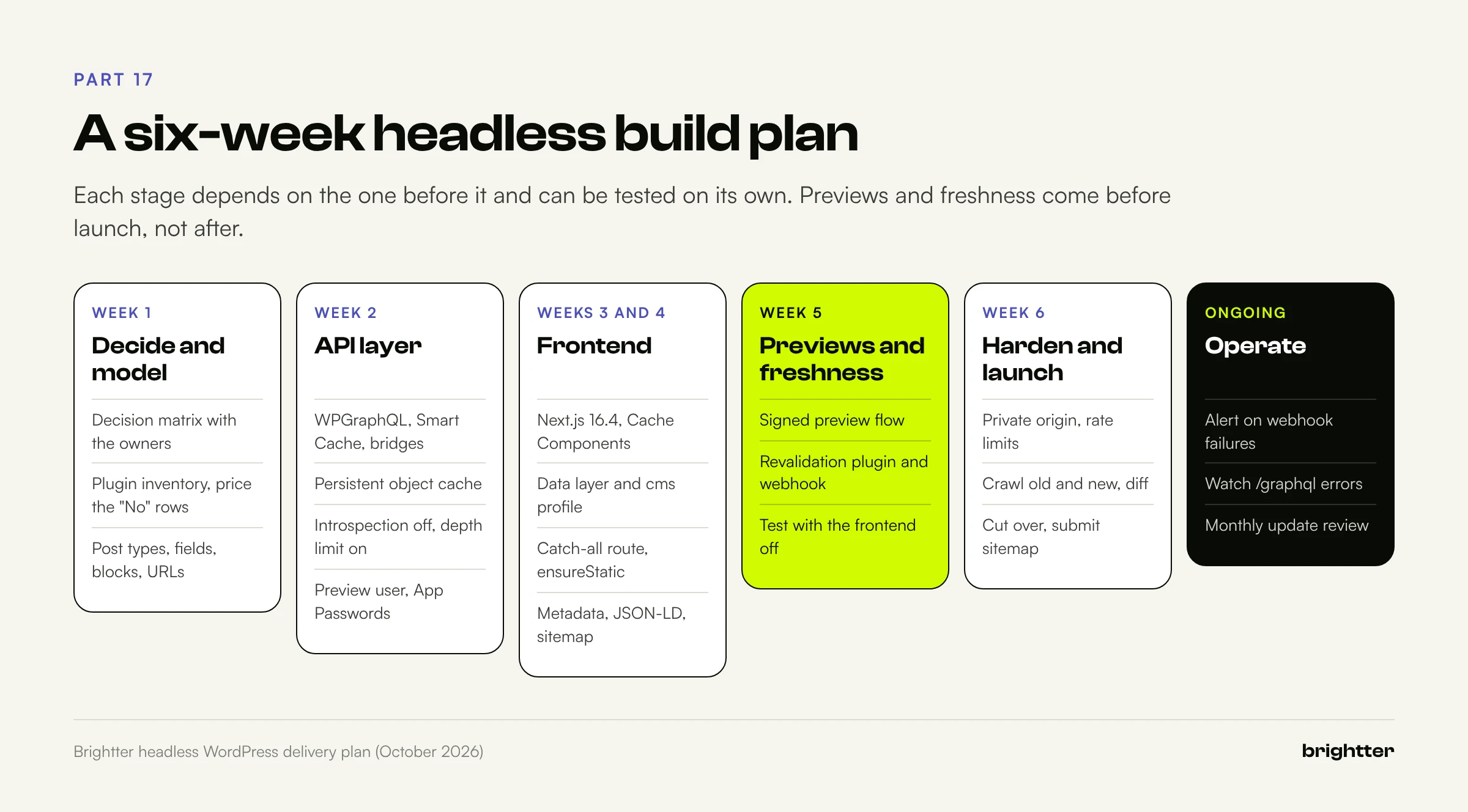
Week 1: decide and model. Run the decision matrix with the people who will own the site. Inventory plugins and price the "No" rows. Model post types, fields, allowed blocks, and URLs, with field groups in version control.
Week 2: API layer. Install WPGraphQL, Smart Cache with its object cache, the bridges, and a persistent object cache. Confirm introspection is off and depth limiting is on. Create the preview user and Application Passwords.
Weeks 3 and 4: frontend. Scaffold Next.js 16.4 with Cache Components and Partial Prefetching. Add the data layer and cms profile. Build the catch-all route with ensureStatic, then archives and home. Map SEO fields, rewrite origin URLs, render JSON-LD, and generate the sitemap and robots.txt.
Week 5: previews and freshness. Add the preview filter, handler, and route; test drafts, autosaves of published posts, and other authors' posts. Add the revalidation plugin and webhook; test with curl, real edits, and the frontend switched off to prove the retry queue.
Week 6: harden and launch. Lock down the origin, add rate limits, crawl old and new, fix every unexplained difference, cut over, and submit the sitemap.
Ongoing. Alert on webhook failures and /graphql errors, and review updates monthly.
Conclusion: Two Applications, One Contract
Headless WordPress in 2026 is no longer an experiment. WPGraphQL has stable stewardship and a release process that takes security seriously, Next.js has a caching model that maps cleanly onto how WordPress content changes, and previews have a documented, header-based protocol.
What makes a build hold up is the contract between the halves: every block has a component, cache tags mean the same thing on both sides, no webhook fails silently, and the frontend owns the HTML that search engines and AI crawlers read. If you're undecided, start with the decision matrix and the plugin inventory; they'll tell you more than any benchmark.
Need help planning or building a headless WordPress site? Brightter, Inc. designs and builds headless WordPress architectures with WPGraphQL and Next.js, from content modeling and preview workflows to caching, security hardening, and SEO-safe migrations, and we'll tell you when a well-built theme is the better answer. As a Webflow Certified Partner that also builds on WordPress and modern JavaScript frameworks, we choose the platform for the job. Talk to our team about your project.